1
O O O O O
0 o 0 0 , '_ 0
' ; ISC
'$ " _ N, S:
o o
buttons
buttons
Screens illustrated are examples.
rmn Fc-
Preparation:
Turn the television on and switch the video input mode on the televi-
sion to suit the type of connection you have made (e.g. VIDEO 1).
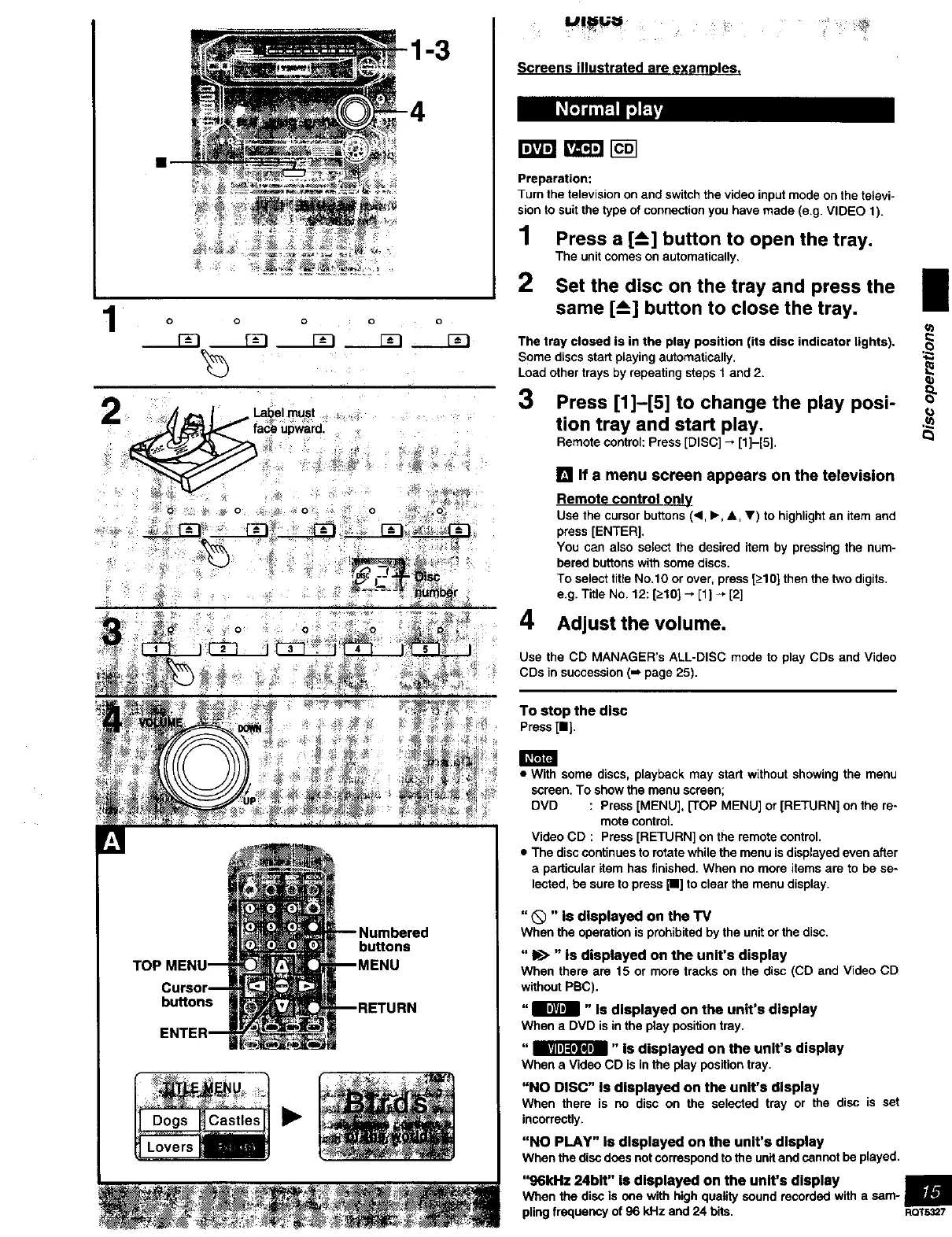
1 Press a [--_] button to open the tray.
The unit comes on automatically,
2 Set the disc on the tray and press the I
same [--_] button to close the tray.
II
The tray closed is in the play position (its disc indicator lights).
Some discs start playing automatically,
Load other trays by repeating steps 1 and 2.
3 Press [1]-[5] to change the play posi-
tion tray and start play.
Remote control: Press [DISC] -* [1]-[5],
_n
r_
[] If a menu screen appears on the television
Remote control only
Use the cursor buttons (_1,I_, &, V) to highlight an item and
press [ENTER].
You can also salect the desired item by pressing the num-
bered buttons with some discs•
To select title No.10 or over, press [_>10]then the two digits.
e.g. Title No. 12: [_>10]--, [1] -, [2]
4 Adjust the volume.
Use the CD MANAGER's ALL-DISC mode to play CDs and Video
CDs in succession (-_ page 25).
To stop the disc
Press[11].
• With some discs, playback may start without showing the menu
screen. To show the menu screen;
DVD : Press [MENU], [TOP MENU] or [RETURN] on the re-
mote control.
Video CD : Press [RETURN] on the remote control.
• The disc continues to rotate while the menu isdisplayed even after
a particular item has finished. When no more items are to be se-
lected, be sure to press [11]to clear the menu display.
"Q "Is displayed on the TV
Whenthe operationis prohibitedby theunitorthe disc.
"In>" Is displayed on the unit's display
When there are 15 or more tracks on the disc (CD and Video CD
without PBC),
"B " Is displayed on the unit's display
When a DVD is in the play position tray.
"_" Is displayed on the unit's display
When a Video CD is in the play position tray,
"NO DISC" Is displayed on the unit's display
When there is no disc on the selected tray or the disc is set
incorrectly.
"NO PLAY" Is displayed on the unit's display
Whenthe discdoesnotcorrespondto theunitandcannotbe played,
"96kHz 24bit" Is displayed on the unit's display
When the disc is one with high quality sound recorded with a sam- I
piing frequency of 96 kHz and 24 bits. ROT5327



 To Next Page