[€]=]l
I Disc GUI I
Icon Content Operation
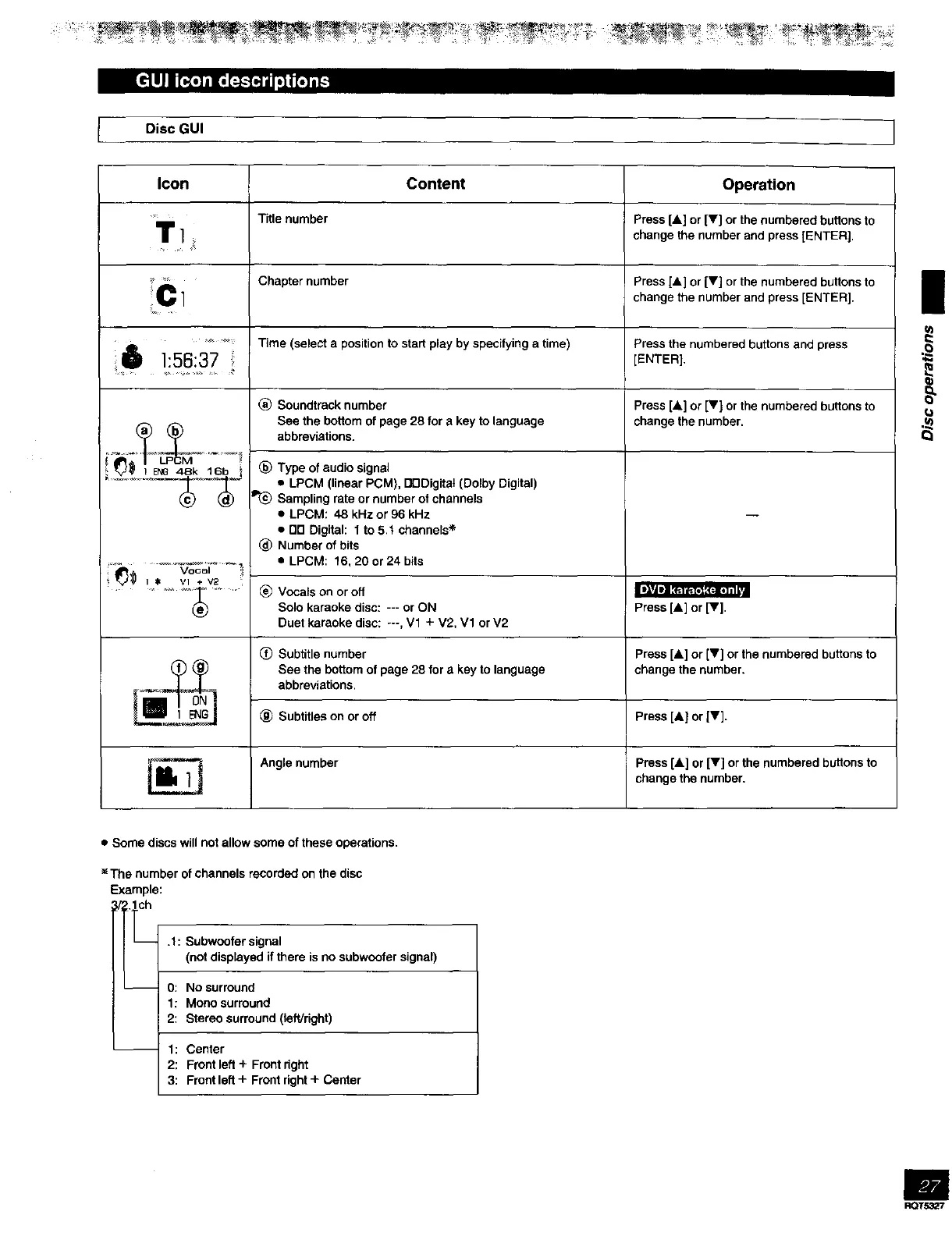
"m Title number Press [a] or [V] or the numbered buttons to
/
] change the number and press [ENTER).
'_ Chapter number Press [&] or [Y] or the numbered buttons to
C l change the number and press [ENTER).
.... Time (select a position to start play by specifying a time) Press the numbered buttons and press
Q 1:56:37 [ENTER]
(_ Soundtrack number Press [&] or [v) or the numbered buttons to
See the bottom of page 28 for a key to language change the number.
,__ abbreviations.
_,__ (_)Type of audio signal
• LPCM (linear PCM), DODigitat (Dolby Digital)
Sampling rate or number of channels
• LPCM: 48 kHz or 96 kHz
• DO Digital: 1 to 5.t channels •
_) Number of bits
-- _=--V'_c_ _ _ • LPCM: 16, 20 or 24 bits
IF3_
! %J,# i $ Vl + v2
..... _ _) Vocals on or off
Solo karaoke disc: --- or ON Press [&] or [Y].
Duet karaoke disc: ---, V1 + V2, V1 or V2
(_) Subtitle number press [&] or [V] or the numbered buttons to
_i See the bottom of page 28 for a key to language change the number.
abbreviations.
_) Subtitles on or off Press [&] or [V].
Angle number Press [&] or [V] or the numbered buttons to
change the number.
|
(o
• Some discs will not allow some of these operations.
The number of channels recorded on the disc
Example:
1/_ 0: No surround
1: Meoo surround
2: Stereo surround (left/dght)
.1: Subweofer signal
(not displayed if there is no subweofer signal)
1: Center
2: Front left + Front dght
3: Front left + Front right + Center
RQT53_/



 To Next Page