10
RQT9869
DAB/DAB+
For the United Kingdom and Ireland
Preparation
Press [RADIO/AUX] to select “DAB/DAB+”.
Note:
If you select
“DAB/DAB+” for the first time, the system will
tune automatically.
Manual tuning
1 Press [PLAY MENU] repeatedly to select
“MANUAL SCAN”.
2 Press [R, T] to select the frequency block and then
press [OK].
If no station is detected, “SCAN FAILED” is shown.
Adjust the antenna and try again.
To tune automatically
1 Press [PLAY MENU] to select “AUTOSCAN” and
then press [OK].
“START?” is shown.
2 Press [OK] to start tuning.
“DAB AUTO SCAN” is shown.
If no station is detected, “SCAN FAILED” is shown.
Do manual tuning.
Note:
Preset frequencies are erased after you do automatic tuning.
Memory presetting
You can preset up to 20 stations.
1 Press [PLAY MENU] repeatedly to select
“TUNEMODE”.
2 Press [R, T] to select “STATION” and then press
[OK].
3 Press [2/3] or [5/6] to tune in to the
station.
4 Press [OK].
5 Press [R, T] to select a preset number and then
press [OK].
Do steps 3 through 5 again to preset more stations.
The new station replaces any station that occupies
the same preset number.
Note:
You cannot preset a station when the station is not
broadcasting or when you have selected a secondary service.
█ Selecting a preset station
1 Press [PLAY MENU] repeatedly to select
“TUNEMODE”.
2 Press [R, T] to select “PRESET” and then press
[OK].
3 Press [2/3] or [5/6] to select the preset
station.
Secondary service
You can listen to secondary services when “ ” is
shown.
1 Press [PLAY MENU] repeatedly to select
“DAB SECONDARY”.
2 Press [R, T] to select the secondary service and
then press [OK].
To cancel, select “PRIMARY”.
Note:
The setting is cancelled when you select other stations.
Viewing available information
You can view the following information on the display
panel:
• Information about the DAB broadcast
• Programme type
• Ensemble label
•Frequency
•Time
Press [DISPLAY].
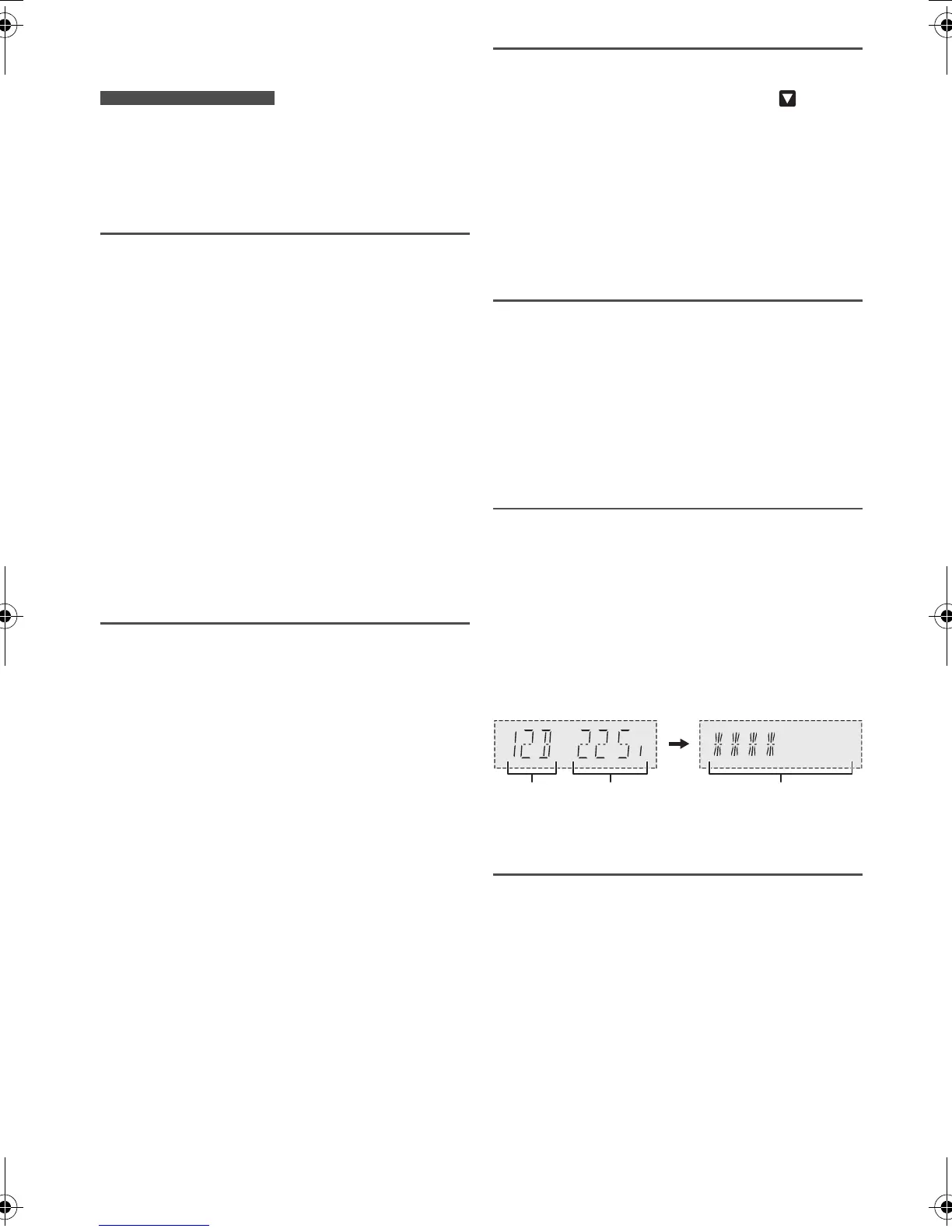
Checking the signal quality
You can check the signal quality when adjusting the
antenna.
1 Press [PLAY MENU] repeatedly to select
“SIGNAL QUALITY”.
2 Press [OK].
The frequency block followed by the reception quality
is shown.
To select other frequency blocks, press [R, T].
3 Press [OK] again to exit.
Automatic clock adjustment
You can set the clock to update automatically.
1 Press [PLAY MENU] repeatedly to select
“AUTO CLOCK ADJ”.
2 Press [R, T] to select “ON ADJUST” and then press
[OK].
To cancel, select “OFF ADJUST”.
Frequency
block
Frequency Reception quality
0 (poor) to 8 (excellent)
SC-HC29 DBEB.GN.GS RQT9869-2B EN.fm Page 10 Friday, April 18, 2014 10:45 AM




 To Next Page