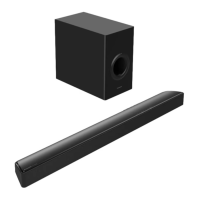
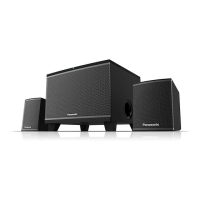
The Panasonic SC-HT19GS-K is a 2.1 Channel Speaker System designed to enhance your audio experience with a built-in amplifier and a range of connectivity options. This system is ideal for various entertainment sources, including Mp3 players and digital playbacks, offering full audio spectrum performances.
Function Description:
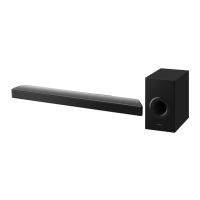
The core of the system is a subwoofer cabinet, which houses the main controls and connections, along with two satellite speakers that provide stereo sound. The system is designed to deliver a rich audio experience, particularly emphasizing bass through its specially designed woofer cabinet.
Usage Features:
The SC-HT19GS-K offers multiple input modes and control options for versatile use:
-
Remote Control Operation: The system comes with a remote control that provides comprehensive command over its functions.
- ST-BY (Stand-by): This button turns the unit ON. When in stand-by mode, an LED indicator blinks, showing the last selected function (Red for AUX, Purple for FM, and Blue for USB & Bluetooth).
- MUTE: This function allows you to turn off the volume and reactivate it with another press.
- AUX Mode: Selects the AUX input. A Red LED illuminates when in AUX mode.
- POP/NORMAL/JAZZ/ROCK EQ Modes: These are different equalizer modes applicable only for USB/BT mode, allowing you to tailor the sound profile to your preference.
- FM Mode: Selects the FM radio function. A purple LED turns on in FM mode. A long press of the "►/II" button automatically searches and stores FM stations/channels.
- USB Mode: Selects the USB input. A blue LED turns on in USB mode. The remote allows for navigation between next and previous songs ("►►I" for next, "◄◄" for previous) and play/pause ("►/II").
- BT (Bluetooth) Mode: Selects the Bluetooth input. A blue LED flashes quickly to search for a Bluetooth device. Once paired with a mobile device (named "SC-HT19"), the LED flashes slowly and stops flashing when music starts playing. Functions like "PREVIOUS/NEXT" and "►/II" can be operated via the front panel. To forcefully disconnect a mobile device in BT mode, press the " " button for 3 seconds.
- Volume Control (VOL+/VOL-): These buttons allow you to increase or decrease the volume with continuous or long presses.
- PLAY/PAUSE: This button plays/pauses songs in USB/BT mode and mutes audio in FM/AUX mode.
- PREVIOUS/NEXT: These buttons select the previous/next song in USB/BT mode and the previous/next stored FM station in FM mode.
-
Front Panel Key Operation: The main unit also features several control buttons on its front panel for direct interaction.
- /SOURCE: After power on, this button selects the input mode. A long press puts the unit into "Stand-by" mode. The LED color changes to indicate the active mode: Red for AUX, Blue for USB/BT, and Purple for FM.
- ►II/SCAN: This button serves multiple purposes depending on the mode.
- In BT/AUX/USB/FM modes, a short press functions as play/pause or mute.
- In BT/USB/FM modes, a short press also allows for track selection (previous/next) or channel selection (previous/next).
- A long press in BT mode will forcefully disconnect the Bluetooth function.
- A long press in FM mode will automatically search for FM radio stations and store them.
- ◄◄ / ►►I: These buttons are used for track selection (previous/next) in BT/USB modes and channel selection (previous/next) in FM mode.
- VOL-/VOL+: These buttons control the volume directly from the front panel.
- USB Socket: A dedicated socket for connecting USB devices.
-
Rear Panel Connections: The rear panel of the subwoofer cabinet provides essential connectivity.
- Input (1) (2): RCA stereo input terminals (L/R) for connecting external sound sources such as computers, CD players, or Mp3 players.
- Output (L/R): Terminals for connecting the satellite speakers.
- AC IN (3): The power input for the AC power cord.
- Power ON/OFF (4): A switch to turn the system on or off.
-
System Connection Diagram:
- Connect both satellite speakers to the "OUTPUT" terminals on the back panel.
- Connect the power cord to the mains and power on the system.
- For AUX mode, connect a 3.5 mm stereo input jack from your audio source (Mp3 player, computer, etc.) to the "INPUT" terminal using an RCA cable.
- For USB playback, connect your USB device to the socket on the front panel.
- For FM radio, select FM mode using either the front panel source key or the FM button on the remote.
- For Bluetooth, select BT mode using the front panel source key or the BT button on the remote, then connect to the device named "SC-HT19".
-
Speaker Placement:
- Subwoofer: Can be placed anywhere on the floor, as there is no directional requirement for the bass effect.
- Satellite Speakers: Should be placed on both sides of the TV or subwoofer for optimal stereo imaging.
Maintenance Features:
- Remote Control Battery Replacement: The manual provides clear instructions for replacing the lithium battery in the remote control. This involves turning the remote to the back side, pulling out a plastic sheet, removing the battery box, taking out the old lithium battery, replacing it with a new one of the same or equivalent type, and then reassembling the battery box and plastic sheet.
- Safety Instructions: The manual includes important safety warnings to ensure the longevity and safe operation of the device.
- The apparatus should not be exposed to dripping or splashing liquids, and no objects filled with liquids (like vases) should be placed on it.
- Batteries (whether in a pack or installed) should not be exposed to excessive heat from sources like sunshine or fire.
- The MAINS plug acts as the disconnect device and must remain readily operable.
- The maximum working temperature for the device is 45 °C.
- A caution regarding battery replacement is provided: "Danger of explosion if battery is incorrectly replaced. Replace only with the same of equivalent type."
- A note mentions that if the remote control stops functioning, it's likely due to a depleted battery.
The Panasonic SC-HT19GS-K is designed for user-friendliness with its intuitive remote and front panel controls, offering a complete audio solution for various media consumption needs.

 Need help?
 General



 To Next Page