18
RQT9979
18
External equipment
Preparation
• Disconnect the AC mains lead.
• Switch off all equipment and read the appropriate
operating instructions.
Note:
Components and cables are sold separately.
Using the auxiliary input
You can connect a VCR, DVD player etc. and listen to the
audio through this system.
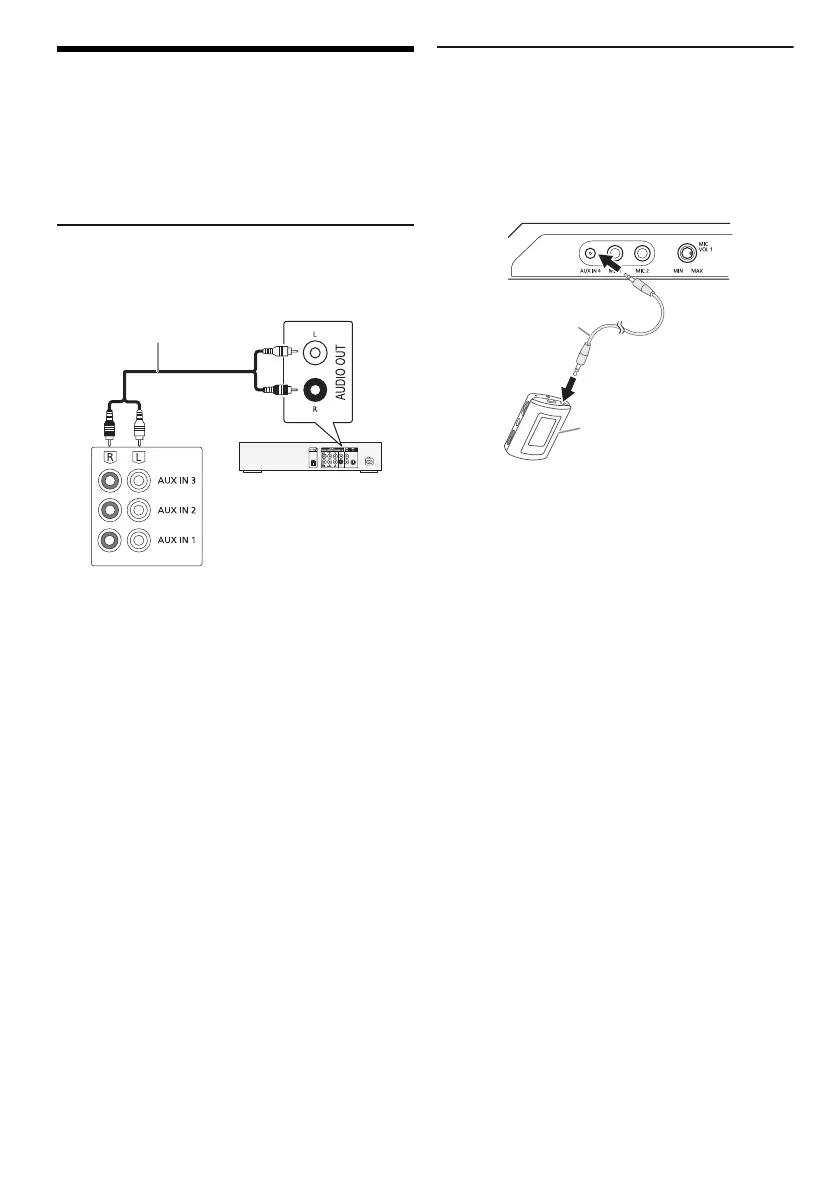
1 Connect the external equipment.
2 Press [CD/RADIO/AUX] to select “AUX 1”,
“AUX 2” or “AUX 3”.
3 Play the external equipment.
Note:
• If you want to connect equipment other than those
described, refer to the audio dealer.
• Sound distortion can occur when you use an adaptor.
Connecting a portable audio equipment
You can play music from a portable audio equipment.
Preparation
• Switch off the equaliser (if any) of the portable audio
equipment to prevent sound distortion.
• Decrease the volume of the system and the portable
audio equipment before you connect or disconnect the
portable audio equipment.
1 Connect the portable audio equipment.
Plug type: Ø 3.5 mm stereo
2 Press [CD/RADIO/AUX] to select “AUX 4”.
3 Play the portable audio equipment.
To adjust the input level
1 Press [PLAY MENU] to select “INPUT LEVEL”.
2 Press [Y, U] to select “NORMAL” or “HIGH” and
then press [OK].
Note:
• You cannot adjust the input level during recording.
• Select “NORMAL” if the sound is distorted during “HIGH”
input level.
• Read the operating instructions of the portable audio
equipment for details.
DVD player
(not supplied)
Audio cable (not supplied)
Rear panel of
this main unit
Audio cable
(not supplied)
Portable audio equipment
(not supplied)
MAX8000_6000GS.book Page 18 Tuesday, March 24, 2015 4:28 PM





 To Next Page