7
RQT6719
Simple setup
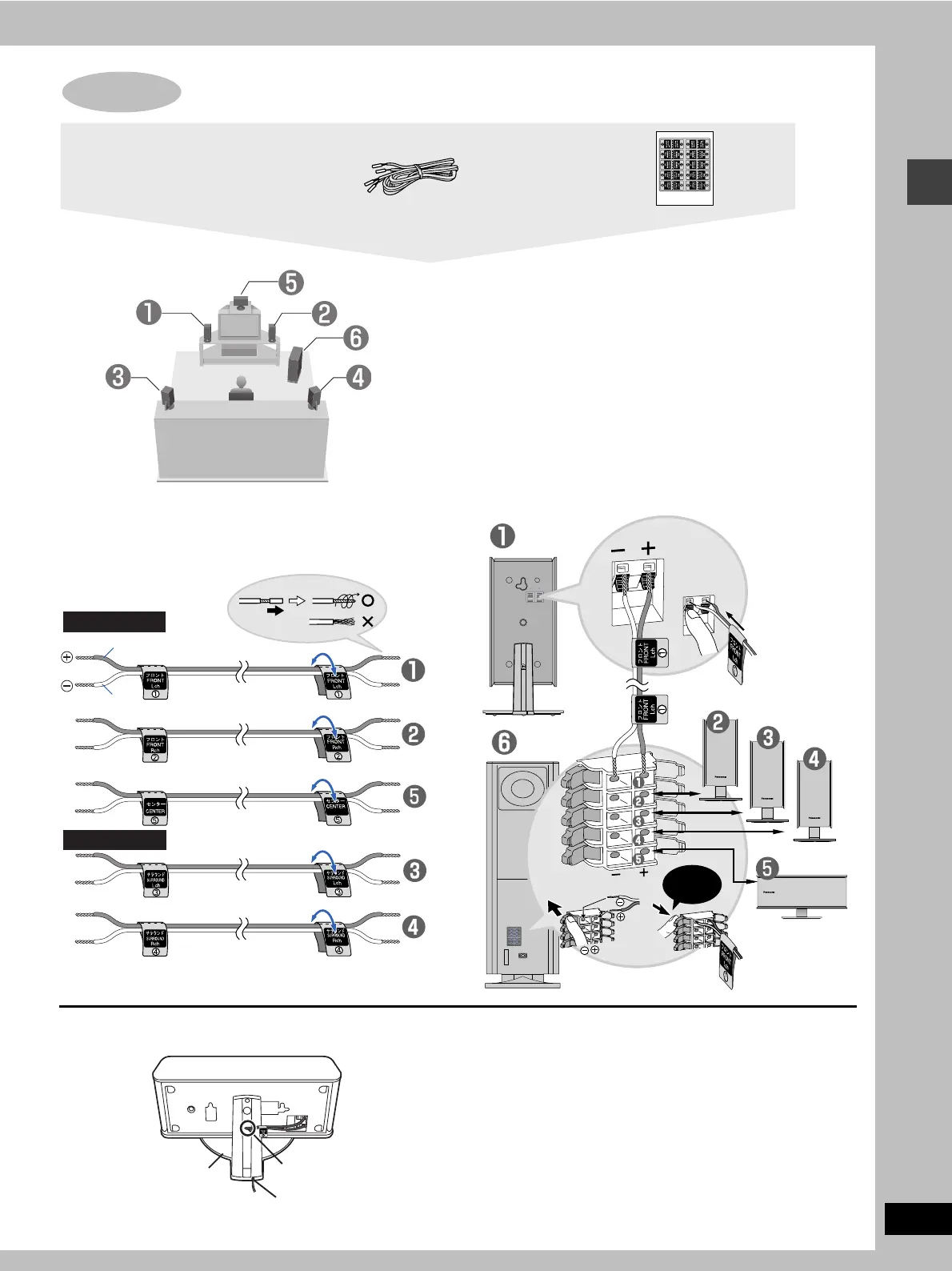
[1] Attaching the stickers to the speaker
cables
Attach the speaker-cable stickers to make connection
easier.
[2] Connecting the speakers
[Note]
≥Never short-circuit positive (i) and negative (j) speaker wires.
≥Be sure to connect only positive (copper) wires to positive (i)
terminals and negative (silver) wires to negative (j) terminals.
Incorrect connection can damage the speakers.
STEP2 Speakers
Speaker cables
≥3k4-m (13-foot) cables
≥2k10-m (33-foot) cables
Sheet of speaker-cable
stickers
Setup example
Short cables
Long cables
Copper
Silver
_:
`:
CENTER
SURROUND (R)
SURROUND (L)
FRONT (R)
SUBWOOFER
FRONT (L)
Copper
Silver
Click!
Keeping the cables out of the way
Pass the cables through the holes in the stand to keep them out of
the way.
1 Pass the cable
through the hole.
2 Pass through the
cutout in the base.
Stand



 To Next Page