Direct access play
This function allows you to start play from a specific track.
CD
Press the numeric buttons to select and play your
desired track.
MP3
1
Press [ALBUM or ] to select the album.
2
Press [ /FF/¡/¢] once and then the numeric
buttons to select and play your desired track.
For two-digit track, press [
h
10] once, and then the two digits.
For three-digit track, press
[
h
10]
twice, and then the three digits.
Note
This function does not work during any random/program mode.
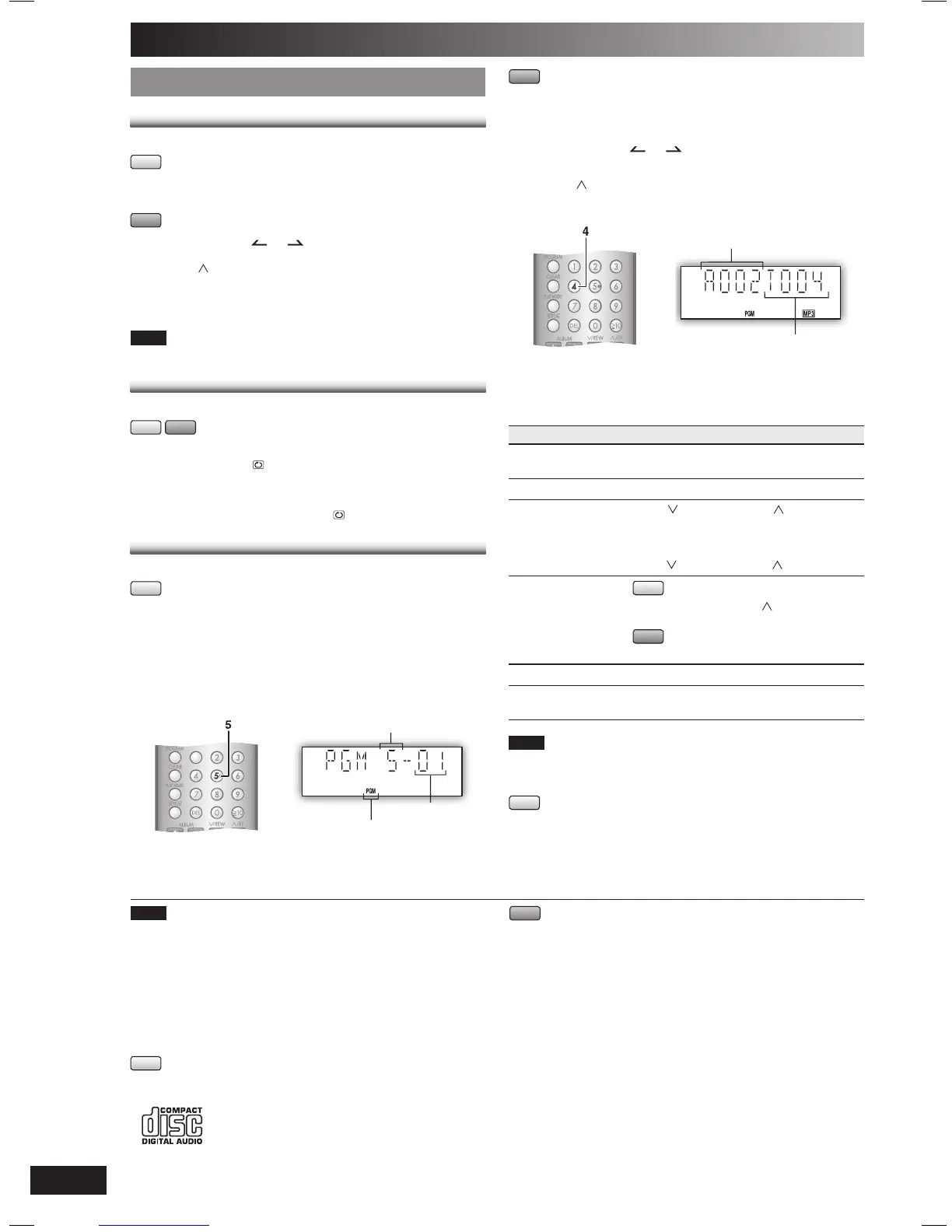
Program play
This function allows you to program up to 24 tracks.
CD
1
Press [CD 6] and then [STOP 7].
2
Press [PROGRAM].
3
Press the numeric buttons to select your desired
track.
Repeat this step to program other tracks.
Example:
Track number
Program number
Program indicator
4
Press [CD 6] to start play.
MP3
1
Press [CD 6] and then [STOP 7].
2
Press [PROGRAM].
3
Press [ALBUM or ] to select your desired
album.
4
Press [ /FF/¡/¢] once and then the numeric
buttons to select your desired track.
Example:
Album number
Track number
5
Press [ENTER].
Repeat steps 3 to 5 to program other tracks.
6
Press [CD 6] to start play.
To Action
cancel program
mode
Press [PROGRAM] in the stop mode.
replay the program Press [PROGRAM] then [CD 6].
check program
contents
Press [ /REW/4/1] or [ /FF/¡/¢]
when “PGM” is displayed in the stop
mode.To check while programming, press
[PROGRAM] twice after “PGM” appears, then
press
[ /REW/4/1] or [ /FF/¡/¢] .
add to the program
CD
In the stop mode, press
[ /FF/¡/¢]
and
then repeat step 3.
MP3
Repeat steps 3 to 5 in the stop mode.
clear the last track Press [DEL] in the stop mode.
clear all
programmed tracks
Press [CLEAR] in the stop mode.
“CLR ALL” is displayed.
Note
• When you try to program more than 24 tracks “PGM FULL”
appears.
• The program memory is cleared when you open the disc tray.
CD
• During program play, you can search backward or forward only
within the current track.
Note
• This unit can play MP3 files and CD-DA format audio CD-R/RW
that have been finalized.
• It may not be able to play some CD-R/RW depending on the
condition of the recording.
• Do not use irregularly shaped discs.
• Do not use discs with labels and stickers that are coming off or with
adhesive exuding from under labels and stickers.
• Do not attach extra labels or stickers on the disc.
• Do not write anything on the disc.
CD
• This unit can access up to 99 tracks.
• Choose a CD with this mark:
Using DualDiscs
The “CD” sides of DualDiscs do not meet the CD-DA standard so it
may not be possible to play them on this unit.
MP3
• Files are treated as tracks and folders are treated as albums.
•
This unit can access up to 999 tracks, 255 albums and 20 sessions.
• Disc must conform to ISO9660 level 1 or 2 (except for extended
formats).
• To play in a certain order, prefix the folder and file names with the
3-digit numbers in the order you want to play them.
PMX1_EB-En.indd 8PMX1_EB-En.indd 8 5/31/06 5:45:32 PM5/31/06 5:45:32 PM







 To Next Page