26
RQT8655
Editing still pictures
[RAM] [SD]
pYou can edit still pictures or albums.
pYou can use SD Memory Cards with capacities from 8 MB to 2 GB
(
➡
page 7).
pYou cannot edit still pictures recorded on CD-R/CD-RW.
Preparation
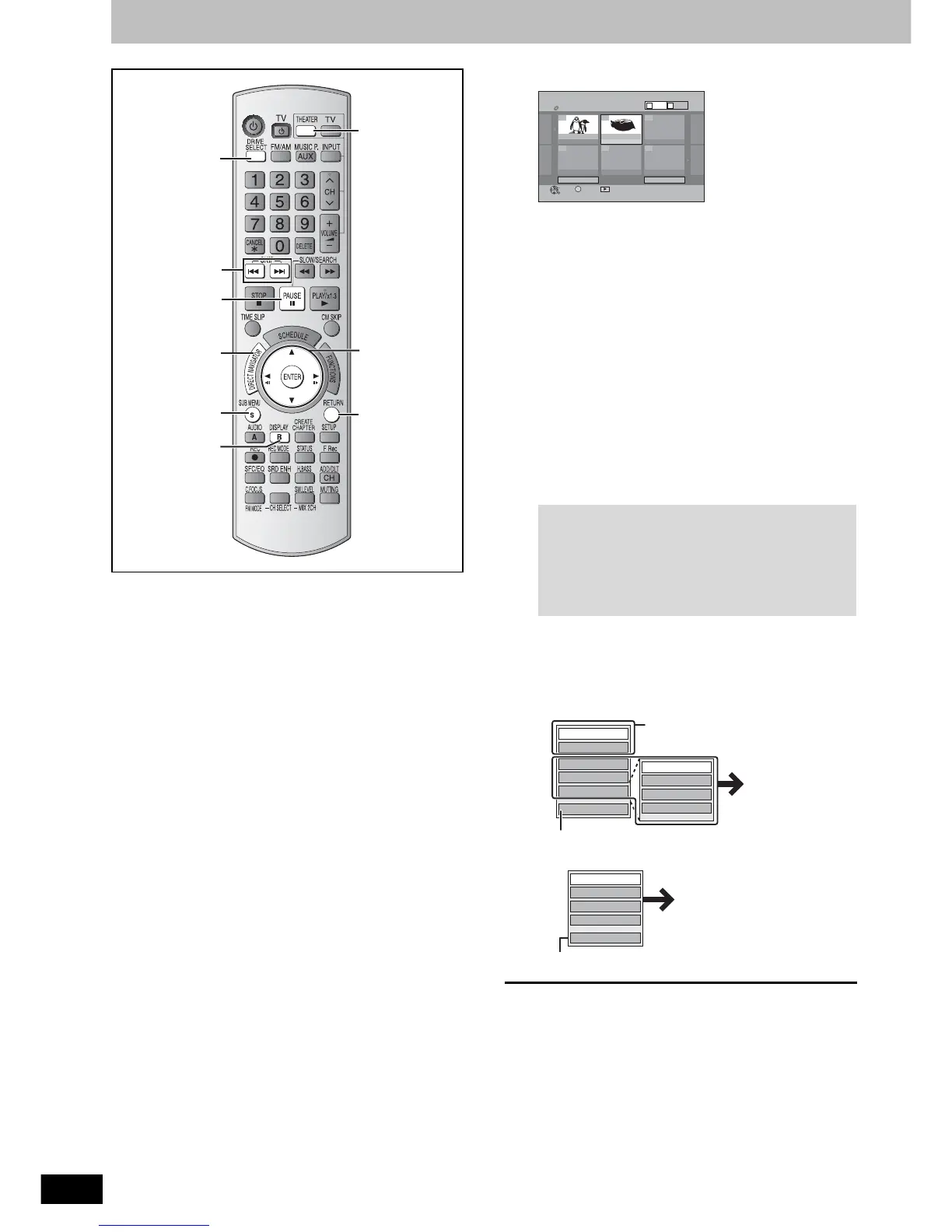
pPress [THEATER] to switch the remote control to operate this unit.
pPress [DRIVE SELECT] to select the DVD or SD drive.
pInsert a disc (
➡
page 12) or card (
➡
page 8).
pRelease protection (
➡
page 32).
1 Press [DIRECT NAVIGATOR].
[RAM]
wWhen the Title View screen is displayed
Press [B] to switch to the Album View screen.
2 Editing an album:
Press [, , , ] to select the
album to edit.
pWhen you want to create an album, go to step 3 without
selecting the album and select “Create Album”.
Editing a still picture:
Press [, , , ] to select the
album which contains the still
picture to edit and press [ENTER].
Press [, , , ] to select the
still pictures to edit.
3
Press [SUB MENU], then press [
,
] to
select the operation and press [ENTER].
If you select “Edit Album”, press [, ] to select the operation
and press [ENTER] (
➡
page 27).
pTo edit the album (e.g., [SD])
pTo edit still pictures (e.g., [SD] )
To exit the screen
Press [DIRECT NAVIGATOR].
To return to the previous screen
Press [RETURN].
w To select the higher folder
While the Album View screen is displayed
(Only if there is a multiple number of higher folders recognizable)
Press [SUB MENU].
Press [, ] to select “Select Root folder” and press [ENTER].
Press [, ] to select the higher folder and press [ENTER].
SRD MUSIC
, , ,
ENTER
,
SUB MENU
RETURN
DIRECT
NAVIGATOR
B
DRIVE
SELECT
THEATER
To show other pages
Press [, , , ] to select “Previous” or “Next” and
press [ENTER].
pYou can also press [, ] to show other pages.
Multiple editing
Select with [, , , ] and press []. (Repeat.)
pA check mark appears. Press [] again to cancel.
NextPrevious
No.
--
0 9
DIRECT NAVIGATOR Album View
DVD-RAM
Page 01/01
Previous
10/27/05
Photo:10/27/2005
Total 4 10/27/05
101_DVD
Total 4
Next
ENTER
001 002
--- --- ---
---
S
SUB MENU Slideshow
Press ENTER to go to
Picture View
Video
Picture
BA
e.g., [RAM]
Start Slideshow
Slideshow settings
Add Picture
Create Album
Edit Album
Select Root folder
Album Name
Delete Album
Protection Setup
Cancel Protection
Refer to “Useful functions during still
picture play” (
➡
page 19).
Refer to “Album and
picture operations”
(
➡
page 27).
To select another folder (
➡
below)
Delete Picture
Set Protection
Cancel Protection
Print Order (DPOF)
Album View
Refer to “Album and
picture operations”
(
➡
page 27).
You can go back to the Album View.



 To Next Page