EasyManua.ls Logo

Panasonic Technics ST-CH7L - Page 5

Panasonic Technics ST-CH7L
21 pages
Print Icon
To Next Page IconTo Next Page
To Previous Page IconTo Previous Page
Loading...
ST-CH7L
ST-CH7L
m
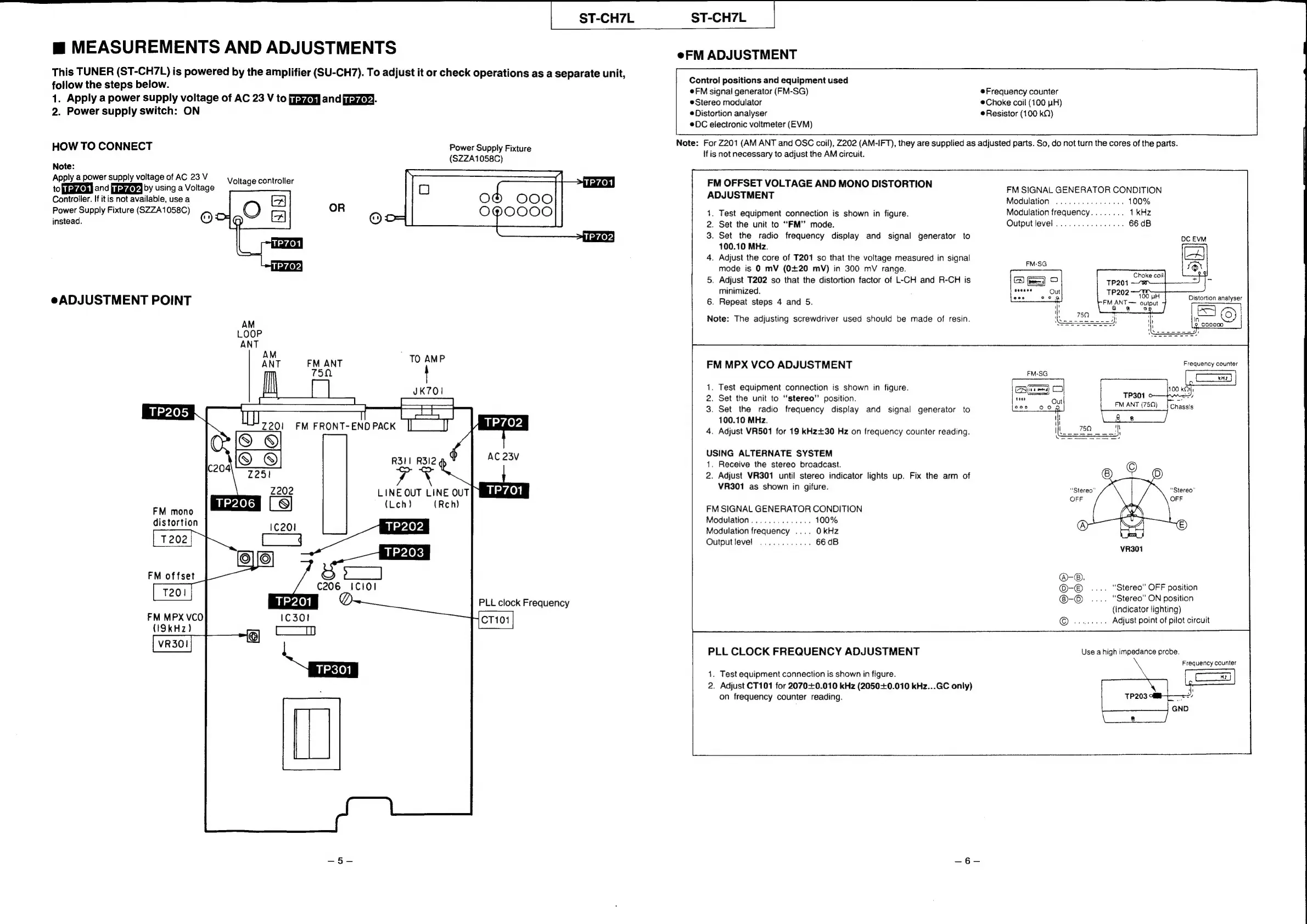
MEASUREMENTS
AND
ADJUSTMENTS
This
TUNER
(ST-CH7L)
is
powered
by
the
amplifier
(SU-CH7).
To
adjust
it
or
check
operations
as
a
separate
unit,
follow
the
steps
below.
1.
Apply
a
power
supply
voltage
of
AC
23
V
to
[yZe
and
iZey)-
2.
Power
supply
switch:
ON
HOW
TO
CONNECT
Note:
Apply
a
power
supply
voltage
of
AC
23
V
to
pieydehd
and
paeygeyy
by
using
a
Voltage
Controller.
If
itis
not
available,
use
a
Power
Supply
Fixture
(SZZA1058C)
Voltage
controller
Power
Supply
Fixture
(SZZA1058C)
OR
instead.
©
a
e
ADJUSTMENT
POINT
AM
LOOP
ANT
AM
ANT
FM
ANT
TO
AMP
750
7
Z202
LINE
OUT
LINE
OUT
(Leh)
(Reh)
FM
mono
distortion
FM
offset
PLL
clock
Frequency
FM
MPX
VCO
(I9kHz)
eFM
ADJUSTMENT
Control
positions
and
equipment
used
@FM
signal
generator
(FM-SG)
Frequency
counter
Choke
coil
(100
LH)
e
Resistor
(100
kQ)
Stereo
modulator
e
Distortion
analyser
DC
electronic
voltmeter
(EVM)
Note:
For
Z201
(AM
ANT
and
OSC
coil),
Z202
(AM-IFT),
they
are
supplied
as
adjusted
parts.
So,
do
not
turn
the
cores
of
the
parts.
If
is
not
necessary
to
adjust
the
AM
circuit.
FM
OFFSET
VOLTAGE
AND
MONO
DISTORTION
ADJUSTMENT
FM
SIGNAL
GENERATOR
CONDITION
Modulation
1.
Test
equipment
connection
is
shown
in
figure.
Modulation
frequency
.
Set
the
unit
to
“FM”
mode.
Output
level
.
Set
the
radio
frequency
display
and
signal
generator
to
100.10
MHz.
.
Adjust
the
core
of
T201
so
that
the
voltage
measured
in
signal
mode
is
0
mV
(0+20
mV)
in
300
mV
range.
.
Adjust
T202
so
that
the
distortion
factor
of
L-CH
and
R-CH
is
minimized.
.
Repeat
steps
4
and
5.
Note:
The
adjusting
screwdriver
used
should
be
made
of
resin.
FM
MPX
VCO
ADJUSTMENT
.
Test
equipment
connection
is
shown
in
figure.
.
Set
the
unit
to
“stereo”
position.
.
Set
the
radio
frequency
display
and
signal
generator
to
100.10
MHz.
.
Adjust
VR501
for
19
kKHz+30
Hz
on
frequency
counter
reading.
FM
ANT
(759)
USING
ALTERNATE
SYSTEM
1.
Receive
the
stereo
broadcast.
2.
Adjust
VR301
until
stereo
indicator
lights
up.
Fix
the
arm
of
VR301
as
shown
in
gifure.
“Stereo”
FM
SIGNAL
GENERATOR
CONDITION
Modulation
Modulation
frequency
....
OkHz
Output
level
.
“Stereo”
OFF
position
.
“Stereo”
ON
position
(Indicator
lighting)
Adjust
point
of
pilot
circuit
PLL
CLOCK
FREQUENCY
ADJUSTMENT
Use
a
high
impedance
probe.
Frequency
counter
1.
Test
equipment
connection
is
shown
in
figure.
2.
Adjust
CT101
for
2070+0.010
kHz
(2050+0.010
kHz...GC
only)
on
frequency
counter
reading.

Related product manuals