6
Connecting the TV
● Please ensure the TV is disconnected from the
mains socket/ power point before attaching or
disconnecting any RF/ AV leads.
● External equipment and cables are for illustrative
purposes only and not supplied with this TV.
● Check the type of terminals and cable plugs are
correct when connecting.
● When using an HDMI cable, use the fully wired one.
● Keep the TV away from electronic equipment (video
equipment, etc.) or equipment with an infrared
sensor. Otherwise, distortion of image/ sound may
occur or operation of other equipment may be
interfered.
● Also read the manual of the equipment being
connected.
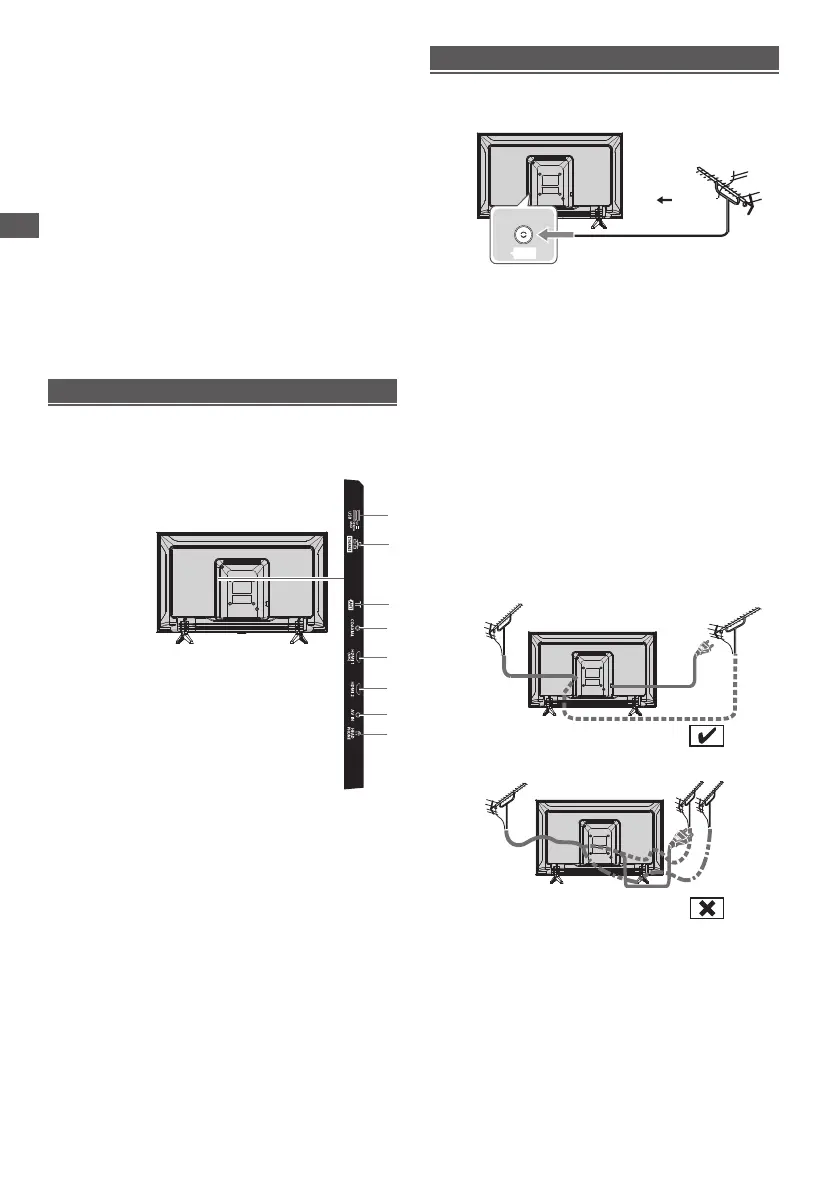
Connecting the TV
Terminals
●
Keep RF (aerial) cable away from the mains lead to
avoid and minimise mains interference pickup.
●
Do not place the RF cable under the TV.
●
An aerial, correct cable (75 Ω coaxial) and correct
terminating plug are required to obtain optimum quality
picture and sound.
●
If a communal aerial system is used, you may require
the correct connection cable and plug between the wall
aerial socket and the TV.
●
Your local Television Service Centre or dealer may be
able to assist you in obtaining the correct aerial system
for your particular area and the accessories required.
●
Any matters regarding aerial installation, upgrading
of existing systems or accessories required, and
the costs incurred, are the responsibility of you, the
customer.
●
If the aerial is placed in the wrong location, interference
might happen.
Connections
Aerial
RF cable
Aerial
ANT
Rear of the TV
1
2
USB
3
4
HDMI 2
5
6
7
8
COAXIAL
HDMI 1(ARC)
AV IN
HEADPHONE
ANTENNA
6
7
8
4
5
2
3
1
ETHERNET



 To Next Page