EasyManua.ls Logo

Panasonic TH-37PX8EA - DVB Settings (DVB)

Panasonic TH-37PX8EA
52 pages
Print Icon
To Next Page IconTo Next Page
To Previous Page IconTo Previous Page
Loading...
Main Menu
VIERA Link
Picture
Sound
Setup
2/3
Common Interface Access
Shipping Condition
System Update Access
Input Labels
Picture Overscan
Banner Display Timeout
3 seconds
Time Zone Auto
Setup Menu
Power Save Off
Side Panel Off
On
GUIDE
RETURN
ASPECT
OPTION
DIRECT TV REC
VCR
132
465
798
0
TEXT STTL INDEX HOLD
PROGRAMME
REC
VCR DVD
TV
INPUT
EXIT
MENU
OK
MENU
26
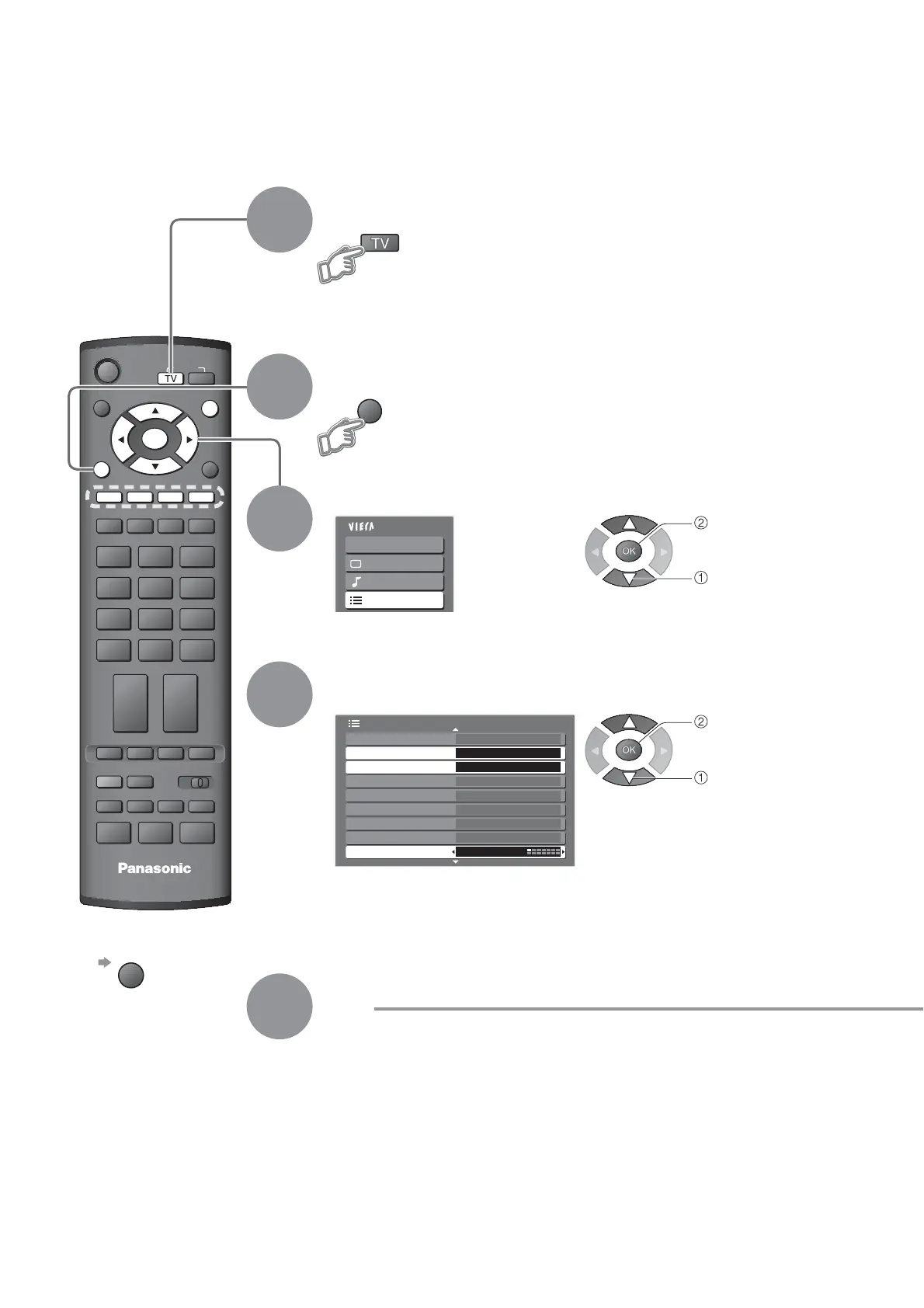
DVB Settings (DVB mode)
4
3
5
Select “Setup”
Select “Common Interface”, “System Update”
or “Time Zone”
Display the menu
Set
ŶTo return to TV
EXIT
1
If in Analogue mode
Select DVB
DVB Settings provide access to various advanced features.
2
access
select
access
select

Related product manuals