EasyManua.ls Logo

Panasonic TH-42PD60X - Page 16

Panasonic TH-42PD60X
91 pages
Print Icon
To Next Page IconTo Next Page
To Previous Page IconTo Previous Page
Loading...
to cti
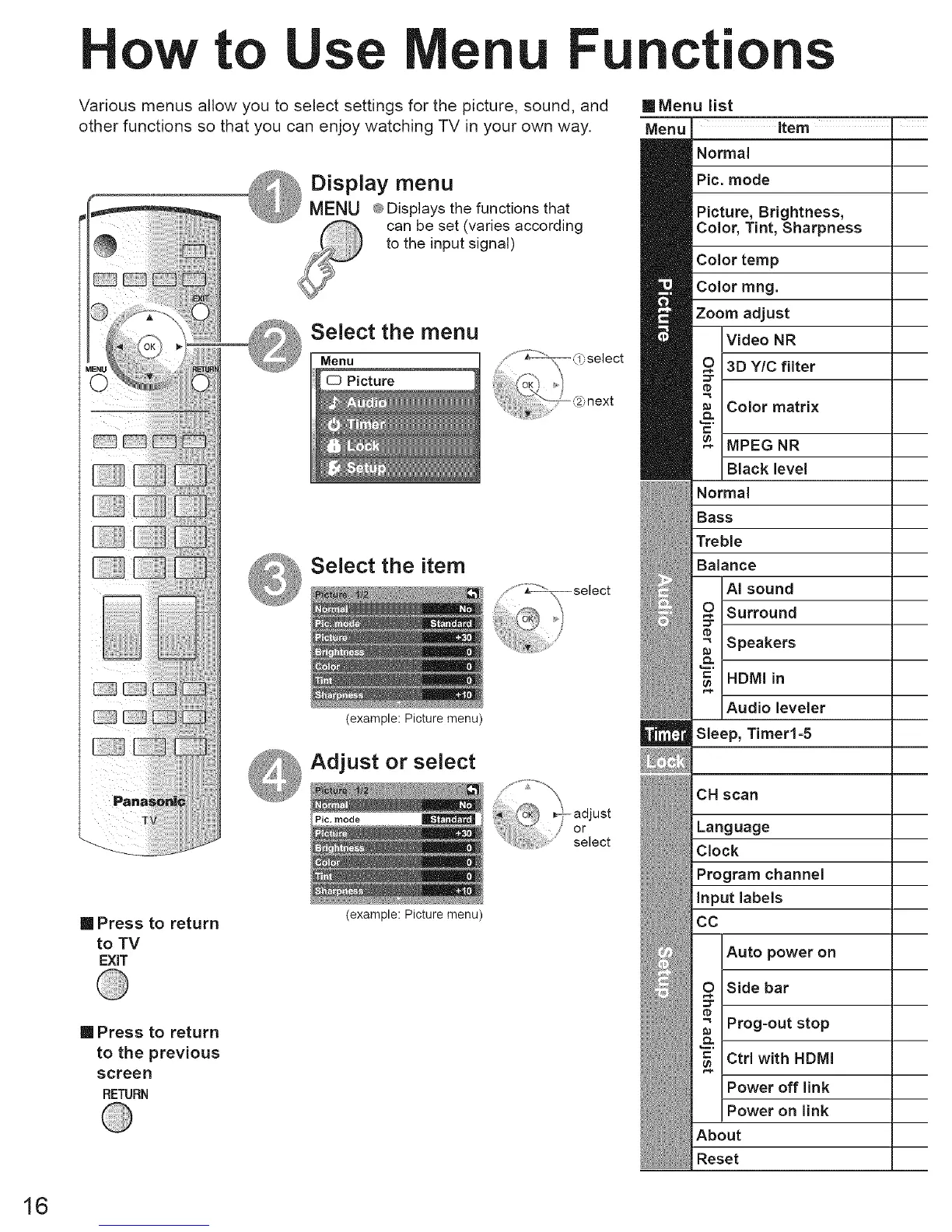
Various menus allow you to select settings for the picture, sound, and
other functions so that you can enjoy watching TV in your own way.
Display menu
MENU _ Displays the functions that
can be set (varies according
to the input signal)
Select the menu
Menu
Picture
Select the item
(example: Picture menu)
_ Adjust or select
mode
[] Press to return
to TV
EXiT
[] Press to return
to the previous
screen
RETURN
(example: Picture menu)
[]Menu list
Menu Item "
Normal
Pic. mode
Picture, Brightness,
Color, Tint, Sharpness
Color temp
Color rang.
Zoom adjust
Video NR
3D Y/C filter
Color matrix
MPEG NR
Black level
Normal
Bass
Treble
Balance
AI sound
Surround
Speakers
HDMI in
Audio leveler
Sleep, Timer1-5
CH scan
Language
Clock
Program channel
Input labels
CO
Auto power on
Side bar
Prog-out stop
Ctrl with HDMI
Power off link
Power on link
About
Reset
16