C ntrol Control
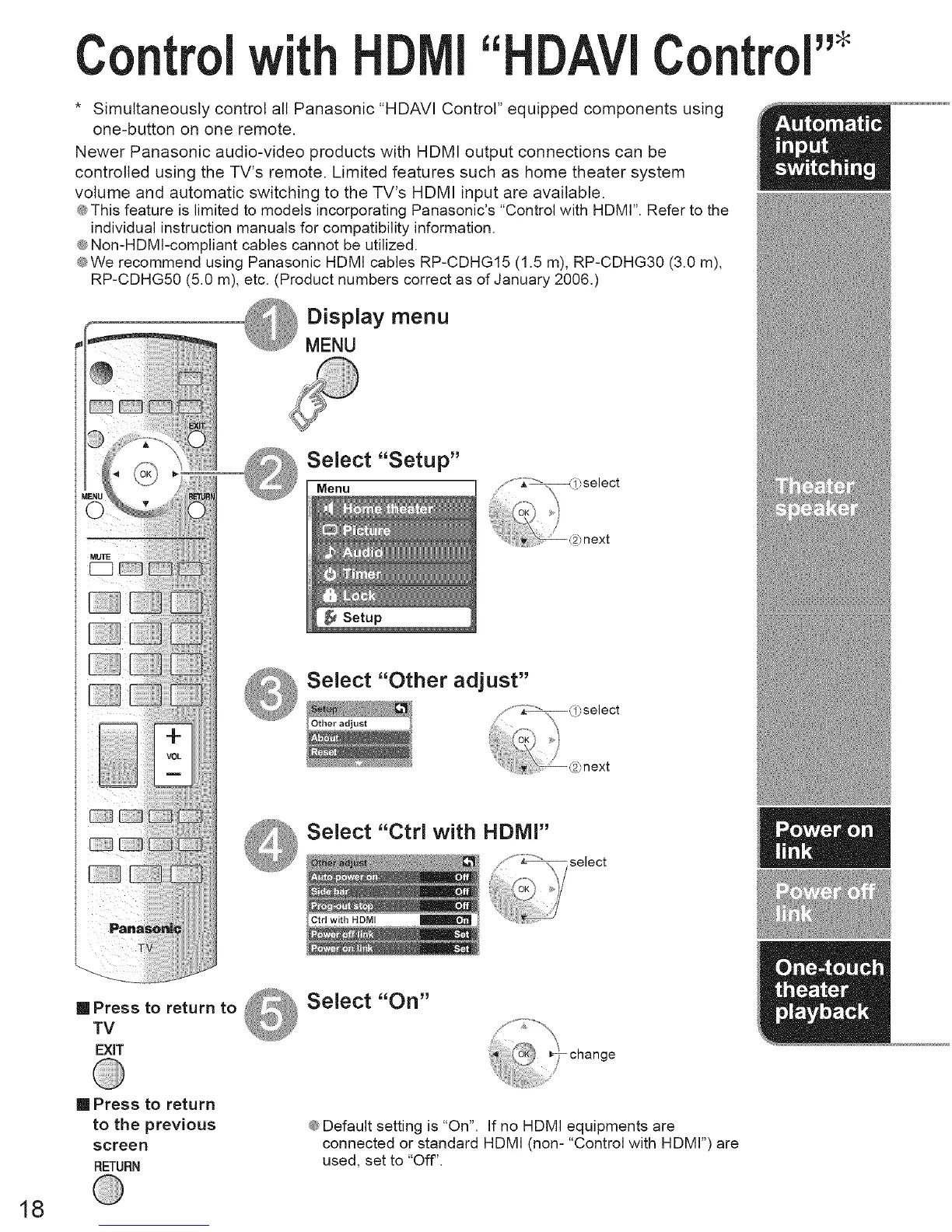
* Simultaneously control all Panasonic "HDAVI Control" equipped components using
one-button on one remote.
Newer Panasonic audio-video products with HDMI output connections can be
controlled using the TV's remote. Limited features such as home theater system
volume and automatic switching to the TV's HDMI input are available.
® This feature is limited to models incorporating Panasonic's "Control with HDMr'. Refer to the
individual instruction manuals for compatibility information.
® Non-HDMI-compliant cables cannot be utilized.
®We recommend using Panasonic HDMI cables RP-CDHG15 (1.5 m), RP-CDHG30 (3.0 m),
RP-CDHG50 (5.0 m), etc. (Product numbers correct as of January 2006.)
Display menu
MENU
[] Press to return to
TV
EXiT
Select "Setup"
Menu
Select "Other adjust"
Select "Ctrl with HDMI"
Select "On"
[] Press to return
to the previous
screen
RETURN
® Default setting is "On". If no HDMI equipments are
connected or standard HDMI (non-"Control with HDMI")are
used, set to "Off".
18





 To Next Page