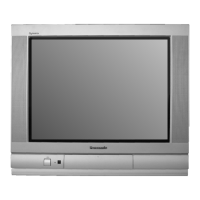
This document is an operating manual for Panasonic Colour Televisions, specifically covering U.K. Models TX-21S1T, TC-21S1R, TX-14S1T, TC-14S1R, and Ireland Models TX-21S1TL, TC-21S1RL, TC-14S1RL. It provides comprehensive instructions for installation, operation, and troubleshooting, along with detailed specifications and safety precautions.
Function Description:
The Panasonic Colour Televisions covered by this manual are designed for home entertainment, offering standard television viewing with additional features for enhanced user experience. Key functions include:
- Television Viewing: Standard reception of broadcast television channels.
- Teletext Operation: Access to FASTEXT Teletext services (on TX-21S1T, TX-14S1T, TX-21S1TL models) and Teletext adaptability (on TC-21S1RL, TC-14S1RL models). This allows users to view information pages broadcast by TV stations, including news, weather, and other data.
- Audio/Video (AV) Input/Output: Connectivity for external equipment such as VCRs, satellite receivers, and video cameras, allowing for playback and recording.
- Remote Control Operation: Full control over TV functions, including channel selection, volume adjustment, menu navigation, and special features, via a multi-function remote control.
- On-Screen Displays (OSD): Graphical user interface for adjusting picture, sound, and tuning settings.
- Tuning System: A 51-position tuning system (1-50 plus VCR) for channel management.
- Off Timer: A feature to automatically switch the TV to standby mode after a set period.
- C-A-T-S (Contrast Automatic Tracking System): An automatic contrast adjustment system (available on TX-21S1T, TX-21S1TL, TC-21S1RL models) that compensates for changes in ambient lighting.
Important Technical Specifications:
The manual provides detailed specifications for different models:
Power Source:
- All models: 220-240V 50Hz A.C.
Power Consumption:
- TX-21S1T, TC-21S1R, TX-21S1TL, TC-21S1RL: 58W
- TX-14S1T, TC-14S1R, TC-14S1RL: 39W
Picture Tube:
- TX-21S1T, TC-21S1R, TX-21S1TL, TC-21S1RL: 51 cm (V 90°)
- TX-14S1T, TC-14S1R, TC-14S1RL: 36 cm (V 90°)
Audio Output:
Dimensions (H x W x D):
- TX-21S1T, TC-21S1R, TX-21S1TL, TC-21S1RL: 477 mm x 518 mm x 478 mm
- TX-14S1T, TC-14S1R, TC-14S1RL: 364 mm x 389 mm x 384 mm
Weight:
- TX-21S1T, TC-21S1R, TX-21S1TL, TC-21S1RL: 21 kg
- TX-14S1T, TC-14S1R, TC-14S1RL: 10 kg
Receiving Systems:
- U.K. Models (TX-21S1T, TC-21S1R, TX-14S1T, TC-14S1R): PAL - I (UHF), PAL - 60
- Ireland Models (TX-21S1TL, TC-21S1RL, TC-14S1RL): PAL - I (UHF), PAL - 60, VHF A-S20
Aerial:
- U.K. Models (TX-21S1T, TC-21S1R, TX-14S1T, TC-14S1R): UHF
- Ireland Models (TX-21S1TL, TC-21S1RL, TC-14S1RL): UHF/VHF
Headphones - Front:
AV - Rear:
- All models: 21 pin terminal - Audio / Video in / out, RGB in (SCART)
AV - Front:
- All models: RCA Audio in / RCA Video in
Usage Features:
- Remote Control (TNQ8E0460/TNQ8E0461): A multi-function remote control is supplied, allowing comprehensive control. Specific models (TC-14S1R) may not have an operating switch in the battery compartment.
- Battery Installation: Requires two R6 (UM3) dry cells for the remote control. Instructions for correct polarity and replacement are provided.
- Tuning Operation: Step-by-step guide for tuning channels, including searching for desired channels and storing them to programme positions. Direct channel access via numeric keys is also available.
- TV/AV Selection: A dedicated button to switch between TV and Audio/Video modes. The TV can automatically switch to AV mode if the connected equipment provides a switching signal via SCART.
- Teletext Operation: Instructions for accessing Teletext, navigating pages (including sub-pages), using coloured keys for subject selection, and revealing hidden answers in quizzes.
- Function Select (F): A key on both the TV front and remote control to access and adjust settings like Volume, Tuning Mode, Colour, Brightness, Contrast, and Sharpness via On-Screen Displays.
- Sound Mute: A dedicated button on the remote to mute/unmute sound.
- Status Display: Shows channel number, programme position, time, and teletext station name (for Teletext models).
- Normalisation Store/Recall: Allows users to store preferred Volume, Colour, Brightness, Contrast, and Sharpness levels and recall them later.
- Off Timer: Sets a time (30, 60, or 90 minutes) after which the TV will switch to standby.
- Sleep Feature: If the TV station stops transmitting, the TV automatically enters standby after 30 minutes (not active in AV mode).
- Last Position Memory: Retains settings for Programme position, Contrast, Sharpness, Colour, Volume, Brightness, Status, and C-A-T-S (21" only) when the TV is switched off.
- Front AV Cover: A cover is supplied for TX-21S1T and TC-21S1R models to hide the front RCA and headphone terminals.
- VCR Operation: The remote control can operate some functions of selected Panasonic VCRs. Users are advised to consult their VCR instruction book for compatibility.
Maintenance Features:
- Cleaning: The cabinet and picture tube can be cleaned with a soft cloth moistened with mild detergent and water. Benzol or petroleum solutions should not be used.
- Battery Replacement: Instructions for replacing remote control batteries and precautions against mixing battery types or using old/rechargeable batteries. Exhausted batteries should be removed and disposed of immediately.
- Fuse Replacement: Detailed instructions for replacing the 5 amp fuse in the fitted three-pin mains plug, including checking for ASTA or BSI approval and ensuring the fuse cover is refitted. Wiring codes for a new plug are also provided.
- Troubleshooting Guide: A comprehensive table of symptoms (e.g., snowy picture, noisy sound, no picture/colour, interference, scrambled channels) and corresponding checks to perform before requesting service.
- Service Request Information: Advices users to contact their local Panasonic dealer, quoting the model and serial number (located at the rear of the TV).
- Aerial Adjustment: Guidance on adjusting the aerial direction for best picture quality and recommendation for an external aerial if quality is unsatisfactory.
- TV Games/Home Computers Precaution: Warnings about potential permanent "shadow" on the screen from extended use of TV games or home computers. Recommendations include reducing brightness and contrast and limiting continuous usage. This type of damage is not covered by the Panasonic warranty.
- General Safety: Warnings against exposing the TV to rain or excessive moisture, removing the rear cover (due to high voltage), exposing it to direct sunlight or heat, and pulling the power cable by the cable itself. The TV can produce static electricity, so care should be taken when touching the screen.

 Need help?



 To Next Page

 General