
 Need help?
Do you have a question about the Panasonic TX-24M330B and is the answer not in the manual?
Key instructions for safe TV operation, including ventilation, power, and environmental considerations.
Alerts on battery ingestion hazards and precautions to prevent the TV from falling.
Guidelines and warnings for safely installing the TV using a wall mount kit.
Step-by-step instructions for assembling and attaching the TV's stand.
How to remove the TV stand and VESA dimensions for wall mounting.
Covers navigation with the remote, input selection, and basic menu operations.
Details accessing, navigating, and customizing the main TV menu structure.
Instructions for inserting remote batteries and connecting the TV's power cord.
Explains the function of buttons related to power, media playback, and menu navigation.
Describes buttons for accessing menus, changing channels, volume, and media controls.
Describes connections for AUDIO IN, HDMI, SCART, and SIDE AV inputs.
Instructions for powering the TV on, switching to standby, and complete power off.
Guides through initial setup steps like language, country, and mode selection.
Settings for selecting and scanning digital aerial, cable, satellite, and analogue broadcasts.
Solutions for power, picture, sound, signal, and remote control problems.
Addresses issues like MAC address registration and firewall problems preventing internet access.
Detailed instructions on wiring the mains plug, including wire colors and terminal connections.
Guidance on correct fuse replacement and essential safety measures for equipment use.
This document provides operating instructions for the Panasonic TX-24M330B LED TV.
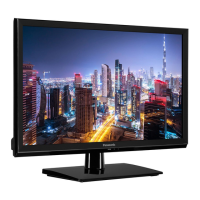
The Panasonic TX-24M330B is an LED TV designed for household and similar indoor use, though it can also be used in public places. It features a remote-controlled color display and comes with a fully integrated digital terrestrial/cable/satellite TV tuner (DVB-T-T2/C/S-S2 compliant). The TV includes HDMI inputs for connecting other devices, a USB input for media playback, and a Scart socket for external devices like DVD players, PVRs, or video game consoles. It supports a stereo sound system, teletext services (where available), and has a headphone connection. The TV also incorporates automatic programming, manual tuning, and an automatic power-down feature that can be set for up to eight hours. Additional features include a sleep timer, child lock, automatic sound mute when no transmission is detected, NTSC playback, Automatic Volume Limiting (AVL), and PLL (Frequency Search).
The TV's main menu system is accessible via the Home button on the remote control, allowing users to navigate and set various options. Input selection is managed through the Source button, enabling switching between connected external systems. Channel and volume adjustments are made using the Programme +/- and Volume +/- buttons. The TV also supports CEC (Consumer Electronics Control) functionality, allowing control of CEC-enabled devices connected via HDMI ports using the TV's remote. This includes System Audio Control, which enables an Audio Amplifier/Receiver to be used with the TV, with volume control through the TV remote.
For wired network connectivity, the TV has a LAN port at the rear, allowing connection to a modem/router or directly to a network wall outlet via an Ethernet cable. This enables interactive services available on digital channels.
Switching On/Off: The TV can be switched on from standby mode by pressing the Standby button, Programme +/- buttons, a numeric button on the remote, or the middle of the side function switch on the TV. To switch off, press and hold the Standby button on the remote or the side function switch for a few seconds to enter standby mode. For complete power down, unplug the power cord from the mains socket.
First Time Installation: Upon first use, the TV guides the user through language selection, country preference, and PIN setup. Users can choose between Store Mode (for retail display) or Home Mode (recommended for home use). Broadcast types (Digital Aerial, Digital Cable, Satellite, Analogue) can be selected for searching, along with encrypted channel searching and time zone preferences. The TV will then search for available broadcasts.
Media Playback via USB Input: The TV supports connecting 2.5" and 3.5" external hard disk drives or USB memory sticks to its USB inputs for media playback. It supports FAT32 and NTFS disk formatting. The Media Browser menu automatically appears upon connection, allowing users to play music, movie, and photo files. Settings for the Media Browser can be accessed via the information bar during playback. Loop/Shuffle modes are available for continuous or random playback of files.
Electronic Programme Guide (EPG): Access the EPG via the Guide button on the remote or the TV menu. Two schedule layouts are available: Timeline Schedule and Now/Next. Users can navigate through events, filter by genre, search, and set timers for future events.
Teletext Services: Press the Text button to access teletext. Pressing it again activates mix mode, superimposing teletext over the broadcast picture. Digital teletext and MHEG teletext are supported, with navigation via colored buttons and directional buttons.
Software Upgrade: The TV can automatically find and update its firmware via broadcast signal or the internet. Users can manually check for upgrades through the Settings menu. The TV also performs a 3 AM search and upgrade if automatic scanning is enabled and connected to an aerial or the internet.
Parental Settings: The Parental menu, accessed through Settings>System>Parental, allows users to prohibit viewing of certain programs, channels, and menus by setting a PIN. Options include Menu Lock, Maturity Lock, Child Lock, Guidance, setting a new PIN, and changing the Default CICAM PIN.
Network Configuration: In the Settings menu, users can configure wired network settings, perform an Internet Speed Test to check bandwidth, and adjust advanced IP and DNS settings.
Display Panel, Cabinet, Pedestal Care: For regular care, gently wipe surfaces with a soft cloth to remove dirt or fingerprints. For stubborn dirt, first dust the surface, then use a soft cloth dampened with clean water or diluted neutral detergent (1 part detergent to 100 parts water), wring it firmly, wipe the dirt, and finally wipe away all moisture. Avoid using hard cloths or rubbing too hard to prevent scratches. Do not expose surfaces to insect repellent, solvent, thinner, or other volatile substances, as this may degrade surface quality or cause paint peeling. The display panel is specially treated and can be easily damaged; avoid tapping or scratching it with fingernails or hard objects. Do not allow the cabinet and pedestal to contact rubber or PVC substances for extended periods, as this may degrade surface quality.
Mains Plug Care: Wipe the mains plug with a dry cloth at regular intervals to prevent moisture and dust from causing fire or electrical shock.
Pedestal Assembly/Removal: When assembling, ensure the two pieces of the stand are installed together, then place the stand(s) on the mounting pattern(s) on the rear of the TV and secure with the provided M4 x 12 screws. When removing, place the TV screen-down on a soft cloth, unscrew the stand(s), and then remove them.
Battery Replacement: The remote control uses two AA batteries. Ensure correct polarity when inserting. Do not mix old and new batteries, and replace only with the same or equivalent type. A message will appear on screen when batteries are low.
Safety Precautions: Disconnect the TV from the mains during extreme weather (storms, lightning) or long periods of inactivity. The mains plug should remain readily operable for disconnection. Ensure at least 5cm of free space around the TV for ventilation and do not block ventilation openings. The power cord plug should be easily accessible and not placed under the TV or furniture. Handle the power cord by the plug, not by pulling the cord. Do not touch the power cord/plug with wet hands. Do not knot the power cord or tie it with other cords. If damaged, it must be replaced by qualified personnel. Do not expose the TV to dripping or splashing liquids, and do not place liquid-filled objects on or over it. Avoid direct sunlight, open flames, or heat sources near the TV. Keep plastic bags away from babies, children, and domestic animals to prevent suffocation. Securely attach the stand to prevent tilting. Dispose of batteries properly, not in fire or with hazardous materials.
 General
| HDMI version | 1.4 |
|---|---|
| PC in (D-Sub) | - |
| Common interface (CI) | Yes |
| USB 2.0 ports quantity | 1 |
| Audio formats supported | AAC, M4A, MP3, WAV, WMA |
| Image formats supported | BMP, GIF, JPEG, JPG, PNG |
| Video compression formats | 3GP, 3GPP, ASF, AVI, DAT, FLV, MKV, MOV, MP4, MPEG, MPG, VOB, WMV |
| Screen shape | Flat |
| Response time | - ms |
| Display diagonal | 24 \ |
| Display brightness | - cd/m² |
| Display resolution | 1366 x 768 pixels |
| Display technology | LED |
| Native aspect ratio | 16:9 |
| Display diagonal (metric) | 60 cm |
| Supported graphics resolutions | 1366 x 768 |
| Dynamic contrast ratio marketing name | High Contrast |
| Tuner type | Analog & digital |
| Digital signal format system | DVB-C, DVB-S, DVB-S2, DVB-T, DVB-T2 |
| Number of OSD languages | 39 |
| Sound modes | Cinema, Game, Music, Speech, Standard, Vivid |
| RMS rated power | 5 W |
| AC input voltage | 220 - 240 V |
| AC input frequency | 50 - 60 Hz |
| Energy efficiency scale | A to G |
| Power consumption (max) | 16 W |
| Power consumption (standby) | 0.5 W |
| Power consumption (typical) | - W |
| Stand type | Center stand |
| Product color | Black |
| Panel mounting interface | 75 x 75 mm |
| Package depth | 468 mm |
| Package width | 629 mm |
| Package height | 114 mm |
| Package weight | 4500 g |
 Weight and Dimensions
| Stand width | 280 mm |
|---|---|
| Depth (with stand) | 134 mm |
| Width (with stand) | 553 mm |
| Height (with stand) | 372 mm |
| Weight (with stand) | 3750 g |
| Depth (without stand) | 63 mm |
| Height (without stand) | 334 mm |
| Weight (without stand) | 3500 g |







 To Next Page