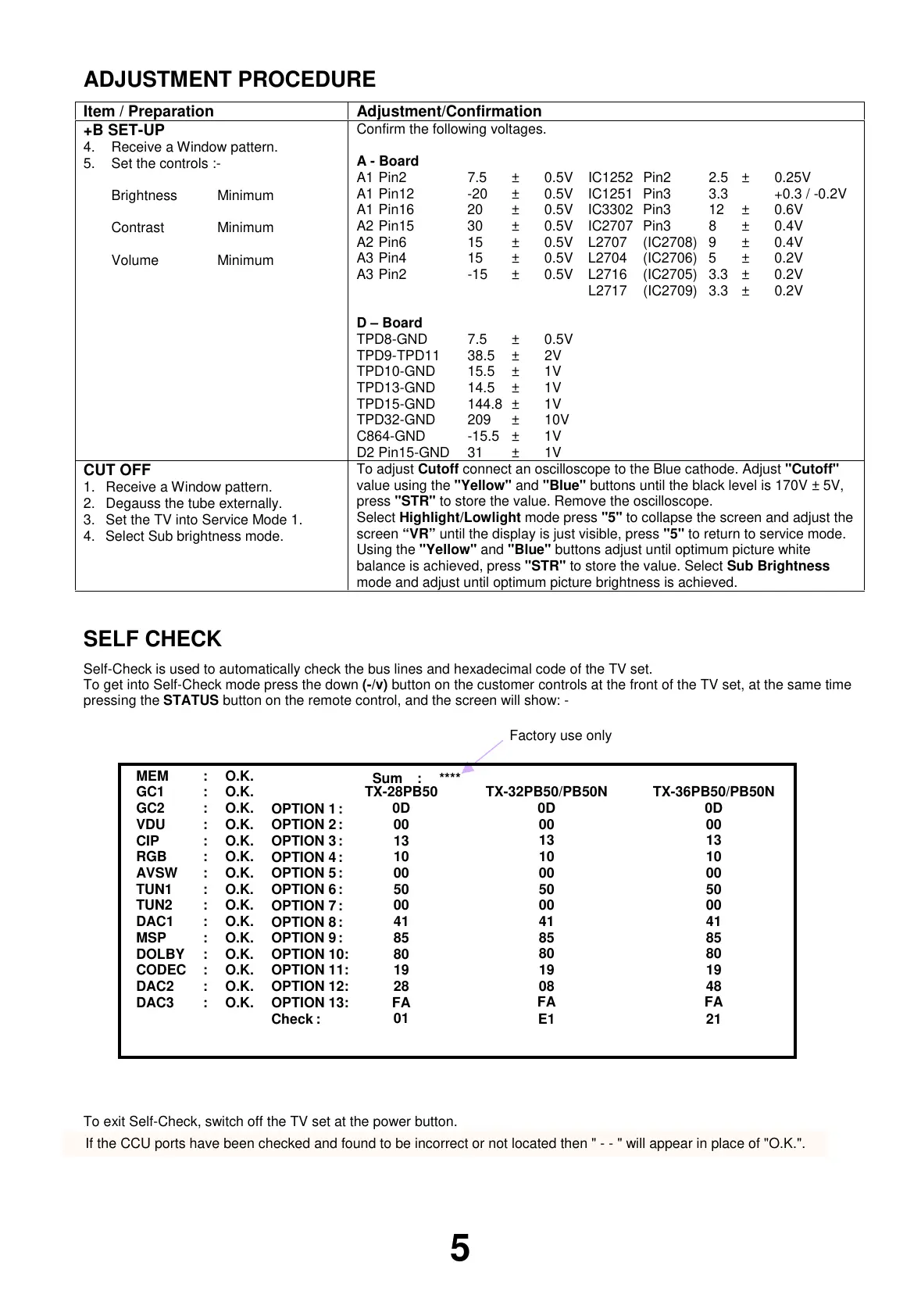
ADJUSTMENT PROCEDURE
Item / Preparation Adjustment/Confirmation
+B SET-UP
4. Receive a Window pattern.
5. Set the controls :-
Brightness Minimum
Contrast Minimum
Volume Minimum
Confirm the following voltages.
A - Board
A1 Pin2 7.5 ± 0.5V IC1252 Pin2 2.5 ± 0.25V
A1 Pin12 -20 ± 0.5V IC1251 Pin3 3.3 +0.3 / -0.2V
A1 Pin16 20 ± 0.5V IC3302 Pin3 12 ± 0.6V
A2 Pin15 30 ± 0.5V IC2707 Pin3 8 ± 0.4V
A2 Pin6 15 ± 0.5V L2707 (IC2708) 9 ± 0.4V
A3 Pin4 15 ± 0.5V L2704 (IC2706) 5 ± 0.2V
A3 Pin2 -15 ± 0.5V L2716 (IC2705) 3.3 ± 0.2V
L2717 (IC2709) 3.3 ± 0.2V
D – Board
TPD8-GND 7.5 ±0.5V
TPD9-TPD11 38.5 ± 2V
TPD10-GND 15.5 ± 1V
TPD13-GND 14.5 ± 1V
TPD15-GND 144.8 ± 1V
TPD32-GND 209 ± 10V
C864-GND -15.5 ± 1V
D2 Pin15-GND 31 ± 1V
CUT OFF
1. Receive a Window pattern.
2. Degauss the tube externally.
3. Set the TV into Service Mode 1.
4. Select Sub brightness mode.
To adjust Cutoff connect an oscilloscope to the Blue cathode. Adjust "Cutoff"
value using the "Yellow" and "Blue" buttons until the black level is 170V ± 5V,
press "STR" to store the value. Remove the oscilloscope.
Select Highlight/Lowlight mode press "5" to collapse the screen and adjust the
screen “VR” until the display is just visible, press "5" to return to service mode.
Using the "Yellow" and "Blue" buttons adjust until optimum picture white
balance is achieved, press "STR" to store the value. Select Sub Brightness
mode and adjust until optimum picture brightness is achieved.
SELF CHECK
Self-Check is used to automatically check the bus lines and hexadecimal code of the TV set.
To get into Self-Check mode press the down (-/v) button on the customer controls at the front of the TV set, at the same time
pressing the STATUS button on the remote control, and the screen will show: -
To exit Self-Check, switch off the TV set at the power button.
5
If the CCU ports have been checked and found to be incorrect or not located then " - - " will appear in place of "O.K.".
Factory use only
Sum : ****
MEM : O.K.
GC1 : O.K.
GC2 : O.K.
VDU : O.K.
CIP : O.K.
RGB : O.K.
AVSW : O.K.
TUN1 : O.K.
TUN2 : O.K.
DAC1 : O.K.
MSP : O.K.
DOLBY : O.K.
CODEC : O.K.
DAC2 : O.K.
DAC3 : O.K.
OPTION 1:
OPTION 2:
OPTION 3:
OPTION 4:
OPTION 5:
OPTION 6:
OPTION 7:
OPTION 8:
OPTION 9:
OPTION 10:
OPTION 11:
OPTION 12:
OPTION 13:
Check :
TX-28PB50
0D
00
13
10
00
50
00
41
85
80
19
28
FA
01
TX-32PB50/PB50N
0D
00
13
10
00
50
00
41
85
80
19
08
FA
E1
TX-36PB50/PB50N
0D
00
13
10
00
50
00
41
85
80
19
48
FA
21



 To Next Page