---$
.1~9FG50A'M.2833_Efin Pago26 Th"~,y,Fobro",3,2005 94'AM
-t
r
~
~
(Teletext Operation)
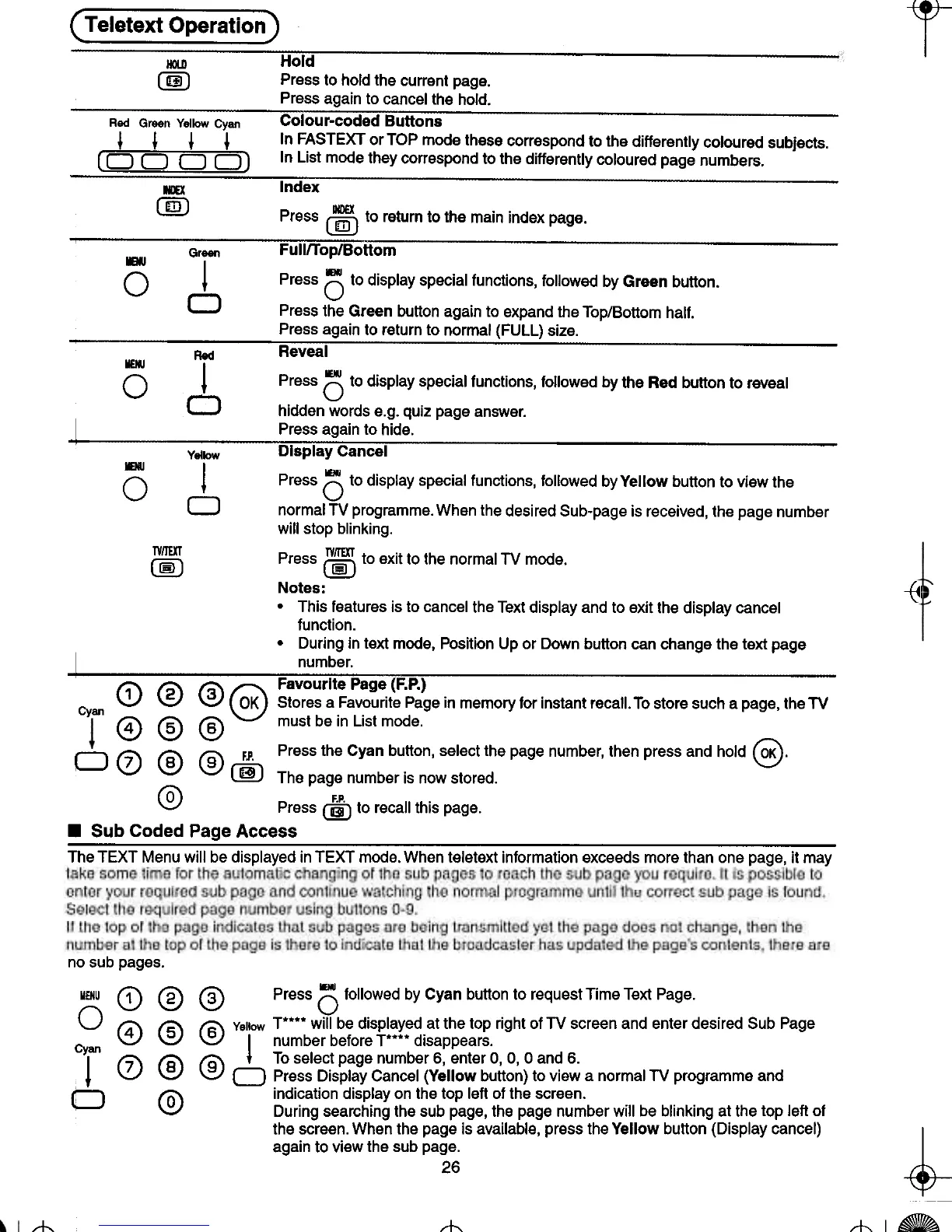
HOlD Hold
@ Press to hold the current page.
Press again to cancel the hold.
..
Red Green YolkJw Cyon Colour-coded Buttons
~ ~ ~ ~ In FASTEXT or TOP mode these correspond to the differently coloured subjects.
[0 0 0 D) In List mode they correspond to the differently coloured page numbers.
..
taX Index
@) IIDEX
Press @) to return to the main index page.
Groen Fulln-op/Bottom
0 l Press () to display special functions, followed by Green button.
0 Press the Green button again to expand the Top/Bottom half.
Press again to return to normal (FULL) size.
, -.
Red Reveal
0 l Press () to display special functions, followed by the Red button to reveal
0 hidden words e.g. quiz page answer.
I ~~es~ ag~in to hide. .-
Yellow Display Cancel
0 ! Press () to display special functions, followed byVeliow button to view the
0 normal TV programme. When the desired Sub-page is received, the page number
will stop blinking.
CiJ Press (i) to exit to the normal TV mode.
Notes:
.This features is to cancel the Text display and to exit the display cancel
function.
.During in text mode, Position Up or Down button can change the text page
I -num~er;,- --
(;j\ (';\ 13" (;:;\ Favourlte Page (F.P.)
Cy ~ \.V \V ~ Stores a Favourite Page in memory for instant recall. To store such a page, the TV
on @ @ @ must be in List mode.
D <2) @ @ Fl. Press the Cyan button, select the page number, then press and hold @.
00 The page number is now stored.
@ P F.P.
II h. ress @ to reca t IS page.
.Sub Coded Page Access
The TEXT Menu will be displayed in TEXT mode. When teletext information exceeds more than one page, it may
no sub pages.
MENU Q) @ @ Press 0 followed by Cyan button to request Time Text Page.
0 f4\ 15' f6\ Yellow T"""" will be displayed at the top right of TV screen and enter desired Sub Page
\::.J ~ \:::) I number before T"""" disappears.
Cylan f7\ I'S'\ 19\ + To select page number 6, enter 0, 0, o and 6.
+ ~ \.V \.V 0 Press Display Cancel (Yellow button) to view a normal TV programme and
0 fQ\ indication display on the top left of the screen.
\:::) During searching the sub page, the page number will be blinking at the top left of
the screen. When the page is available, press the Yellow button (Display cancel)
again to view the sub page.
26
~
~
-rl-
~
-1-







 To Next Page