English
30
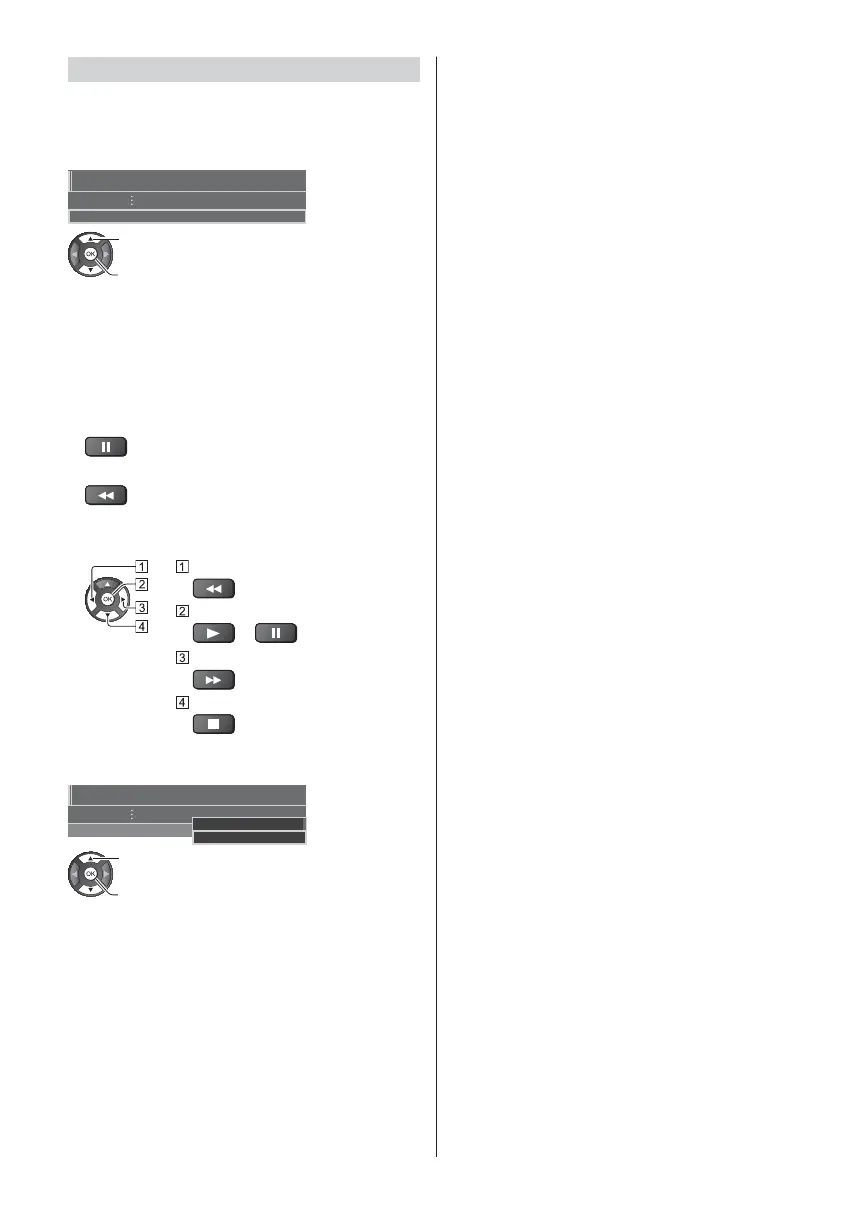
[REW LIVE TV]
Records the current programme to the USB HDD
constantly within the maximum recordable time.
Confirm the remote control code is “73” (p. 26).
Select [Auto] to start [REW LIVE TV]
REW LIVE TV Auto
Recording Setup
select
access / start [REW LIVE TV]
When you select [Auto], recording will start
automatically.
This recording may not start if another recording is in
progress, TV signal condition is bad or there are no
images displayed.
To operate [REW LIVE TV]
To pause
To search backward (up to 90 minutes)
After pausing or searching backward, the following
buttons are available for operation.
Search backward
Playback / Pause
/
Search forward
Return to the current programme
To stop [REW LIVE TV]
REW LIVE TV
Recording Setup
Auto
Off
select [Off]
store
If you stop [REW LIVE TV], the recorded content for
[REW LIVE TV] will be deleted.
[REW LIVE TV] is stopped and the recorded content
is deleted automatically in the following conditions:
(Even if [REW LIVE TV] stops for the following
conditions, as long as the setting is [Auto], a new
recording starts automatically in a condition that
makes the recording available.)
Other channels selected
Locked channel selected
Invalid channel selected
No TV signal
External input selected
When the full-screen application (TV Guide, Media
Player, eHELP, etc.) is launched
When the TV enters Standby or is turned off
When another recording starts












 To Next Page