9
English
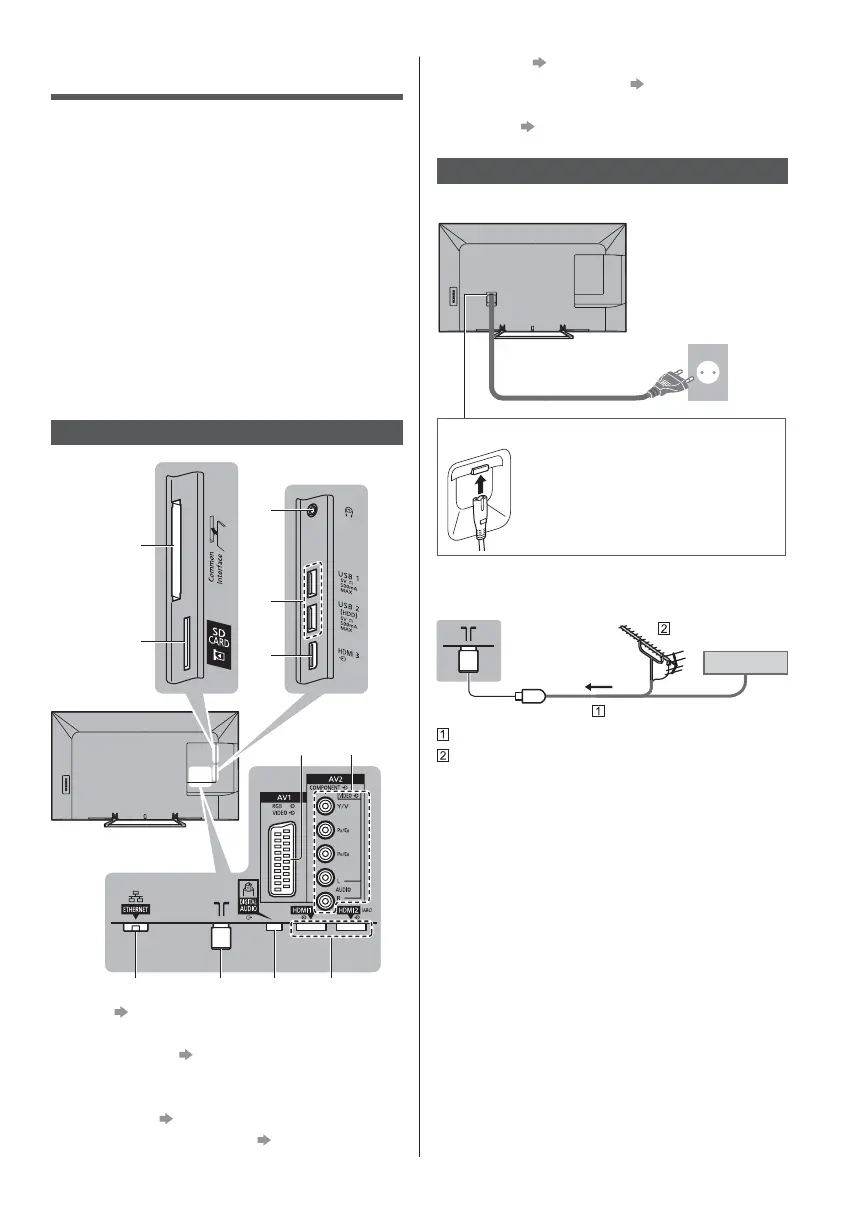
8 ETHERNET (p. 10)
9 Terrestrial / cable terminal
(p. 9)
10
DIGITAL AUDIO
11
HDMI1 - 2 (p. 10, 11)
Basic connections
Mains lead
AC 220-240 V
50 / 60 Hz
Mains lead
(supplied)
Insert the mains plug firmly into place.
When disconnecting the mains lead,
be absolutely sure to disconnect the
mains plug at the socket outlet first.
Aerial
TV
Cable
RF cable
Terrestrial aerial
For DVB-C, DVB-T, Analogue
Connections
External equipment and cables shown are not
supplied with this TV.
Please ensure that the unit is disconnected from the
mains socket before attaching or disconnecting any
cables.
Check the terminal type and cable plugs are correct
when connecting.
Use a fully wired HDMI compliant cable.
Use a fully wired SCART cable.
Keep the TV away from electronic equipment (video
equipment, etc.) or equipment with an infrared sensor,
otherwise distortion of image / sound may occur or
operation of other equipment may be affected.
Please also read the manual of the equipment being
connected.
Terminals
3
4
5
8
67
10 119
1
2
1 CI slot (p. 11)
2 SD Card slot
3 Headphone jack
(p. 11)
4 USB 1 - 2 port
5 HDMI3
6 AV1 (SCART)
(p. 10)
7 AV2 (COMPONENT / VIDEO)
(p. 10, 11)






 To Next Page