13
English
●
The LED blinks when the TV receives a command
from the remote control.
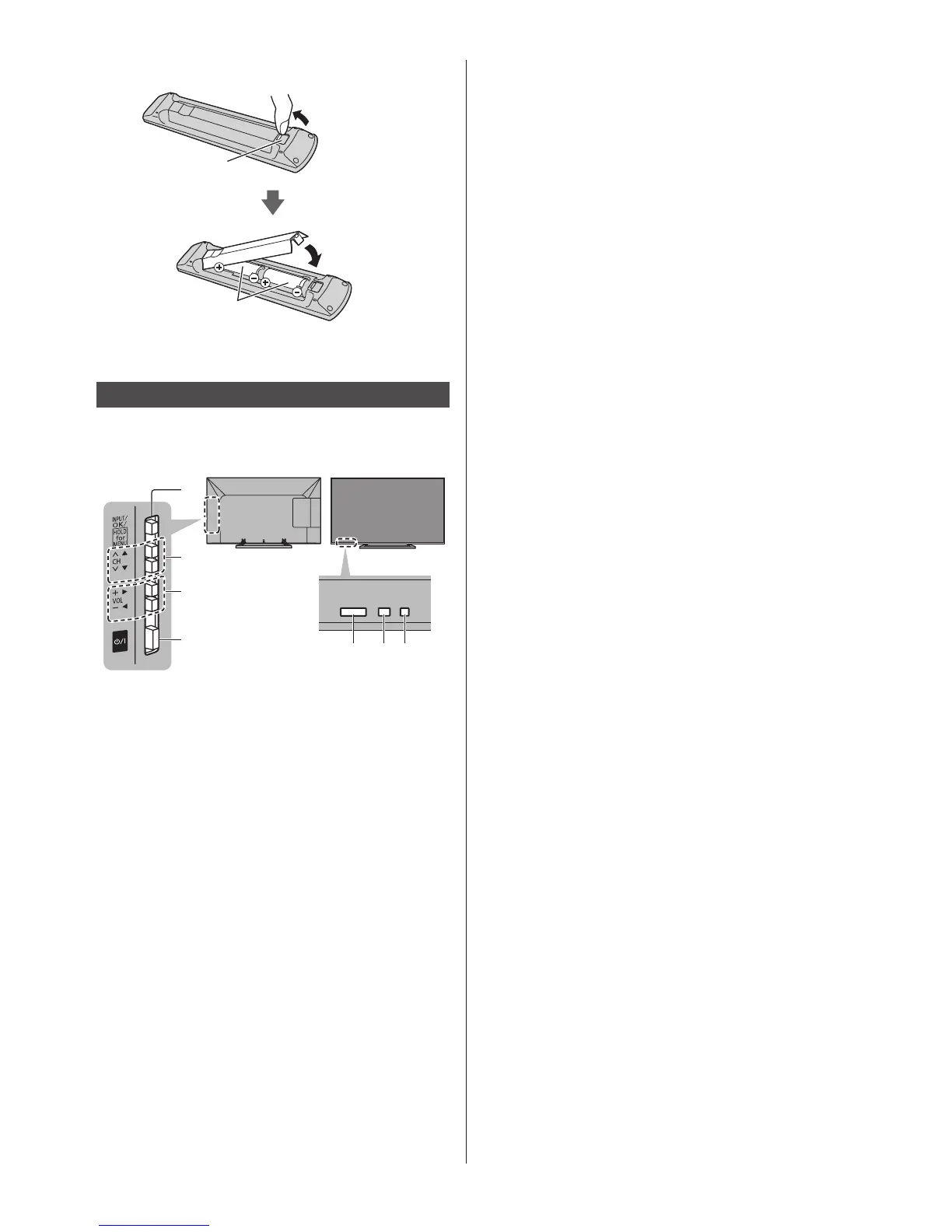
■ Installing / Removing batteries
Pull open
Hook
Note the correct
polarity (+ or -)
Close
Indicator / Control panel
●
When pressing 1, 2, 3 buttons, the control panel
guide appears on the right side of the screen for 3
seconds to highlight the pressed button.
1
567
2
3
4
Rear side of the TV
1 Input mode selection
●
Press repeatedly until you reach the desired mode.
[Main Menu]
●
Press and hold for about 3 seconds to display main
menu.
OK (when in the menu system)
2 Channel Up / Down
Cursor Up / Down (when in the menu system)
3 Volume Up / Down
Cursor Left / Right (when in the menu system)
4 Mains power On / Off switch
●
Use to switch the mains power.
5 Remote control signal receiver
●
Do not place any objects between the TV remote
control signal receiver and remote control.
6 Ambient sensor
●
Senses brightness to adjust picture quality when
[Ambient Sensor] in the Picture Menu is set to
[On].
7 Power LED
Red: Standby
Green: On




 To Next Page