English
7
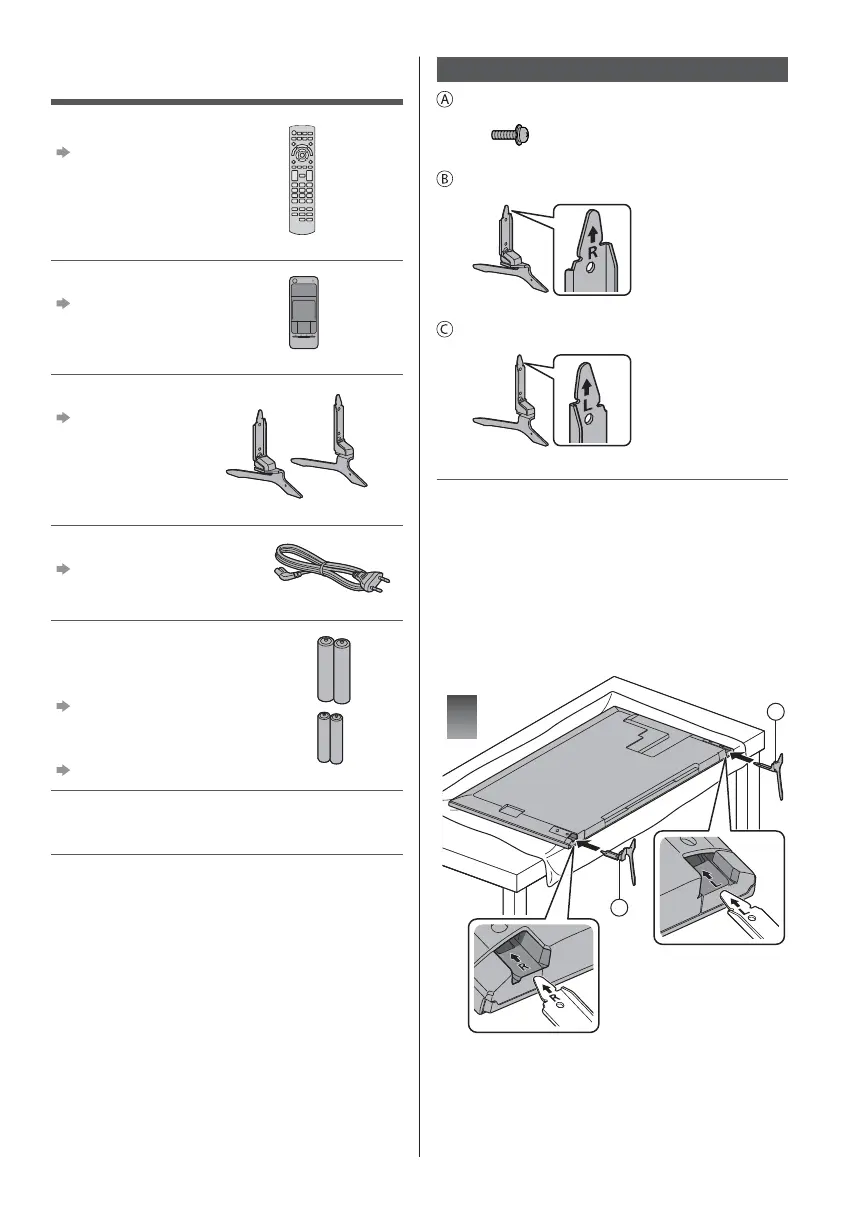
Accessories
Remote Control
(p. 12)
N2QAYB001010
Touch Pad Controller
(p. 13)
N2QBYA000015
Pedestal (2)
(p. 7)
R
L
Mains lead
(p. 9)
Batteries
R6 (2)
(For Remote Control)
(p. 13)
R03 (2)
(For Touch Pad Controller)
(p. 14)
Operating Instructions
Pan European Guarantee Card
Accessories may not be placed all together. Take care
not to throw them away unintentionally.
For information about the optional accessories, refer
to [eHELP] (Support > Optional accessories).
Assembling / Removing the pedestal
Assembly screw (4)
M4 × 12
Pedestal (R)
Pedestal (L)
Preparations
Take out the pedestal and the TV from the packing case
and put the TV onto a work table with the screen panel
down on the clean and soft cloth (blanket, etc.)
Use a flat and firm table bigger than the TV.
Do not hold the screen panel part.
Make sure not to scratch or break the TV.
Assembling the pedestal
1
C
B





 To Next Page