English
7
Accessories
Standard accessories
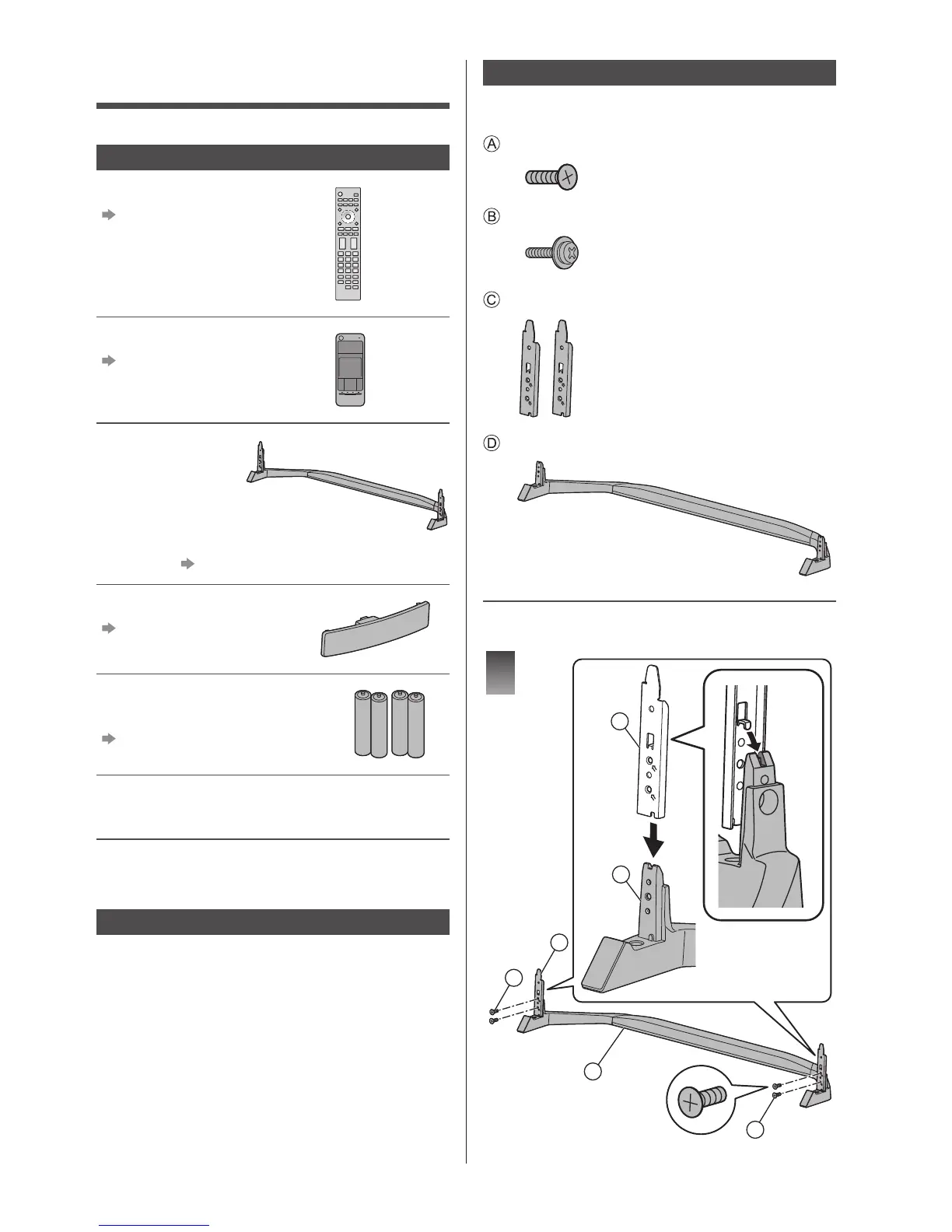
Remote Control
(p. 14)
●
N2QAYA000097
Touch Pad Controller
(p. 15)
●
N2QBYA000012
Pedestal
This illustration is the assembled pedestal. Be sure to
assemble it. (p. 7)
Cable guide
(p. 12)
Batteries (4)
●
R03
(p. 15, 16)
Operating Instructions
Production Registration Leaflet
●
Accessories may not be placed all together. Take care
not to throw them away unintentionally.
Optional accessories
3D Eyewear
●
If you need 3D Eyewear, please purchase Panasonic
optional accessories.
●
Use Panasonic 3D Eyewear supporting Bluetooth
wireless technology for active shutter 3D.
●
For information about 3D Eyewear:
http://panasonic.net/viera/support
Assembling / Removing the pedestal
When using the pedestal, this TV is slightly inclined
because of the slant design adopted.
Assembly screw (4)
M4 × 12
Assembly screw (4)
M4 × 12
Bracket (2)
Base
■ Assembling the pedestal
1
D
C
D
C
A
A







 To Next Page