English
7
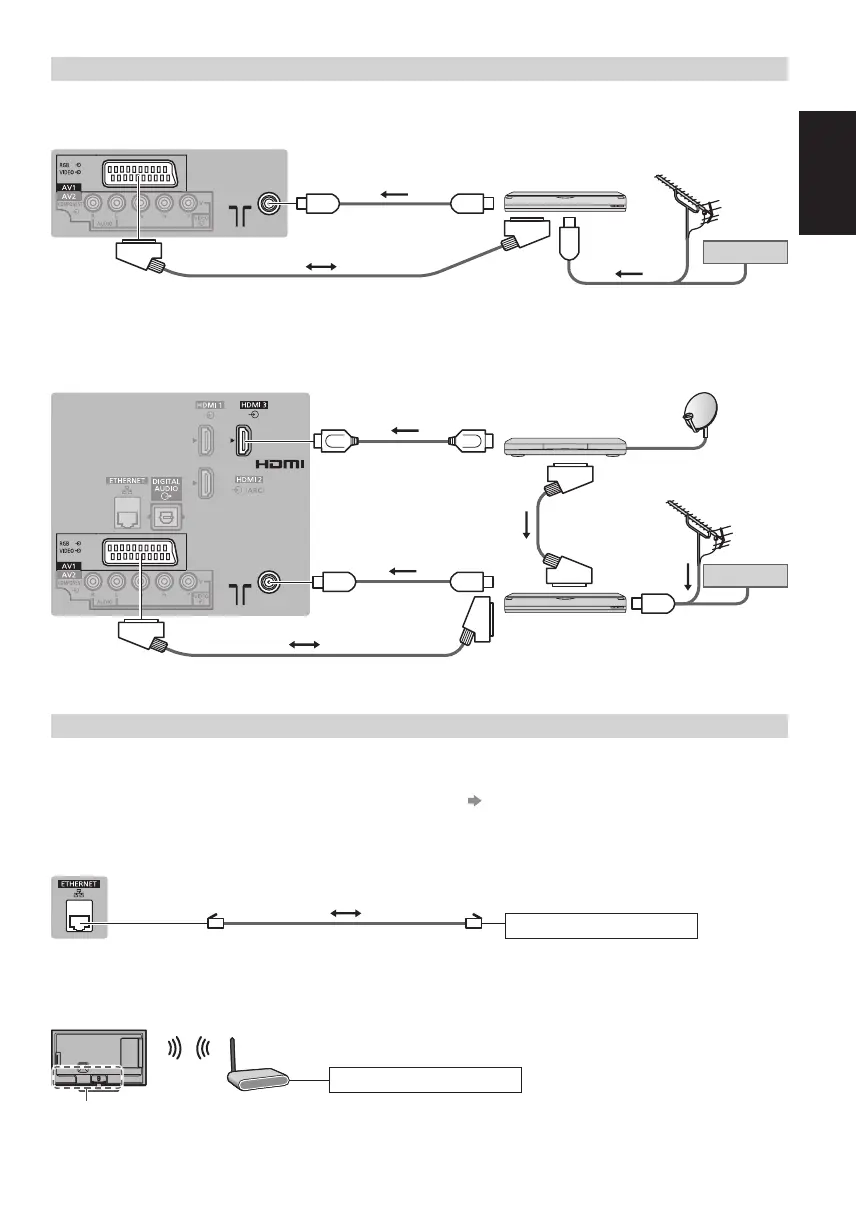
AV devices
■ DVD Recorder / VCR
TV
DVD Recorder / VCR
Cable
SCART cable
RF cable
Terrestrial aerial
RF cable
■ DVD Recorder / VCR and Set top box
TV
Set top box
HDMI cable
SCART cable
SCART cable
DVD Recorder / VCR
Terrestrial aerial
RF cable
RF Cable
Cable
Network
●
To enable the network service functions (VIERA Connect, etc.), you need to connect the TV to a broadband network
environment. If you do not have any broadband network services, please consult your retailer for assistance.
●
Prepare the internet environment for wired connection or wireless connection.
●
Setup of the network connection will start when first using the TV. (p. 12)
■ Wired connection
TV
Internet environment
LAN cable (Shielded)
●
Use the Shielded Twist Pair (STP) LAN cable.
■ Wireless connection
Internet environment
Access point
Built-in wireless LAN






 To Next Page