- 45 -
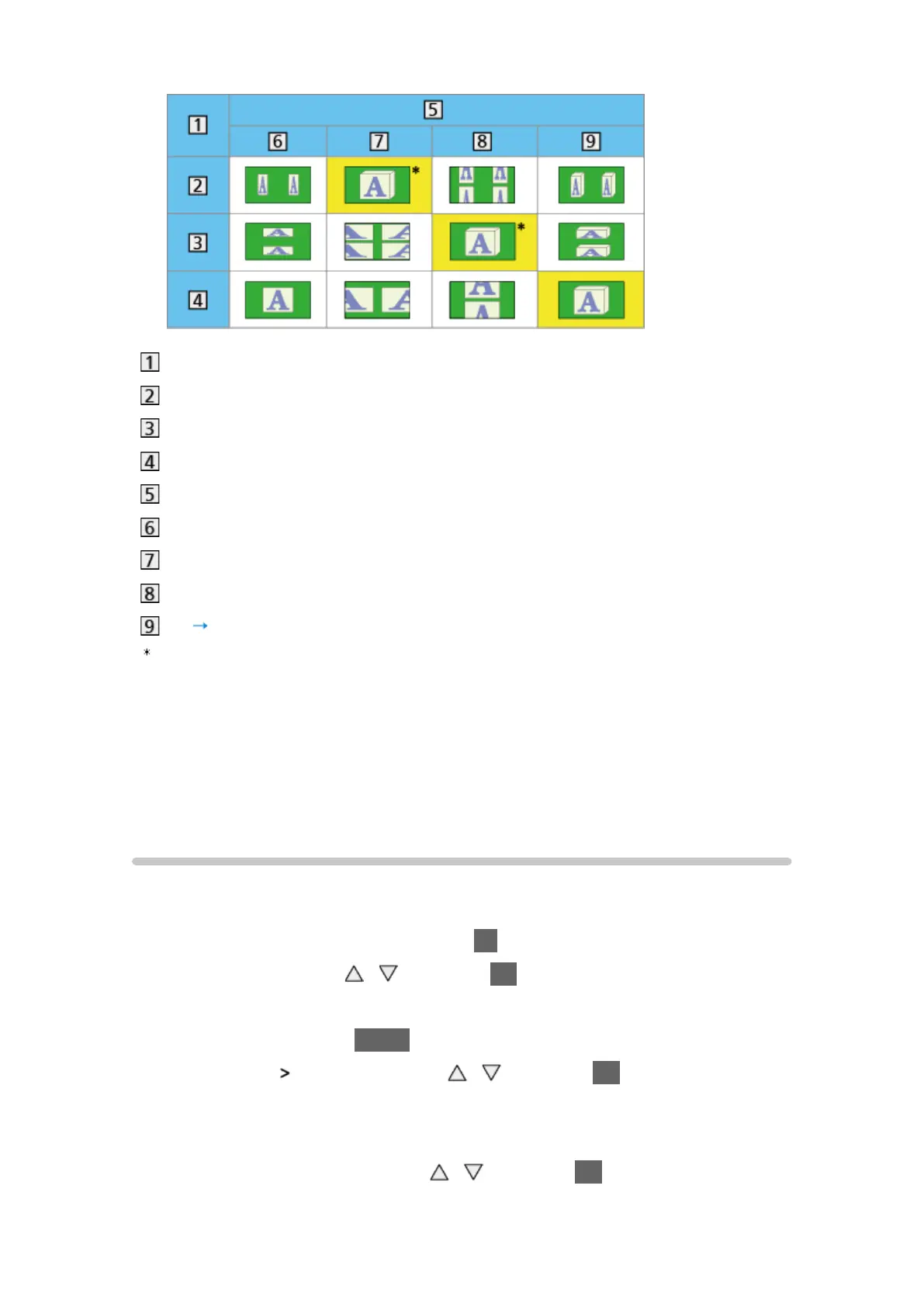
Source image format
Side by Side
Top and Bottom
Normal format (2D)
3D Mode Selection
Original
Side by Side - 3D
Top and Bottom - 3D
2D 3D
: When selecting Side by Side - 2D or Top and Bottom - 2D, the images will
be displayed without 3D effect.
●
Depending on the player or broadcasts, the image may be different from
the above illustrations.
Tuning and editing channels
Setting menu
You can retune channels, create your favourite channel lists, skip unwanted
channels, etc.
1. Display the TV Selection screen with TV
2. Select the mode with
/ and press OK to set
DVB-C / DVB-T / Analogue
3. Display the menu with MENU
4. Select Setup
Tuning Menu with / and press OK to access
DVB-C Tuning Menu / DVB-T Tuning Menu / Analogue Tuning Menu
●
The menu name varies depending on the TV mode.
5. Select one of the functions with
/ and press OK to access
Favourites Edit / Channel List / Auto Setup / Manual Tuning / Update







 To Next Page