Loose wiring may cause
the terminal to overheat or
result in unit malfunction.
A fire hazard may also
exist.Therefore, ensure
that all wiring is tightly
connected.
When connecting each power wire to the terminal, follow
the instructions on “How to connect wiring to the terminal”
and fasten the wire securely with the fixing screw of the
terminal plate.
How to connect wiring to the terminal
■■
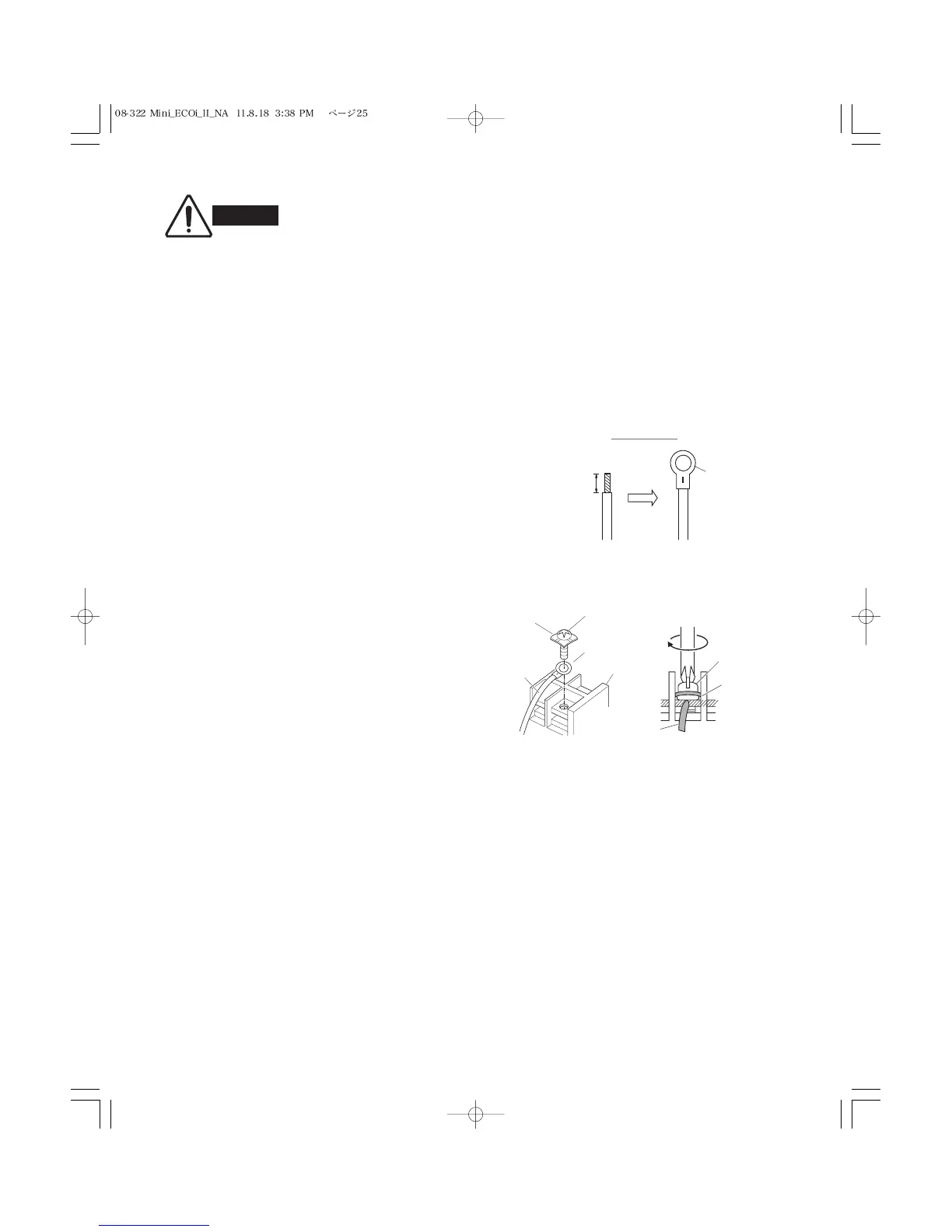
For stranded wiring
(1) Cut the wire end with cutting pliers, then strip the
insulation to expose the stranded wiring approx. 3/8"
and tightly twist the wire ends. (Fig. 4-4)
(2) Using a Phillips head screwdriver, remove the terminal
screw(s) on the terminal plate.
(3) Using a ring connector fastener or pliers, securely
clamp each stripped wire end with a ring pressure
terminal.
(4) Place the ring pressure terminal, and replace and
tighten the removed terminal screw using a
screwdriver. (Fig. 4-5)



 To Next Page