EasyManua.ls Logo

Panasonic UB-T580 - User Manual

Panasonic UB-T580
34 pages
Print Icon
To Next Page IconTo Next Page
Loading...
Operating Instructions
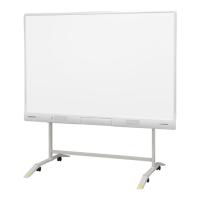
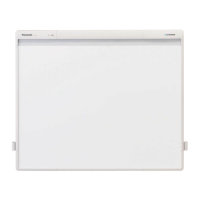
Electronic Board
(elite Panaboard)
Model No. UB-T580W
UB-T580W
UB-T580
1
Before operating this unit, please read these instructions carefully and keep them for future reference.
Please refer to attached Installation Manual.
Installation performed by non-authorized individuals could cause safety-related problems with the
operation of this equipment.
For U.S.A. only:
To locate the closest authorized dealer in your area, please call 1-800-449-8989.
Stand and electronic pen are optional devices.

Other manuals for Panasonic UB-T580

Questions and Answers

Summary

Essential Safety Information

Understanding Safety Symbols

Explains graphic symbols (WARNING, CAUTION) used in the manual.

Power Safety Warnings

Immediate action if smoke, heat, or noise occurs; unplug USB cable.

Installation and Relocation Safety

Units must be installed/removed by qualified personnel; prevent falling.

Operating and Electronic Pen Safety

General Operating Safeguards

Precautions against fire/shock from metal fragments, water, or unauthorized modifications.

Electronic Pen Battery Safety

Battery usage, polarity, handling damaged batteries, charging, disposal.

Installation and Operational Safety Precautions

Installation and Relocation Cautions

Do not position unstably, avoid humid/dusty environments, protect from rain/moisture.

Operational Safeguards

Prevent unit damage from falls, avoid leaning, watch for extension legs, take breaks when using finger.

Battery Precautions and Disposal

General Battery Usage Precautions

Leaking risk from improper use; remove/dispose of dead batteries promptly.

Understanding Panaboard Components

Electronic Pen Features and Controls

Electronic Pen Functions and Range

Connecting the Panaboard System

Moving the Panaboard with Stand

Installing the Panaboard Software

Software Installation Steps

Insert DVD, select device type, read me first, install software, accept agreement, select features.

Completing Software Installation

Projector Setup and Adjustment

Panaboard Calibration Procedures

Understanding Calibration

Setting up Panaboard/projector for accurate input detection.

Performing Basic Calibration

Connect to PC, touch indicated points on screen for calibration.

Launching Panaboard Software and Book

Using the Electronic Pen

Initial Electronic Pen Setup

Install software, connect device, and establish Electronic Pen mode.

Post-Calibration and Help Access

Maintaining Calibration

Do not move unit/projector without recalibration; lock casters.

Recalibration Procedure

How to manually display and perform calibration.

Software Management

Uninstalling Panaboard Software

Steps to remove the main Panaboard software.

Routine Maintenance and Penpoint Replacement

Electronic Pen Battery and Holder Management

Replacing Electronic Pen Battery

Instructions for replacing the battery in the electronic pen.

Troubleshooting Common Issues

Status LED Error Indicators

Solutions for LED not lighting or showing red error status.

Computer Recognition Problems

Solutions for the computer not recognizing the Panaboard.

Troubleshooting Connectivity and Alignment

Connection Loss and Response Delays

Solutions for lost connection and delayed Panaboard response.

Control Point Misalignment

Steps to fix issues where control points are out of alignment.

Finger Drawing Operation Issues

Solutions for inability to operate or draw with finger.

Troubleshooting Electronic Pen and Marks

Electronic Pen Functionality Issues

Solutions for unresponsive buttons, broken lines, or color changes.

Technical Specifications

Summary

Essential Safety Information

Understanding Safety Symbols

Explains graphic symbols (WARNING, CAUTION) used in the manual.

Power Safety Warnings

Immediate action if smoke, heat, or noise occurs; unplug USB cable.

Installation and Relocation Safety

Units must be installed/removed by qualified personnel; prevent falling.

Operating and Electronic Pen Safety

General Operating Safeguards

Precautions against fire/shock from metal fragments, water, or unauthorized modifications.

Electronic Pen Battery Safety

Battery usage, polarity, handling damaged batteries, charging, disposal.

Installation and Operational Safety Precautions

Installation and Relocation Cautions

Do not position unstably, avoid humid/dusty environments, protect from rain/moisture.

Operational Safeguards

Prevent unit damage from falls, avoid leaning, watch for extension legs, take breaks when using finger.

Battery Precautions and Disposal

General Battery Usage Precautions

Leaking risk from improper use; remove/dispose of dead batteries promptly.

Understanding Panaboard Components

Electronic Pen Features and Controls

Electronic Pen Functions and Range

Connecting the Panaboard System

Moving the Panaboard with Stand

Installing the Panaboard Software

Software Installation Steps

Insert DVD, select device type, read me first, install software, accept agreement, select features.

Completing Software Installation

Projector Setup and Adjustment

Panaboard Calibration Procedures

Understanding Calibration

Setting up Panaboard/projector for accurate input detection.

Performing Basic Calibration

Connect to PC, touch indicated points on screen for calibration.

Launching Panaboard Software and Book

Using the Electronic Pen

Initial Electronic Pen Setup

Install software, connect device, and establish Electronic Pen mode.

Post-Calibration and Help Access

Maintaining Calibration

Do not move unit/projector without recalibration; lock casters.

Recalibration Procedure

How to manually display and perform calibration.

Software Management

Uninstalling Panaboard Software

Steps to remove the main Panaboard software.

Routine Maintenance and Penpoint Replacement

Electronic Pen Battery and Holder Management

Replacing Electronic Pen Battery

Instructions for replacing the battery in the electronic pen.

Troubleshooting Common Issues

Status LED Error Indicators

Solutions for LED not lighting or showing red error status.

Computer Recognition Problems

Solutions for the computer not recognizing the Panaboard.

Troubleshooting Connectivity and Alignment

Connection Loss and Response Delays

Solutions for lost connection and delayed Panaboard response.

Control Point Misalignment

Steps to fix issues where control points are out of alignment.

Finger Drawing Operation Issues

Solutions for inability to operate or draw with finger.

Troubleshooting Electronic Pen and Marks

Electronic Pen Functionality Issues

Solutions for unresponsive buttons, broken lines, or color changes.

Technical Specifications

Panasonic UB-T580 Specifications

General IconGeneral
ModelUB-T580
CategoryWhiteboard
ConnectivityUSB
Writing surfaceSpecial surface for projection
Multi-touchYes
MagneticYes
Touch TechnologyInfrared
TypeInteractive
Number of Touch Points3
Mounting TypeWall mount
Erase TypeDry Erase

Related product manuals