
 To Next Page
J
Joseph MooreAug 5, 2025
How to fix Pantone 2PTSK1456Y0BL not turning on?
- RRaymond TerryAug 5, 2025
If your Pantone Clock is not turning on, charge it for 2 hours and then try again.

How to fix Pantone 2PTSK1456Y0BL not turning on?
If your Pantone Clock is not turning on, charge it for 2 hours and then try again.
What to do if Pantone 2PTSK1456Y0BL failed to connect to Bluetooth?
If your Pantone Clock fails to connect to Bluetooth, try these steps: * Move your phone and the clock closer together. * Ensure your phone's Bluetooth menu shows connection to the correct device. * Restart the clock. * Turn Bluetooth off and then on again on your device, and search for available devices.
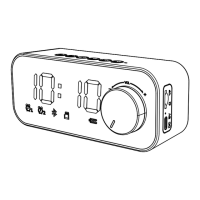
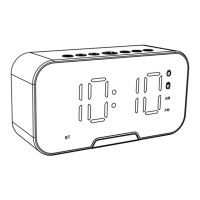
Details of buttons and controls on the front and top views for operation.
Description of ports (AUX, TF, USB) and LED indicators for connectivity and status.
Instructions for charging the device and powering it on.
Procedure for setting the current time on the digital clock display.
Steps to set, manage, and turn off up to two alarms.
Guide to connecting, pairing, and controlling music/calls via Bluetooth.
Instructions for using AUX input and playing music from TF/Micro SD cards.
How to answer and end incoming calls using the device.
Solutions for common problems like power, audio, and Bluetooth connection failures.
Details on battery, output power, play time, range, and dimensions.
Information regarding technical support, warranty, safety, and disposal.
This document describes the PANTONE Digital Clock with Bluetooth Speaker, available in models 2PTSK1456Y0BL, 2PTSK1456N0BL, 2PTSK1456P0BL, and 2PTSK1456E0BL. It functions as a digital clock, a Bluetooth speaker, and supports various audio input modes.
The device primarily serves as a digital clock with an LED display showing the time (hours and minutes), and indicators for AM/PM, Alarm 1, and Alarm 2. Beyond its timekeeping function, it integrates a Bluetooth speaker, allowing wireless audio streaming from compatible devices. It also supports AUX input for wired audio connections and TF Card/Micro SD card playback for locally stored music. Additionally, it features hands-free phone call capabilities when connected via Bluetooth.
The device is powered on by pressing and holding the play/pause button. The LED display brightness can be adjusted using the dedicated brightness button.
To set the time, press the mode button until "clock mode" is announced. Press and hold the mode button until the hour flashes, then use the < and > buttons to adjust the hour. Press the mode button again for the minutes to flash, and use the < and > buttons to adjust the minutes. Press and hold the mode button to save the settings.
To set an alarm, press and hold the mode button until the Alarm 1 indicator lights up. Press and hold the mode button again until the hour flashes, then use the < and > buttons to set the hour. Press the mode button for minutes to flash, and use the < and > buttons to set the minutes. Press and hold the mode button to save the first alarm. To set a second alarm, press the mode button four times until the Alarm 2 indicator lights up, then follow the same procedure. Alarms can be turned off by repeatedly pressing the mode button until the respective alarm indicators turn off.
When the device is on, press the mode button to switch to Bluetooth mode. A "Bluetooth Mode - ready to pair" voice prompt will be heard, and the BT indicator will flash. On a Bluetooth device, search for "2PTSK1456" and pair. A notification sound confirms successful pairing, and the BT indicator will light up. The device will automatically reconnect to previously paired devices.
<< and >> buttons control previous/next song selection. Pressing and holding << or >> adjusts the volume. These functions can also be controlled via the connected Bluetooth device.Connect an audio device to the AUX port using a 3.5mm audio cable (not included). The speaker will automatically enter AUX mode.
<< or >> adjusts the volume. The << and >> buttons control previous/next song selection. These functions can also be controlled via the connected audio device.Insert a TF card/Micro SD card into the dedicated slot. The product will automatically enter media playback.
<< or >> adjusts the volume. The << and >> buttons control previous/next song selection.When a call comes in via Bluetooth, press the play/pause button to answer. Press it again to end the call.
Before first use, or when the battery is low, charge the product using the supplied Micro USB cable. Plug the cable into the Micro USB port on the product and the other end into a power source. A full charge takes approximately 2 hours.
This product complies with the Australian Safety Standard AS/NZS 62368.1 to ensure product safety. The Bluetooth® word mark and logos are registered trademarks owned by Bluetooth SIG, Inc., and any use of such marks by Hands (IP) Holdings Pty Ltd is under license. PANTONE and the PANTONE Chip Design are trademarks of Pantone LLC in the United States and/or in other countries. This product is manufactured under license by DATAplus Supplies, Inc.
 General