English
What’s New in V2.1
• Press any key to view the last system status saved by the remote
(even when out of range of the system). Press any key again to
activate the remote’s backlight.
• If the remote fails to communicate with the system, the LED will flash
red rapidly, and a fail beep will occur.
Introduction
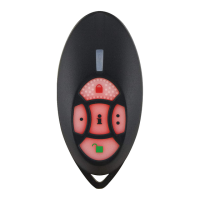
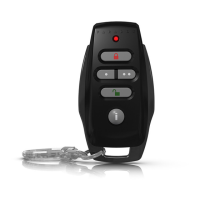
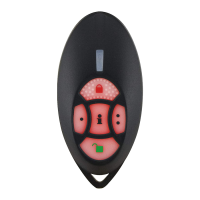
The REM2 (previously MG-REM2) is a water-resistant 5-button remote
control that provides the user with the status of their system by
pressing the [ i ] button. The remote control provides both auditory and
visual feedback in an attractive streamlined style. To activate the
remote’s backlight, press any button twice.
The feedback provided for the user is separated into two categories:
security feedback and accessory feedback. Security feedback deals
with actions concerning arming and disarming, system in alarm, and
panic alarms. Accessories feedback deals with actions concerning the
FM tuner and PGMs. The REM2 is available in a 433MHz or 868MHz
version. The 868MHz version is not UL approved.
Compatibility
• MG6160 / MG6130
• MG5000 / MG5050
•RPT1
•RTX3
ID Label
Use the space provided on the back of the unit to identify the remote
control’s owner.
Range
• 30m (100ft) with the MG6160 and MG6130
• 45m (150ft) with the MG5000, MG5050 / RPT1 / RTX3
Battery
One 3V lithium battery (2032). Battery life expectancy is a minimum of
2 years.
How to Replace the Battery
1. Remove the screw from the back of the remote control and carefully
remove the back cover.
2. Use a non-metallic object, or any plastic device, to push the battery
out from under the battery plate (see Figure 1). Avoid using metal as
it may cause a short in the board.
3. Insert the new battery. Make sure the positive side of the battery is
inserted face up.
4. Set the back cover in place, and fasten it with the screw.
Danger of explosion exists if the lithium battery is incorrectly
replaced. Replace only with the same or equivalent type
recommended by the manufacturer. Dispose of used
batteries according to the manufacturer's instructions.
Español
Novedades de la Versión 2.1
• Pulsar cualquier tecla para visualizar el último estado del sistema
que fue guardado por el control remoto (incluso cuando se está fuera
del alcance del sistema). Pulsar cualquier tecla nuevamente para
activar la luz de fondo del remoto.
• Si hay un error de comunicación entre el control remoto y el sistema,
la luz LED roja parpadea rápidamente, y se escucha un tono de fallo.
Introducción
El REM2 (antes MG-REM2) es un control remoto de 5 botones
resistente al agua que permite que el usuario conozca el estado de su
sistema con tan solo pulsar el botón [ i ]. El control remoto provee
información de manera visual y audible y viene en un atractivo diseño
aerodinámico. Para activar la luz del fondo del control remoto, pulsar
cualquier botón dos veces.
La información brindada al usuario puede dividirse en dos categorías:
información sobre la seguridad e información sobre los accesorios. La
información sobre la seguridad tiene que ver con el armado y
desarmado, las alarmas del sistema y las alarmas de pánico. La
información sobre los accesorios tiene que ver con las acciones
respecto al sintonizador FM y las PGMs. El REM2 está disponible en
versión de 433MHz ó 868MHz
. La versión de 868MHz no está
homologada por UL.
Compatibilidad
• MG6160 / MG6130
• MG5000 / MG5050
•RPT1
•RTX3
Etiqueta de Identificación
Usar el espacio disponible en la parte trasera de la unidad para
identificar al propietario del control remoto.
Alcance
• 30m (100ft) con MG6160 y MG6130
• 45m (150ft) con MG5000, MG5050 / RPT1 / RTX3
Batería
Una batería de litio de 3V (2032). La esperanza de vida de la batería es
de mínimo 2 años.
Cómo Cambiar la Batería
1. Retirar el tornillo de la parte trasera del control remoto y retirar con
cuidado la cubierta trasera.
2. Emplear un objeto no metálico, o algún útil plástico, para sacar la
batería de debajo de la placa de batería (ver la Figura 1). Evitar el
uso de objetos de metal pues podrían causar un corto en la placa.
3. Insertar la nueva batería. Verificar que el lado positivo de la batería
este mirando hacia arriba.
4. Reponer la cubierta trasera en su lugar y reajustarla con el tornillo.

 Need help?
 General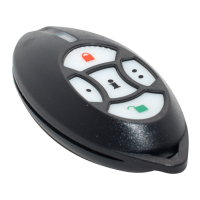

 To Next Page