This document outlines the operating procedures and important warnings for the 7775 Deluxe Safe, a security device designed to protect valuables. The manual emphasizes critical safety precautions and provides step-by-step instructions for setup, operation, and maintenance.
Function Description
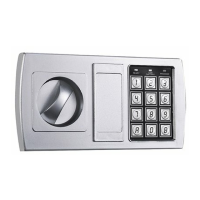
The 7775 Deluxe Safe is a security storage unit equipped with a keypad for electronic access and an emergency override lock for manual entry. Its primary function is to secure valuable items against unauthorized access. The safe operates using a digital keypad where users can set and change personal passcodes, offering a convenient and secure method of entry. In cases of forgotten passcodes or battery failure, an emergency lock provides an alternative means of access using physical keys. The safe is designed to store up to two passcodes: a user code and a manager code, allowing for flexible access management. It features visual and auditory indicators, such as green, red, and orange lights, along with beeps, to communicate operational status, successful code entry, or errors. The internal mechanism automatically locks the safe when the knob is turned counter-clockwise after closing the door, ensuring that the contents remain secured.
Usage Features
The safe offers several user-friendly features for its operation:
- Initial Setup and Unlocking: To begin, users must remove the keyhole cover, insert the key, and turn it counter-clockwise to unlock the safe. The handle is then turned clockwise to open the door. This initial manual unlock is essential before setting up electronic access.
- Battery Installation: The safe requires four AA alkaline batteries, which are installed by removing a battery cover plate located on the inside of the door. The manual explicitly states that if both the red and green lights are on while the safe is open, it indicates low battery power, prompting the user to replace them.
- Setting User Passcodes: Users can set a new user passcode (3-8 digits long) by pressing a red button on the back of the door (near the hinge) while the door is open, listening for a beep, entering the desired passcode, and then immediately pressing either the "A" or "B" button on the keypad. The safe can store up to two passcodes (a user code and a manager code), and entering a third code will erase the first one entered.
- Setting Manager Passcodes: To set or change a manager passcode, the user must open the safe with an existing passcode, leave the door ajar, press the "0" button on the keypad twice, press the red button, listen for a beep, and then enter the new manager passcode (3-8 digits long). Similar to user passcodes, the "A" or "B" button must be pressed immediately after entering the code to confirm.
- Opening the Safe Electronically: To open the safe using a passcode, the user inputs their code and then presses the "B" button. A green light will illuminate, indicating successful code entry. The knob must then be turned clockwise within 5 seconds to open the door. Each key press is accompanied by a buzzer and a yellow flashing light. If an invalid code is entered, the yellow light will flash, and the buzzer will sound quickly, signaling that the code needs to be re-entered.
- Security Lockout: For security, entering an incorrect code three times will lock the system for 20 seconds, preventing further attempts during this period.
- Closing the Safe: To close the safe, the user simply turns the knob counter-clockwise, and the internal mechanism will automatically lock the safe.
- Dual Key Sets: The safe comes with two separate sets of keys: one for the exterior door's emergency lock and another for an interior locking cabinet, if present. This ensures comprehensive key-based access for different compartments.
Maintenance Features
The manual provides clear guidelines for maintaining the safe's functionality and security:
- Battery Replacement Indicator: The safe features a visual indicator for low batteries. If both the red and green lights are illuminated while the safe door is open, it signifies that the batteries are low and require replacement. This proactive warning helps users avoid being locked out due to power loss.
- Emergency Override: In situations where the electronic passcode is forgotten or batteries are depleted, the emergency override lock allows manual access using the provided keys. This is a crucial backup mechanism to ensure continuous access to the safe's contents.
- Contact for Support: For any questions, problems with the safe, or the need for a replacement key, users are directed to contact www.teamcustomerservice.com. This provides a dedicated channel for technical support and parts replacement, ensuring long-term usability and problem resolution.
Important Warnings and Best Practices:
The manual includes several critical warnings to ensure the safe's effectiveness and user safety:
- DO NOT store emergency override keys inside the safe. This is the most crucial warning, as storing the keys inside would defeat the purpose of the emergency override in case of electronic malfunction or forgotten passcodes.
- DO NOT store the instruction manual inside the safe. Keeping the manual outside ensures that users can always refer to it for operating instructions, especially during initial setup or troubleshooting.
- Not for all materials: The safe is explicitly stated not to be intended for the secure storage of all materials. Specifically, items such as firearms, other weapons, ammunition, combustible materials, or medication should NOT be stored in this unit. This highlights the safe's limitations and intended use for general valuables.
- Part of total security: The manual emphasizes that the safe is only part of a user's total security protection, suggesting that additional security measures might be necessary depending on the value and nature of the items being protected.
- Recommended Placement: Lock & Safe recommends storing the safe in a closet, office, basement, bedroom, or any other location that is convenient but out of direct line of sight from prying eyes. This advice aims to enhance security by making the safe less visible to potential intruders, although the manual clarifies that the location does not affect the safe's ability to protect valuables.

 Need help?
 General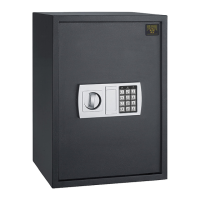



 To Next Page