EasyManua.ls Logo

Parallax 27800 - User Manual

Parallax 27800
5 pages
Print Icon
To Next Page IconTo Next Page
Loading...
Web Site: www.parallax.com
Forums: forums.parallax.com
Sales: sales@parallax.com
Technical: support@parallax.com
Office: (916) 624-8333
Fax: (916) 624-8003
Sales: (888) 512-1024
Tech Support: (888) 997-8267
Copyright © Parallax Inc. Page 1 of 5
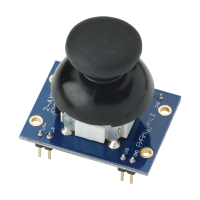
Parallax 2-Axis Joystick KickStart (#27800)
What It Can Do
Miniature two-axis analog joystick with up/down and left/right action
Spring-loaded movement always returns joystick to center position
Easy plug-in module for use in breadboards and custom circuits
The 2-Axis Joystick provides a simple and convenient way to add X-Y control to a project. A
potentiometer attached to each axis provides proportional feedback of the up/down and left/right
positions. The joystick is spring-loaded, so that it always returns to its centered position when
you release it.
Depending on the microcontroller you use, a small assortment of external components is required
to complete the connection. These are noted in the Parts List. Refer to the appropriate diagram
under Basic Wiring.
Parts List
2-Axis Joystick
BASIC Stamp HomeWork Board, Propeller QuickStart, or Arduino Uno microcontroller
22 gauge solid conductor hookup wire
(2) 220 Ω resistors, 1/8 or 1/4 watt, 5% tolerance (BASIC Stamp and Propeller interface)
(2) 0.01 μF ceramic disc capacitors (BASIC Stamp and Propeller interface)
Question and Answer IconNeed help?

Do you have a question about the Parallax 27800 and is the answer not in the manual?

Summary

What It Can Do

Joystick Functionality

Describes the miniature two-axis analog joystick with spring-loaded movement and its suitability for breadboards and custom circuits.

Parts List

Required Components

Lists all necessary components for connecting the joystick, including microcontrollers, wire, resistors, and capacitors.

Basic Wiring

Wiring Diagrams

Illustrates connection diagrams for the 2-Axis Joystick with BASIC Stamp, Propeller, and Arduino microcontrollers.

Program KickStarts

Microcontroller Value Ranges

Details how to display joystick values and provides approximate output ranges for BASIC Stamp, Propeller, and Arduino.

BASIC Stamp HomeWork Board

BASIC Stamp Implementation

Provides a specific wiring diagram and sample BASIC Stamp program for reading joystick axis values.

Propeller QuickStart

Propeller Implementation

Offers a wiring setup and Propeller code example for capturing and displaying joystick axis data.

Arduino Uno

Arduino Implementation

Details the Arduino Uno wiring and provides a sketch to read analog values from the joystick's X-Y axes.

For More Information

Additional Resources

Directs users to product documentation and related navigational control components for further details.

Summary

What It Can Do

Joystick Functionality

Describes the miniature two-axis analog joystick with spring-loaded movement and its suitability for breadboards and custom circuits.

Parts List

Required Components

Lists all necessary components for connecting the joystick, including microcontrollers, wire, resistors, and capacitors.

Basic Wiring

Wiring Diagrams

Illustrates connection diagrams for the 2-Axis Joystick with BASIC Stamp, Propeller, and Arduino microcontrollers.

Program KickStarts

Microcontroller Value Ranges

Details how to display joystick values and provides approximate output ranges for BASIC Stamp, Propeller, and Arduino.

BASIC Stamp HomeWork Board

BASIC Stamp Implementation

Provides a specific wiring diagram and sample BASIC Stamp program for reading joystick axis values.

Propeller QuickStart

Propeller Implementation

Offers a wiring setup and Propeller code example for capturing and displaying joystick axis data.

Arduino Uno

Arduino Implementation

Details the Arduino Uno wiring and provides a sketch to read analog values from the joystick's X-Y axes.

For More Information

Additional Resources

Directs users to product documentation and related navigational control components for further details.

Overview

The Parallax 2-Axis Joystick (#27800) is a compact, two-axis analog joystick designed to provide X-Y control for various electronic projects. It features spring-loaded movement, ensuring the joystick always returns to a centered position when released. This makes it suitable for applications requiring precise and intuitive directional input.

Function Description:

The 2-Axis Joystick operates by utilizing two 10 kΩ potentiometers, one for each axis (X for Left/Right and Y for Up/Down). As the joystick is moved, the resistance of these potentiometers changes proportionally to the joystick's position. This change in resistance provides an analog feedback signal that can be read by a microcontroller. The spring-loaded mechanism ensures that when the joystick is not actively being manipulated, it automatically centers itself, providing a neutral input. This plug-in module is designed for easy integration into breadboards and custom circuits, making it a versatile component for hobbyists and engineers.

Important Technical Specifications:

  • Interface: Dual 10 kΩ potentiometers with common ground.
  • Power Consumption: 0.01W.
  • Dimensions: 1.64 x 1.2 x 1.1 inches (41.67 x 30.54 x 27.7 mm).
  • Required External Components (for BASIC Stamp and Propeller interface):
    • (2) 220 Ω resistors (1/8 or 1/4 watt, 5% tolerance).
    • (2) 0.01 µF ceramic disc capacitors.
  • Microcontroller Compatibility: BASIC Stamp HomeWork Board, Propeller QuickStart, Arduino Uno, and other microcontrollers capable of reading analog inputs.

Usage Features:

The 2-Axis Joystick is designed for straightforward integration and use. Depending on the chosen microcontroller, a small assortment of external components (resistors and capacitors) may be required for proper connection. The manual provides detailed wiring diagrams for BASIC Stamp & Propeller, and Arduino platforms, illustrating how to connect the joystick to the microcontroller's I/O pins and power supply.

Program KickStarts:

The manual includes "KickStart" program examples for BASIC Stamp, Propeller, and Arduino. These examples demonstrate how to read the instantaneous X and Y values from the joystick and display them in a debug window or serial monitor.

  • BASIC Stamp: The example code utilizes RCTIME to measure the time it takes for a capacitor to charge through the potentiometer, providing a proportional value for each axis. The DEBUG command is used to display these values in the BASIC Stamp Debug Terminal. The approximate range of values for BASIC Stamp is 1-60, with a center position of 30.
  • Propeller: The Propeller example uses FullDuplexSerial and RCTime objects to read the joystick values and send them to the Parallax Serial Terminal. The waitcnt function introduces a delay between readings. The approximate range of values for Propeller is 0-6000, with a center position of 3000.
  • Arduino: The Arduino example uses analogRead() to directly read the analog voltage from the joystick's potentiometers. The Serial.print() and Serial.println() functions are used to display the values in the Arduino IDE's Serial Monitor. The approximate range of values for Arduino is 0-1023, with a center position of 512.

Connecting to Microcontrollers:

  • BASIC Stamp & Propeller: Requires two 220 Ω resistors and two 0.01 µF capacitors. The joystick's L/R+ and U/D+ pins are connected to I/O pins through the resistors, and the I/O pins are also connected to ground via the capacitors. The L/R- and U/D- pins are connected to ground, and +5V is supplied to the joystick.
  • Arduino: The joystick's L/R+ and U/D+ pins are connected directly to analog input pins (e.g., A0 and A1). The L/R- and U/D- pins are connected to ground, and +5V is supplied to the joystick. No external resistors or capacitors are explicitly shown as required in the Arduino wiring diagram, as the Arduino's analog input circuitry typically handles this.

Viewing Results:

  • BASIC Stamp: The Debug Terminal automatically opens when the program is run.
  • Propeller: After uploading, the Parallax Serial Terminal needs to be run (from the Run menu or by pressing F12). The Reset button on the Propeller QuickStart board may need to be momentarily depressed to restart the program.
  • Arduino: After uploading, click the Serial Monitor icon in the Arduino IDE. The Reset button on the Arduino board may need to be momentarily depressed to restart the sketch.

Maintenance Features:

The manual does not explicitly detail maintenance features for the 2-Axis Joystick, suggesting it is a low-maintenance component. Given its design as a sealed module, typical maintenance would likely involve ensuring proper connections and handling to prevent physical damage. If issues arise, troubleshooting would generally focus on verifying wiring, power supply, and microcontroller code.

Further Information:

Parallax provides additional resources for the 2-Axis Joystick, including product documentation. They also offer the Parallax 5-Position Switch (#27801) as an alternative for navigational control, with its own KickStart guide.

Parallax 27800 Specifications

General IconGeneral
BrandParallax
Model27800
CategoryVideo Game Controller
LanguageEnglish