Need help?
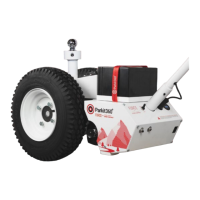
Do you have a question about the PARKIT360 FORCE 10K and is the answer not in the manual?
Step-by-step guide for assembling the dolly and its components.
Controls the trailer's electric or surge brakes via a 7-Way plug.
Allows toggling between high and low speeds for smoother operation.
Engages/disengages the motor for drive or neutral modes.
Controls trailer speed, with gradual motor start/stop for better traction.
Protects the motor and smart brake from overheating; features a reset button.
Allows moving the dolly without power for transportation or positioning.
Do not exceed dolly's maximum weight capacity to prevent damage or injury.
Ball mount must be re-tightened before each operation for safety.
Do not operate the dolly on inclines steeper than 6% to avoid runaway trailers.
Repeat tightening process by moving dolly back and forth.
 General
| Brand | PARKIT360 |
|---|---|
| Model | FORCE 10K |
| Category | Utility Vehicle |
| Language | English |


 To Next Page