MODULE
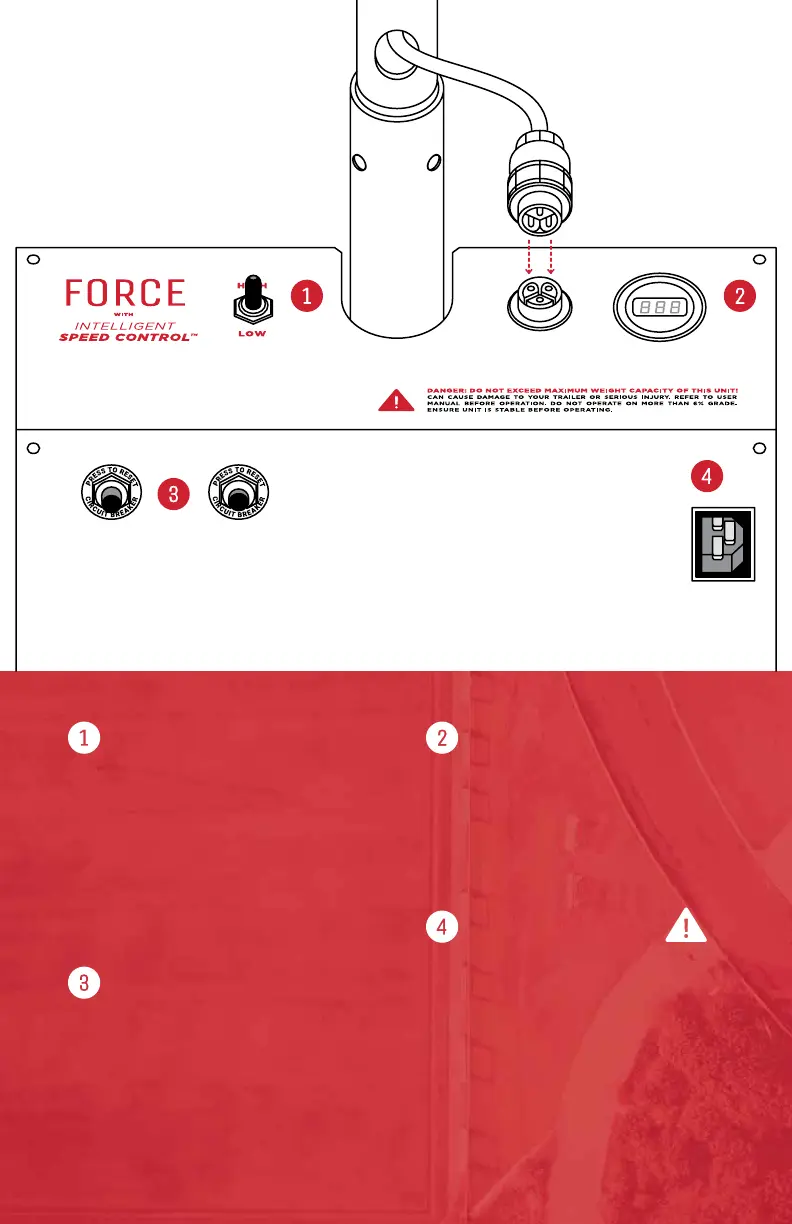
FEATURES
HANDLE PLUG
Plug in and twist
locking cap over
connection.
Unplug cable while
charging the battery.
CIRCUIT BREAKERS
By default, the Brake Button
protrudes more than the Motor.
BATTERY CHARGER PLUG
With the battery connected,
plug into wall outlet to charge.
VOLT METER
Digital Meter that measures and
displays Power Level of Battery.
Fully Charged Batteries Rest
between 12.6 to 13V.
CIRCUIT BREAKERS
Prevents Motor and Smart Brake
from overheating.
If a breaker trips, the Reset Button
will extend up to 1/2” from the panel.
Allow 30 seconds for the system to
cool down, then press Reset.
ISC CONTROL™
While parking your trailer, switch
between High or Low Speed anytime
by ipping the toggle switch.
Motor speed starts and stops
gradually for better traction and a
smoother parking experience.
BATTERY CHARGER
Ensure the Battery and Charger Cable
are plugged into the Dolly. Plug the
Charger Cable into a Wall Socket to
charge. Disconnect the charger after
an over-night charge (10 hrs Max).
To prevent accidental operation while
charging, unplug the Handle Cable.
3



 To Next Page