Installation - Butterfly Mount
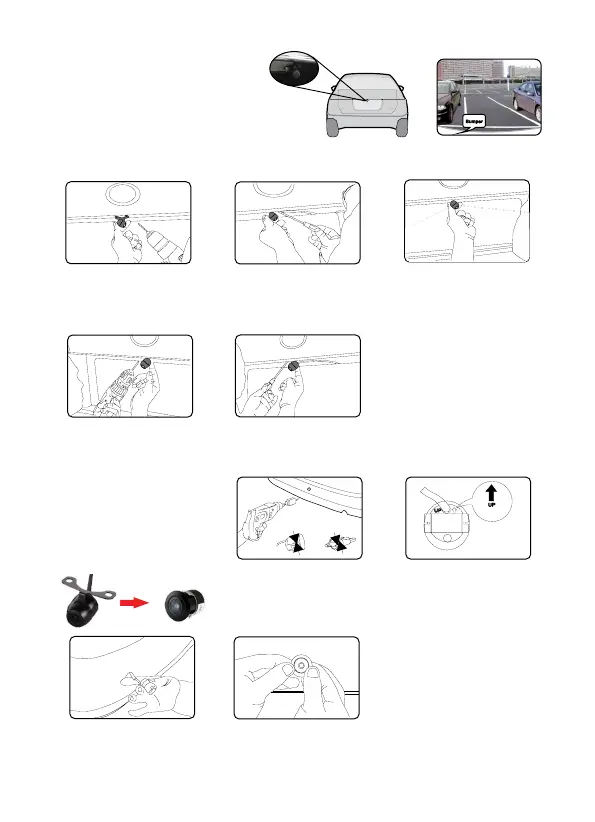
1. Select a flat and centred location
near the number plate lamp at the
rear of the vehicle to mount camera.
IMPORTANT: When selecting this location it is highly recommended that the image transmitted
by the camera show the rear bumper and area behind the vehicle.
Installation - Flush Mount
1. Unscrew the upper part of
the camera anticlockwise,
detach the upper part and
bracket, and place the
bumper adaptor instead.
2. Attach the 3M tape to the
bracket of the camera, and
drill a small hole for the
first screw.
3. Use a screw driver to fix
the first screw, but don’t
tighten it yet.
4. Insert camera wire through
newly drilled hole and
mount securely in place.
5. Mark the position suitable
for the second screw and
drill a small hole for it.
6. Fix the second screw and
tighten both screws.
4. Pull the camera lead
through the bumper hole
before fixing the camera.
5. Put the camera into the
hole and use both your
thumbs to press it evenly
to ensure tight and flat
mounting.
2. Mark the middle position
of rear bumper, and drill
a hole with the provided
16.5mm hole saw.
3. Adjust the camera to turn
the UP arrow straight
up-wards.
Suggested location
to mount camera


 To Next Page
 Loading...