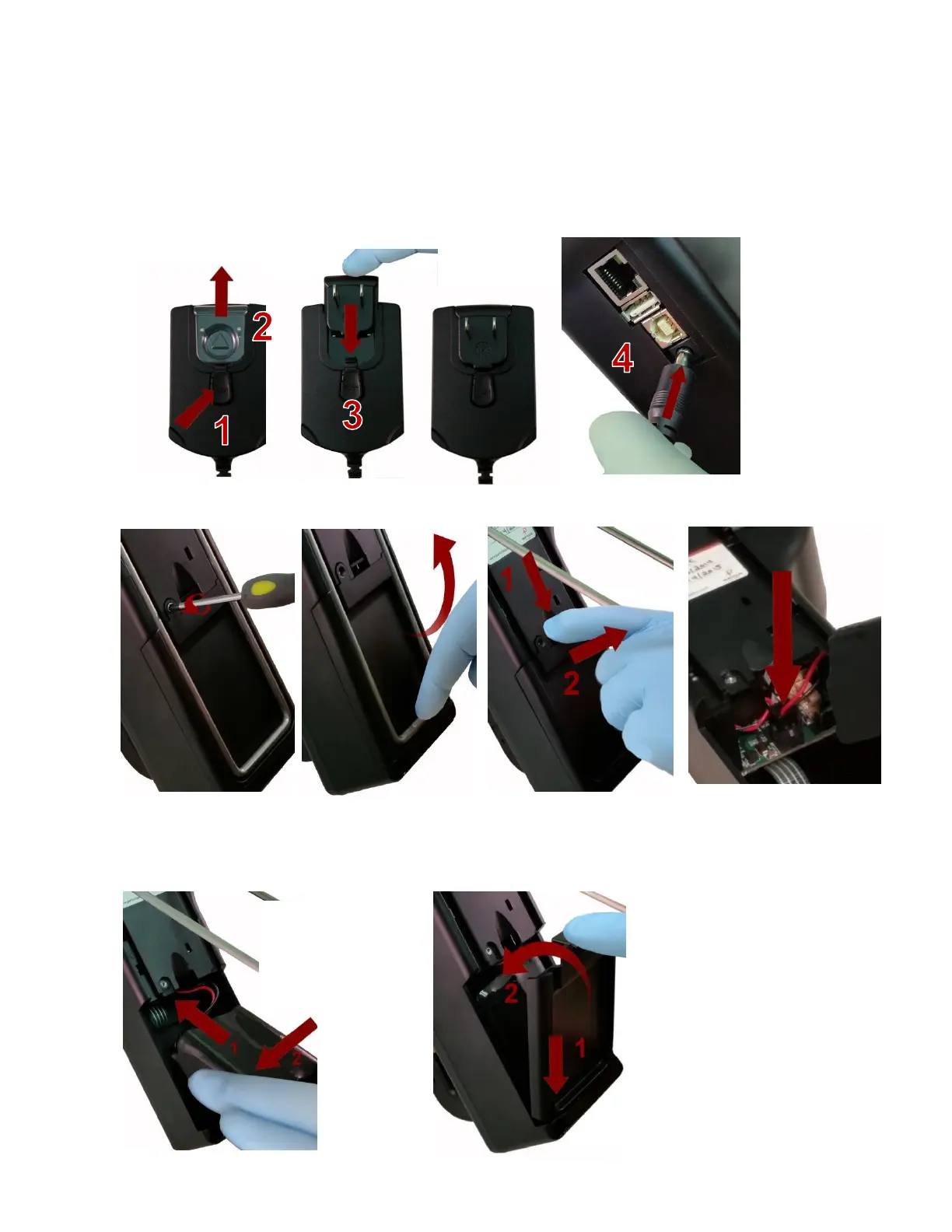
8. Power Considerations and Connecting to AC Mains Power
The Particles Plus Instrument comes with a power adapter line cord for AC mains powered operation and battery
charging. The power adapter is designed to operate with line voltage from 100-240V. The correct plug adapter must be
used to match your local AC power adapter standard. If the Instrument power adapter does not have the proper plug
configuration, please contact Particles Plus or an authorized reseller for service.
To install the country specific plug adapter, simply slide the adapter into the power supply as shown.
9. Install the Particles Plus’ Battery Pack
Step 1 - Remove security
screw with Phillips screwdriver
Step 2 – Pull out kick-stand
Step 3 – Push down latch while
pulling battery compartment cover
out and away
Step 4 – Insert battery connector
plug into socket on PCB board in
battery compartment. Note: Red
and black lead are closest to
the bottom edge of the
connector.
Step 5 – Carefully push
battery into the
compartment, using an
upward motion, until
bottom of battery clears
edge of the compartment
and drops in freely.
Step 6 – Seat the battery’s
compartment cover in to bottom slot
and push inward until the locking
latch clicks. The security screw can
be reinstalled with a screw driver or it
can be removed for optional battery
replacement use.


 To Next Page