
 Need help?
Do you have a question about the Particles Plus 8000 Series and is the answer not in the manual?
Details the front panel components and connections of the particle counter.
Shows the input and output ports on the left side of the instrument.
Illustrates the rear panel features, including tripod mounting and kick-stand.
Accesses product information like serial number, calibration dates, and channel status.
Controls the audio volume for alerts and feedback on the instrument.
Displays detailed temperature, humidity, and barometric pressure readings.
Allows users to view and change the instrument's current date and time settings.
Shows battery status and provides access to power management options.
Indicates USB connection and allows saving displayed records to a USB drive.
Shows printer connection status and enables printing of current records.
Alerts users to system issues and provides access to more detailed information for troubleshooting.
Notifies users of alarm conditions based on thresholds and allows silencing alarms.
Initiates the instrument's sampling process.
Halts the instrument's current sampling operation.
Switches between real-time meter view, graphing, and the main screen.
Accesses a page displaying all saved data records and historical information.
Opens options for selecting various reporting standards like ISO 14644-1 or EU-GMP.
Changes displayed particle data units (e.g., count, mass) and shows differential/cumulative counts.
Toggles the display of differential particle data values on and off.
Toggles the display of cumulative particle data values on and off.
Accesses settings for managing locations and user-defined sampling recipes.
Displays the current operational mode, such as automatic or manual sampling.
Shows the remaining time for the current sample collection duration.
Displays the current interval time between samples.
Shows the current count of samples in a cycle and the total number of samples for the cycle.
Displays the number of saved records out of the instrument's total storage capacity.
Navigates to the main settings screen for comprehensive instrument configuration.
Allows adding textual annotations to records during or after sampling.
Used for scrolling through saved locations and their assigned recipes.
Indicates the status of the pump and internal flow sensor, showing correct flow or no flow.
Navigates back to the previous screen or the main menu.
Instructions for initiating a sample collection using the handle button or display icon.
How to cease sample collection using the handle button or display icon.
Allows changing the displayed units for particle count data (e.g., m³, ft³, µg/m³).
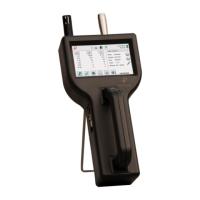
The Particles Plus 8000 Series Handheld Particle Counter is a sophisticated instrument designed for measuring particles in ambient environments. It features a compact, handheld design with a 4.3" color touch screen for intuitive operation. The device is powered by a high-quality advanced Lithium Ion Power Cell (model EE-80003A, 55Wh) and can also operate on AC mains power (100-240V) using a power adapter (model EE-80081-XX).
The primary function of the 8000 Series is to count and measure particles. It offers various display modes, including real-time meter, graphing of pulse/seconds, and recorded data. Users can select particle data output in count, count per cubic meter, count per cubic foot, or micrograms per cubic meter (mass mode). The instrument supports both differential and cumulative count displays. It is capable of storing up to 40,000 sampling records, including particle count data, environmental data, locations, and times.
 General
| Brand | Particles Plus |
|---|---|
| Model | 8000 Series |
| Category | Measuring Instruments |
| Language | English |

 To Next Page