EasyManua.ls Logo

Partlow MRC 7000 - User Manual

Partlow MRC 7000
73 pages
Print Icon
To Next Page IconTo Next Page
Loading...
Form 2877 • Price $32.00
Edition 7 • © Dec. 1996
Revised February, 1998
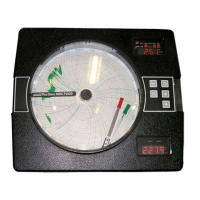
MRC 7000
ONE AND TWO PEN CIRCLE CHART RECORDING CONTROLLER
Installation, Wiring, Operation Manual
Brand
www.GlobalTestSupply.com
Find Quality Products Online at: sales@GlobalTestSupply.com

Questions and Answers

  • Z
    zmorrisAug 18, 2025
    How to fix a blank display on Partlow Controller?
    • E
      Elizabeth WilliamsAug 18, 2025
      If the display on your Partlow Controller is blank, first, ensure the instrument is receiving power at terminals 1 & 2. If power is confirmed, try turning the instrument off, waiting approximately 5 seconds, and then turning it back on. If the issue persists, open the cover, loosen the platen hold-down screw, and swing the platen out of the way to inspect for any loose connections. As a last resort, power off the instrument, press and hold the UP and DOWN keys, and then turn the power back on while still holding the keys.
  • R
    rebecca65Aug 20, 2025
    What to do if Partlow Controller displays 'SnSr' error?
    • T
      Tracey DavisAug 21, 2025
      If the Partlow Controller displays 'SnSr', indicating a sensor break or over range, begin by inspecting the sensor for proper operation and a secure connection to the instrument. Next, verify that the Program mode input selection matches the connected sensor input. Also, check that the input conditioning jumpers on the Processor board are correctly positioned. If problems persist, perform the calibration procedures as described in the Calibration section.
  • M
    mmaxwellAug 23, 2025
    How to correct the model number displayed on Partlow Controller?
    • L
      Larry ShannonAug 23, 2025
      If the Model Number displayed during power up of your Partlow Controller is incorrect, turn off the power to the instrument. Then, press and hold the UP and DOWN keys while turning the power back on. Keep the keys pressed until the model number resets to the correct format: 72X0**0000-0X21, where X represents digits determined by the installed firmware. Alternatively, to manually enter the correct model number, press and hold the SCROLL and DOWN keys while turning on the instrument.
  • D
    Dana PerezAug 26, 2025
    What does error code Er 5 mean on Partlow Controller and how to fix it?
    • M
      Mark MorrisAug 26, 2025
      If your Partlow Controller displays 'Er 5', indicating no zero crossings detected, first turn off the power to the instrument, wait 5 seconds, and then turn it back on. If the error persists, try connecting the instrument to a different AC power source.
  • F
    fwernerAug 28, 2025
    What does error code Er 6 mean on Partlow Controller and how to resolve it?
    • L
      Lori SimmonsAug 28, 2025
      If your Partlow Controller displays 'Er 6', indicating the AC line frequency is below 43 Hz, try turning off the power to the instrument, waiting 5 seconds, and then turning it back on. If the error continues, connect the instrument to an alternative AC power source.
  • J
    Jennifer WolfeAug 30, 2025
    What does error code Er 7 mean on Partlow Controller and how do I fix it?
    • K
      Kim HudsonAug 31, 2025
      If your Partlow Controller displays 'Er 7', indicating the AC line frequency is over 64 Hz, first turn off the power to the instrument, wait 5 seconds, and then turn it back on. If the problem persists, connect the instrument to a different AC power source.
  • D
    Donna FarrellSep 2, 2025
    How to troubleshoot Er 1 error on Partlow Controller?
    • N
      Nicole HansonSep 2, 2025
      If your Partlow Controller displays 'Er 1', indicating a Microprocessor RAM Failure, turn off the power to the instrument, wait 5 seconds, and then turn it back on. If the error persists, inspect the microprocessor chip on the Processor board to ensure it is properly seated in its socket.
  • L
    Latoya NguyenSep 4, 2025
    Why are the relays malfunctioning on my Partlow Controller?
    • R
      Ronald EstradaSep 4, 2025
      If your Partlow Controller's relays or SSR drivers are malfunctioning, verify that the Program and Tune mode parameters are correctly configured. Additionally, open the cover, loosen the platen hold-down screw, and swing the platen open to inspect the instrument's Relay/SSR Driver board. You may also check the output operation by performing Test 6 as described in the Test section.
  • K
    Kelly NashSep 7, 2025
    What does error code Er 2 mean on Partlow Controller?
    • E
      Elizabeth ButlerSep 7, 2025
      If your Partlow Controller displays 'Er 2', indicating an External RAM Failure, turn off the power to the instrument, wait 5 seconds, and then turn it back on.
  • N
    Nicole CaseySep 9, 2025
    What causes mADC output malfunction in Partlow Controller?
    • O
      oowensSep 9, 2025
      If the mADC outputs on your Partlow Controller are malfunctioning, verify that the Program mode parameters are correctly set. Also, open the cover, loosen the platen hold-down screw, and swing the platen open to inspect the instrument's Current Output board. For further diagnostics, refer to the Test section and perform the procedure for Current Output(s) Test 7.

Summary

SECTION 1 - GENERAL

1.1 Product Description

Overview of the MRC 7000 recorder controller's capabilities.

SECTION 2 - INSTALLATION & WIRING

2.1 Installation and Wiring

General guidelines for installing and wiring the instrument.

2.2 Unpacking

Instructions for unpacking and inspecting the instrument upon arrival.

2.3 Location

Recommendations for selecting a suitable operating location.

2.4 Mounting

Procedures for panel and surface mounting the instrument.

2.5 Preparations for Wiring

Guidelines for minimizing electrical noise during wiring.

2.6 Wiring Connections

Details on making various electrical wiring connections to the instrument.

SECTION 3 - CONFIGURATION

3.1 Configuration

Introduction to the instrument's configuration setup procedures.

3.2 Shipped Configuration;Jumper Positioning

Information on factory settings and jumper configurations.

3.3 Operation Summary

Overview of the instrument's different operating modes.

3.4 Start up Procedures

Steps for initial instrument startup and configuration.

Operation

4.1 OFF MODE

How to operate the instrument in the Off mode.

4.1.2 CONTROL MODE

Managing setpoints and control functions in Control mode.

4.2 Alarm Operation

Configuration and behavior of alarm functions.

4.3 Tune Mode Operation

Adjusting PID parameters for optimal process control.

Service

5.2 Changing Charts

Procedure for replacing the recording chart.

5.3 Changing Pens

Instructions for replacing pen cartridges.

Calibration

5.4 Calibration Procedures

Overview of calibration routines for various inputs.

5.4.1 CAL 1 Parameter Re-initialization

Resets program and tuning values to factory defaults.

5.4.2 CAL 2 Main Calibration

Primary calibration for all input types.

5.4.3 CAL 3 Cold Junction Compensation

Corrects for variations in thermocouple cold junction compensation.

5.4.5 CAL 5 RTD Input

Calibrates Resistance Temperature Detector (RTD) inputs.

5.4.7 CAL 9 Pen Calibration

Calibrates the pen position on the chart.

Test Mode

5.5 Test Procedures

Overview of diagnostic tests for instrument functions.

5.5.1 TEST 1 Internal RAM Test

Verifies the functionality of the microprocessor's internal RAM.

5.5.5 TEST 5 Keypad;Display Test

Checks the operation of keypad buttons and display elements.

5.5.6 TEST 6 Relay;SSR Driver Output Test

Verifies the functionality of relay and SSR driver outputs.

5.5.7 TEST 7 Current Output Test

Tests the current output functions and associated devices.

Trouble-shooting and Diagnostics

Display and Model Number Issues

Resolving blank displays and incorrect model number during startup.

Output Malfunctions

Troubleshooting relay, SSR, mADC, and pen output problems.

Error Code Displayed

Understanding and resolving specific error codes displayed by the instrument.

Partlow MRC 7000 Specifications

General IconGeneral
BrandPartlow
ModelMRC 7000
CategoryVoice Recorder
LanguageEnglish