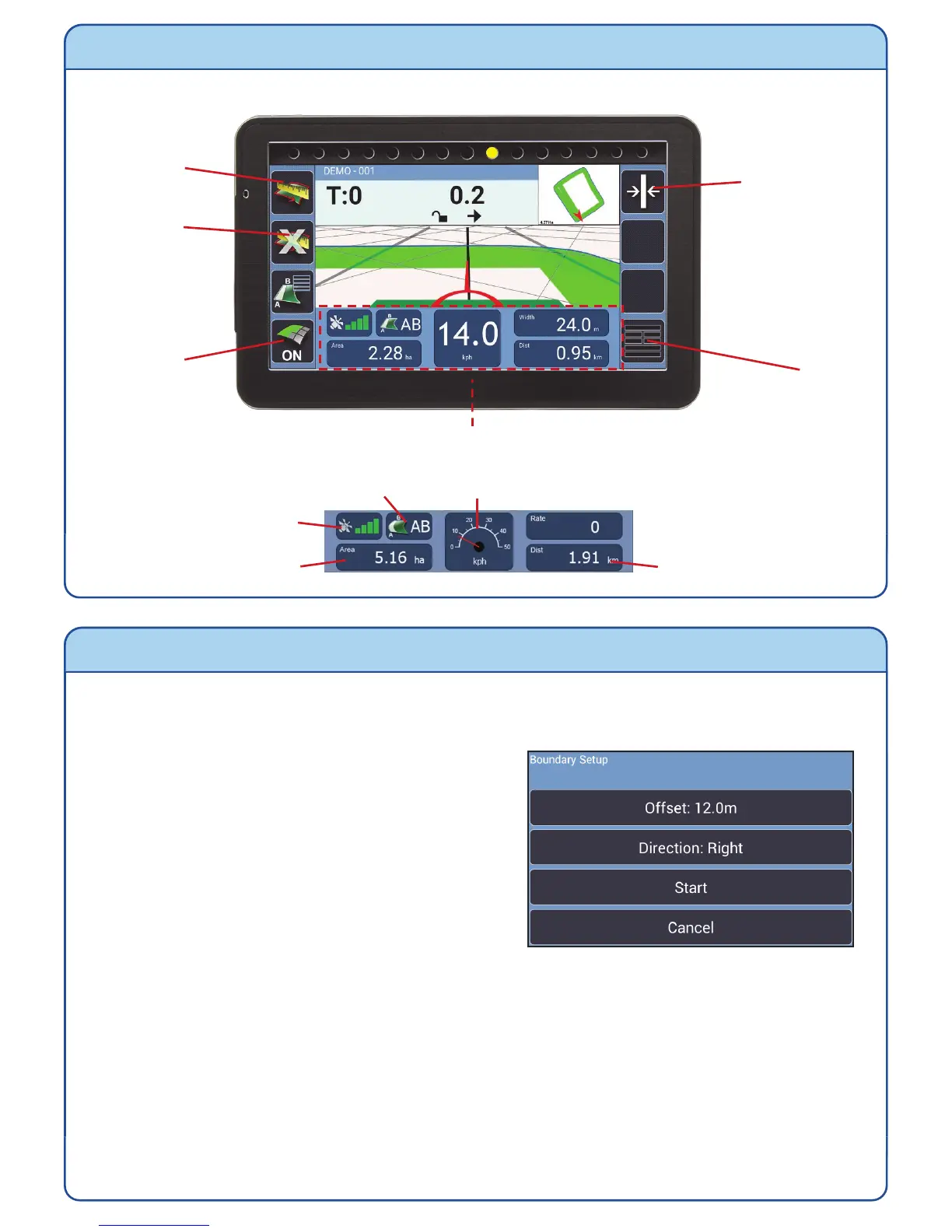
Guidance Screen
Measuring the Area of a Field
1) After starting a new job, position your vehicle at the edge of the field and press the
Start/Pause Boundary.
2) Change the settings as required:-
Offset – the distance that the antenna
is from the field edge.
Direction – Where the edge of the field is
when you are facing forward.
3) Press Start and drive around the field edge until the start point is reached. The
BlackBox will automatically close and save the boundary map, displaying the field
shape and area size in the mini map. If the boundary doesn’t close, press the Close
Boundary button.
N.B. During the boundary run the boundary recording can be paused and restarted
using the Start/Pause Boundary button, if there is a need to drive around obstacles.
To do a new boundary map redo steps 1) to 3).
Start/Pause
Boundary
Close
Boundary
Recording
On/Off
Menu
Information Panel
GPS Strength
Coverage Area
Guidance Status Speed (Toggle Speedometer / Digital)
Distance Travelled
Recalibrate
Guidance line
(Straight Mode
only)


 To Next Page