EasyManua.ls Logo

PCE Instruments PCE-HT 224E - User Manual

PCE Instruments PCE-HT 224E
29 pages
Print Icon
To Next Page IconTo Next Page
Loading...
© PCE Instruments
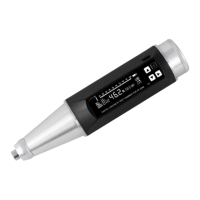
PCE-HT 224E Concrete Test Hammer
User Manual
User manuals in various languages (français,
italiano, español, português, nederlands, türk, polski,
русский, 中文) can be found by using our
product search on: www.pce-instruments.com
Last change: 19 December 2023
v1.0
English
Question and Answer IconNeed help?

Do you have a question about the PCE Instruments PCE-HT 224E and is the answer not in the manual?

Overview

The PCE-HT 224E is a digital concrete test hammer designed for non-destructive testing of concrete compressive strength. It provides a quick and efficient method for evaluating the quality of concrete structures.

Function Description:

The device operates on the rebound principle, where an impact body strikes the concrete surface, and the rebound value (R) is measured. This rebound value is then correlated to the concrete's compressive strength (MPa or N/mm²). The PCE-HT 224E allows for individual measurements or test series with configurable parameters. It can store a significant amount of data and offers various settings for different concrete types, test angles, and carbonization depths to ensure accurate strength calculations. The device also features a PC software for data transfer, analysis, and documentation of measured results, making it suitable for professional applications such as quality control and acceptance reports.

Important Technical Specifications:

  • Measurement range: 10 ... 100 N/mm²
  • Accuracy of the rebound value R: ±0.1 R
  • Display: OLED
  • Nominal kinetic energy: 2.207 J
  • Compliance: Technical regulations for rebound measurement (JGJ/T23-2001)
  • Interface: Mini USB
  • Memory: 1000 data units with 256 measurements each
  • Operating conditions: -4 ... 40 °C
  • Power supply: 3.7 V Li-Ion battery
  • Power supply (mains adaptor): Primary: 100 ... 240 V AC, 50/60 Hz; Secondary: 5 V DC, 1 A
  • Dimensions: 280 x 75 x 60 mm / 11 x 3 x 2.4 in
  • Weight: approx. 1.2 kg / 2.6 lbs
  • Bending stiffness of the return spring: 785 ±30.0 N/m
  • Internal length of the sensor: 20.0 ±0.2 mm
  • Frictional force of the sensor: 0.65 ±0.15 N
  • Radius of the impact body: R 25 ±1.0 mm
  • Active length of the impact spring: 61.5 ±0.3 mm
  • Length of the impact body: 75.0 ±0.3 mm
  • Display resolution: 256 x 64 pixels
  • Max. number of test zones per component: 16
  • Max. number of test points per test zone: 16
  • Sensor type: contactless optocoupler sensor
  • Units of measurement, adjustable: MPa, N/mm², kgf/mm², psi
  • Communication options to the PC: serial interface (optional Bluetooth)

Usage Features:

  • Simple Test Mode: Allows for immediate individual measurements without extensive setup. The result is displayed as an R value and in MPa.
  • Test Series with Default Settings: After powering on, users can access the main menu to set up test series. Parameters like component name, number of test procedures, number of test zones, concrete type, test angle, test direction (top, bottom, side), and carbonization depth (0.0 to 6.0 mm in 13 steps) can be configured.
  • Strength Curve Selection: The device supports various concrete strength curves, including "No standard," "GB standard-Pumping," "GB standard-Non-Pumping," "North America curve," and "Users curve" for customized calculations.
  • Calibration: The device can be calibrated by performing 16 test procedures on a calibration anvil. The rebound value should be 80 ±2 after calibration.
  • Data Review: Users can review measurement data, including individual part data and complete test zones, directly on the LCD.
  • Data Deletion: Options are available to delete current part data, all data, or view memory capacity.
  • Data Transfer to PC: Measured data can be transferred to a PC via a mini-USB cable. The accompanying software allows for analysis and documentation.
  • Main Menu Settings:
    • Unit Setup: Allows selection of measuring units (MPa, N/mm², Kgf/mm², PSI).
    • Upper/Lower Limit Setup: Enables setting upper and lower limit values for the rebound value (00 ... 60 R) to trigger alarms.
    • Rights Management: Provides password protection for data retrieval, limit value entry, and rights management.
    • Energy Saving Settings: Offers three modes: Normal (8-10 hours operating time), 60% consumption (10-13 hours), and 30% consumption (13-16 hours) to optimize battery life.
    • Date Setting: Allows setting the date for test records.
    • Counter: Displays the number of saved test procedures and allows resetting the counter.
    • Battery Status Display: Shows battery capacity in percentage.
    • Instrument Data: Displays serial number and firmware version.
  • Troubleshooting Guide: A comprehensive table is provided to diagnose and resolve common mechanical faults, detailing causes and repair methods (to be performed by authorized personnel).

Maintenance Features:

  • Regular Maintenance: Recommended after more than 2000 rebound tests, inconclusive test results, or when the number of rebound tests performed is unknown.
  • Disassembly and Cleaning: The manual provides detailed instructions for disassembling the hammer, cleaning internal components with compressed air, and lightly oiling the central guide tube. Other components should not be oiled.
  • Locking Unit Torque: The holding torque of the locking unit should be approximately 0.5 ... 0.8 Nm. The retaining nut should be slightly tightened.
  • Calibration After Repair: A self-calibration (rebound value 80 ±2) must be performed after any repairs.
  • Component Inspection: Regular inspection of parts like the retaining claw, impact weight, locking spring, signal transmitter, and guide rail for wear, damage, or misalignment is crucial for accurate measurements.
  • Surface Smoothing: Instructions are given for smoothing surfaces of the signal transmitter and guide channel if they rub against the housing body.
  • Spare Parts: Emphasizes that only accessories from PCE Instruments or equivalent should be used, and self-manufactured spare parts are not permitted.

PCE Instruments PCE-HT 224E Specifications

General IconGeneral
BrandPCE Instruments
ModelPCE-HT 224E
CategoryTest Equipment
LanguageEnglish

Related product manuals