5 6
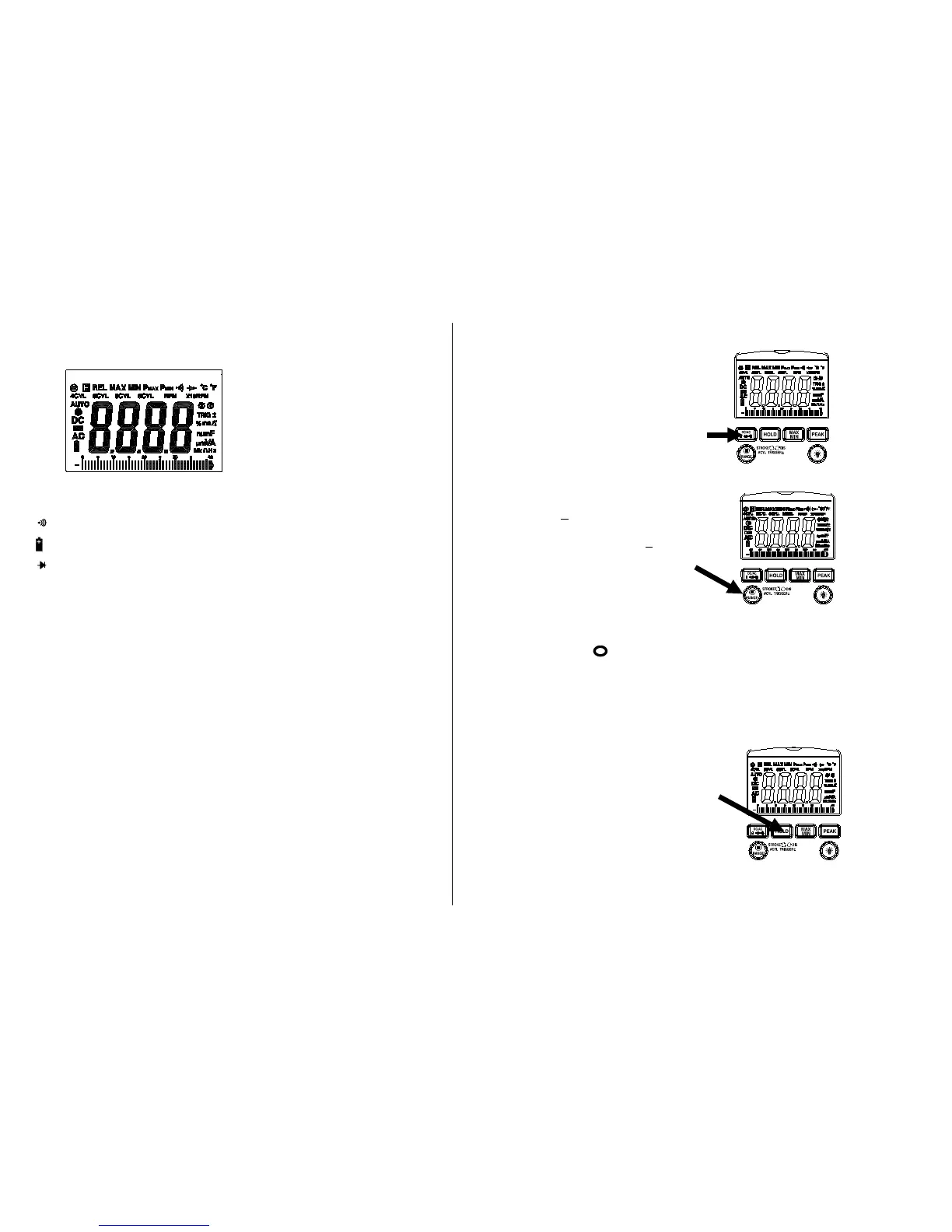
LCD DISPLAY SYMBOLS
-8.8.8.8 LCD display reading
Continuity
Low Battery
Diode
H Data Hold
AUTO AutoRanging
AC Alternating Current or Voltage
DC Direct Current or Voltage
n nano (10
-9
) (capacitance)
µ micro (10
-6
) (amps, cap)
m milli (10
-3
) (volts, amps) A Amps
k kilo (10
3
) (ohms) F Farads (capacitance)
M mega (10
6
) (ohms) Ω Ohms
Hz Hertz (frequency) V Volts
% Percent (duty ratio)
ºF Degrees Fahrenheit
ºC Degrees Centigrade
Function Buttons
Mode Button
Press the mode pushbutton to select
the following functions;
DC/AC Voltage, DC/AC Current
Resistance, Diode, Continuity &
Capacitance
Manual Range & Stroke 4/2(DIS),
Hz, %, ms +, CYL Button
Press to this button to select;
STROKE 4, 2DIS, Hz ,%, ms+ ,
CYL range & V/A/ Resistance manual
Range
Manual Ranging
The meter turns on in the autoranging mode.
Press the Range button to go to manual ranging.
The display icon " " will appear. Each press of the range button will
step to the next range as indicated by the units and decimal point
location. Press and hold the Range button for two seconds to return to
autoranging.
Data Hold
The Data Hold function allows the
meter to "freeze" a measurement for
later reference.
1. Press the HOLD button to “freeze”
the reading on the display.
The HOLD indicator, “H”, will appear
in the upper left corner of the display.
2. Press the HOLD button again to return
to normal operation.


 To Next Page