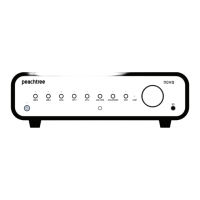
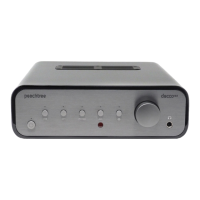
The Peachtree Audio Carina is an integrated amplifier designed to provide a comprehensive audio solution, combining a Digital-to-Analog Converter (DAC), preamplifier, power amplifier, and a premium headphone amplifier into a single, elegantly crafted unit. Its chassis is constructed from aluminum and wood, offering both aesthetic appeal and robust build quality.
Function Description
The Carina serves as the central hub for a variety of audio sources, processing and amplifying signals to deliver high-quality sound through speakers or headphones. Its primary function is to convert digital audio signals into analog sound, amplify those signals, and provide a versatile interface for different audio components.
Digital-to-Analog Conversion (DAC):
At its core, the Carina features a sophisticated 32-bit DAC architecture capable of handling a wide range of digital audio formats. This includes compressed and uncompressed audio, high-resolution audio, and ultra-high-resolution audio up to 24-bit/768kHz PCM and octuple rate DSD (DSD512). The unit incorporates two separate ESS 9068 DAC chips, operating in "mono mode." One DAC is dedicated to the left channel, and the other to the right, a design choice aimed at maximizing the signal-to-noise ratio, dynamic range, and channel separation. The ESS 9068 DACs are known for their neutral, transparent, and musical presentation. The Carina also offers adjustable DAC filters and other settings, allowing users to fine-tune the sound to their preferences and system characteristics.
Preamplifier:
The preamplifier section manages input selection and volume control, preparing the audio signal for the power amplifier. It ensures that the signal is clean and properly conditioned before amplification.
Power Amplifier:
The Carina integrates a Hypex NCORE power amplifier section, renowned for its clean, neutral, and powerful output. This amplifier is designed to drive a wide range of speakers with nominal impedances between 2.5Ω and 16Ω, delivering an impressive 300 Watts-Per-Channel (WPC) into 8 ohms. The ample power ensures that most speakers can be driven to their full potential, providing deep, tight bass and transparent, natural upper frequencies without causing listener fatigue.
Headphone Amplifier:
A premium-quality, fully-balanced headphone amplifier is also integrated, offering an exceptional listening experience. It boasts an extremely low noise floor, ensuring clear music reproduction free from artifacts. The headphone amplifier provides both a traditional unbalanced output and a balanced output for headphones that support this type of connection, aiming to compare favorably with stand-alone headphone amplifiers.
Usage Features
The Carina offers a comprehensive array of digital audio inputs:
- USB-B: For connecting to computers, supporting up to 32-bit/762kHz PCM and octuple DSD (DSD512). Windows users may need to download specific drivers for ASIO, WASAPI, or DSP playback with "exclusive mode."
- Bluetooth: For wireless streaming from compatible devices. An external antenna connector is provided to maximize reception range.
- Coaxial (COAX-1, COAX-2): Two RCA-style S/PDIF inputs, accepting digital audio up to 24-bit/192kHz PCM.
- Optical (OPT): One Toslink-style S/PDIF input, accepting digital audio up to 24-bit/192kHz PCM.
- I2S: An input for devices offering I2S output, supporting up to 32-bit/762kHz PCM and octuple DSD (DSD512). It's important to note that this is not an HDMI or eARC input.
For outputs, the Carina provides:
- Right & Left Speaker Outputs: Binding posts that accommodate various speaker cable terminations, including banana connectors, spade connectors, pin connectors, and bare wire.
- PREAMP OUTPUT: An analog audio output for connecting to a powered subwoofer or an external power amplifier. These outputs remain active when used, and both speaker and preamp outputs are automatically muted when headphones are connected or the mute function is engaged.
- USB-C 5V OUT: A 5V DC output for powering or charging external devices. This is not a digital audio input port.
Front Panel Controls:
- On/Standby Button: Toggles the unit between on (green LED) and standby (red LED) modes. The rear panel POWER switch must be ON for this button to function.
- Left Knob: Rotates to select the desired input. Pushing and holding it for approximately 3 seconds enters the MENU. Rotating it moves the option selection arrow, and the Right knob changes the setting of the selected option. Holding it again exits the MENU.
- Right Knob: Rotates clockwise or counter-clockwise to adjust the volume/output level. Pushing and releasing it mutes and unmutes the output. When in the MENU, it changes the setting of the selected option.
- IR Receiver: Concealed behind the display window, it receives Infra-Red (IR) commands from the included remote control or third-party systems.
- Headphone Outputs: Includes a 1/4" unbalanced output and a 4.4mm balanced T/R/R/S output. Connecting headphones automatically mutes the speaker and preamp outputs. Users are advised to lower the output level before connecting or removing headphones due to varying sensitivities.
Remote Control:
The included remote control provides convenient access to various functions:
- On/Standby Button: Toggles power.
- Mute Button: Toggles mute on/off.
- Volume Up & Down Buttons: Adjusts output level.
- Display Brightness Button: Cycles through front panel display brightness settings.
- Bluesound NODE Display Brightness Button: Adjusts brightness for connected Bluesound NODE/VAULT devices.
- Transport Control Buttons: Controls compatible devices like a Bluesound NODE, computers via USB-B, and mobile devices via Bluetooth.
- Input Selection Buttons: Dedicated buttons for USB-B, COAX1, COAX2, OPT, I2S, and BT inputs.
- Presets 1-8: Selects presets on a Bluesound NODE.
The Carina's menu system allows for further customization:
- PCM Filter: Selects between L-FAST (Linear phase FAST roll-off, neutral), H-FAST (Hybrid FAST roll-off, musical), and M-SLOW (Minimum phase SLOW roll-off, smoother sound) filters. These filters offer objective and subjective sound differences, encouraging users to audition them.
- NOS MODE: Toggles between ON (bypasses DAC oversampling) and OFF (engages 8x oversampling). Useful for experimenting with software-based oversampling.
- BT POWER: Configures Bluetooth radio power: BT INPUT (powers up only when Bluetooth input is selected) or ALWAYS (keeps radio powered up).
- VOLUME: Selects between DIGITAL (high-quality digital audio volume attenuator) and HYBRID (analog resistor ladder with digital attenuator for optimal performance). Hybrid mode may produce slight clicking sounds during level changes, which is normal.
- DISPLAY: Sets display behavior: ALWAYS (display stays on) or AUTO OFF (display turns off after a few seconds).
- BRIGHTNESS: Adjusts front panel display brightness from 1 (dimmest) to 8 (brightest).
- TRIGGER SEL: Configures the 12V trigger input to select a specific input or the LAST input used before standby.
- [SOURCE] VOLUME: Sets independent starting volume/output levels for each input. Options include LAST (retains last used volume), specific dB values (-20, -35, -50), or FIXED (0dB FS, use with caution).
- INPUT I2S, COAX-1, COAX-2, OPT: Allows renaming these inputs to labels like CD, SACD, TV, STREAM, or AUX. USB-B and Bluetooth inputs cannot be renamed.
Enables power on/off control from another product with a 12V trigger output. The unit will power on and off in sync with the controlling product, configurable via the MENU.
Maintenance Features
Safety Instructions:
The manual emphasizes several important safety guidelines:
- Read all instructions before operation.
- Keep instructions for future reference.
- Heed all warnings on the appliance and in the manual.
- Follow all instructions.
- Avoid using near water or moisture.
- Clean only with a dry cloth.
- Do not block ventilation openings.
- Do not install near heat sources.
- Do not defeat the safety purpose of polarized or grounding plugs.
- Protect the power cord from being walked on or pinched.
- Use only manufacturer-specified attachments/accessories.
- Use caution when moving the unit with a cart to prevent tip-over.
- Unplug during lightning storms or long periods of disuse.
- Refer servicing to qualified personnel for damage, liquid spills, rain exposure, or excessive moisture.
- Ensure good ventilation.
- Servicing should only be performed by qualified personnel to reduce electric shock risk.
- Do not expose to rain or moisture; avoid dripping or splashing liquids, and do not place liquid-filled objects on the apparatus.
Fuse Replacement:
The AC INPUT includes a fuse holder. The fuse should only be replaced after turning the POWER switch OFF and removing the power cord. Specific fuse values are provided in the specifications section, and using an improper fuse can damage the unit.
Battery Disposal:
The remote control includes batteries. Users are advised to dispose of batteries carefully due to toxic materials and to refer to local recycling and hazardous waste centers for guidance.
Product Disposal:
The product bears a marking indicating it should not be disposed of with other household wastes in the EU. It should be recycled responsibly through return and collection systems or by contacting retailers to promote sustainable reuse of materials.
Unpacking and Warranty:
- Keep all packing materials for potential shipping needs.
- Retain a copy of the sales receipt and note the serial number for warranty and insurance.
- Register the product online at www.peachtreeaudio.com.
Warranty and Repair:
- International Warranty: Two (2) years parts and labor from the original purchase date from an authorized reseller. Extended to three (3) years upon online product registration.
- Peachtree Audio reserves the right to refuse warranty claims without valid proof of sale or serial number.
- Warranty does not cover failures due to accident, neglect, misuse, modification, or unauthorized repair, nor does it cover shipping costs.
- Repair Process: In case of product failure, repack in original carton and contact an authorized reseller or Peachtree Audio directly for a Return Authorization (RA) number before shipping. Products without an RA number may be misdirected. Ship using FedEx or UPS, not Postal Service. Insure the shipment for replacement value as Peachtree Audio is not responsible for products lost, stolen, or damaged in transit.

 Need help?
 General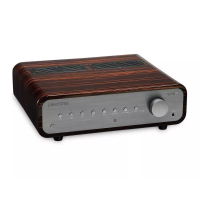

 To Next Page