31
712325
Use the cleaning program after the oven has fully cooled down.
AQUA CLEAN CLEANING PROGRAM
Before running the cleaning program, remove all large chunks of dirt and food residues
from the oven cavity.
Pour 0.6l of warm water into the deep baking tray and place it in the second guide. Select
the oven cleaning program.
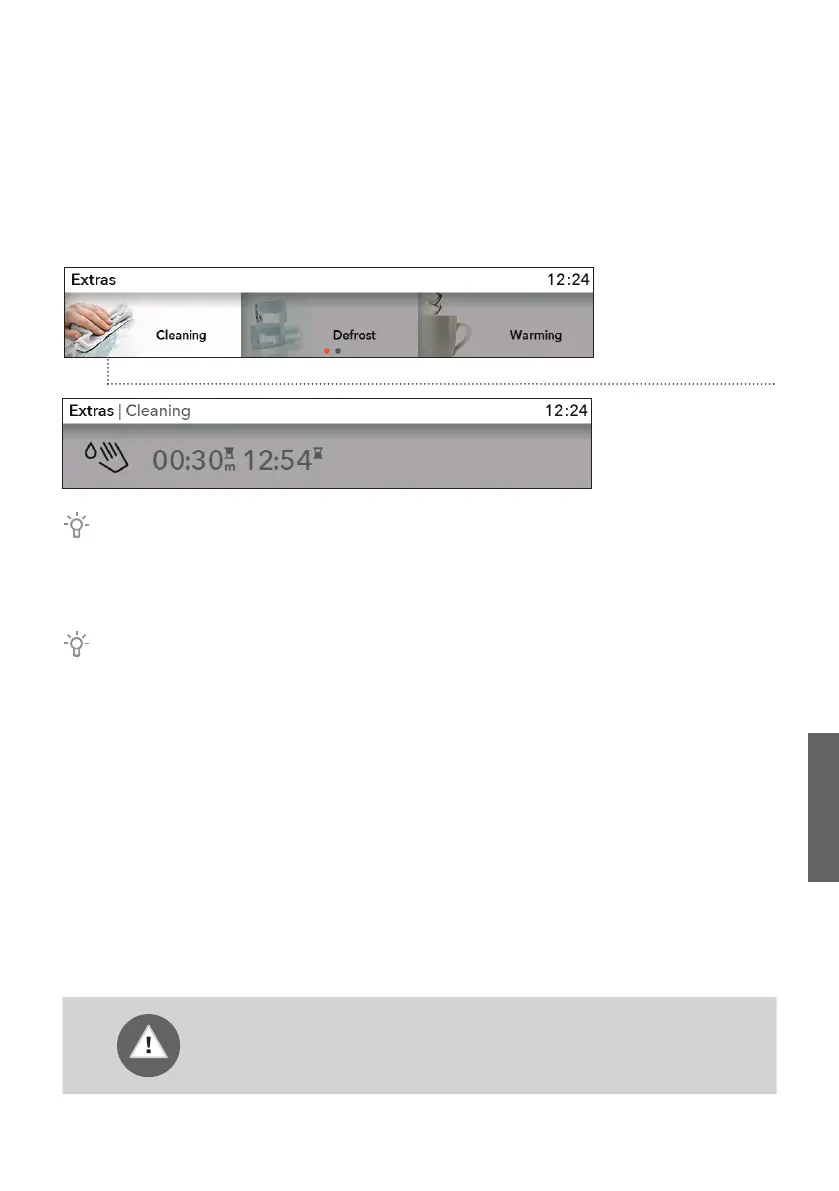
In the main menu,
select Extra and
Cleaning. Confirm
your selection by
pressing the KNOB.
Press the START
key.
When the program is complete, wait for the oven to cool down sufficiently so that you
can wipe the oven interior safely.
After the 30-minute program, the stains on the oven enamel walls will soften, which allows
easier cleaning. Wipe the stains with a damp cloth.
If the cleaning process is not successful (in case of particularly stubborn dirt), repeat
it.
712325_en_naslovnica_drug_papir.indd 31712325_en_naslovnica_drug_papir.indd 31 15. 11. 2021 08:14:0615. 11. 2021 08:14:06


 To Next Page