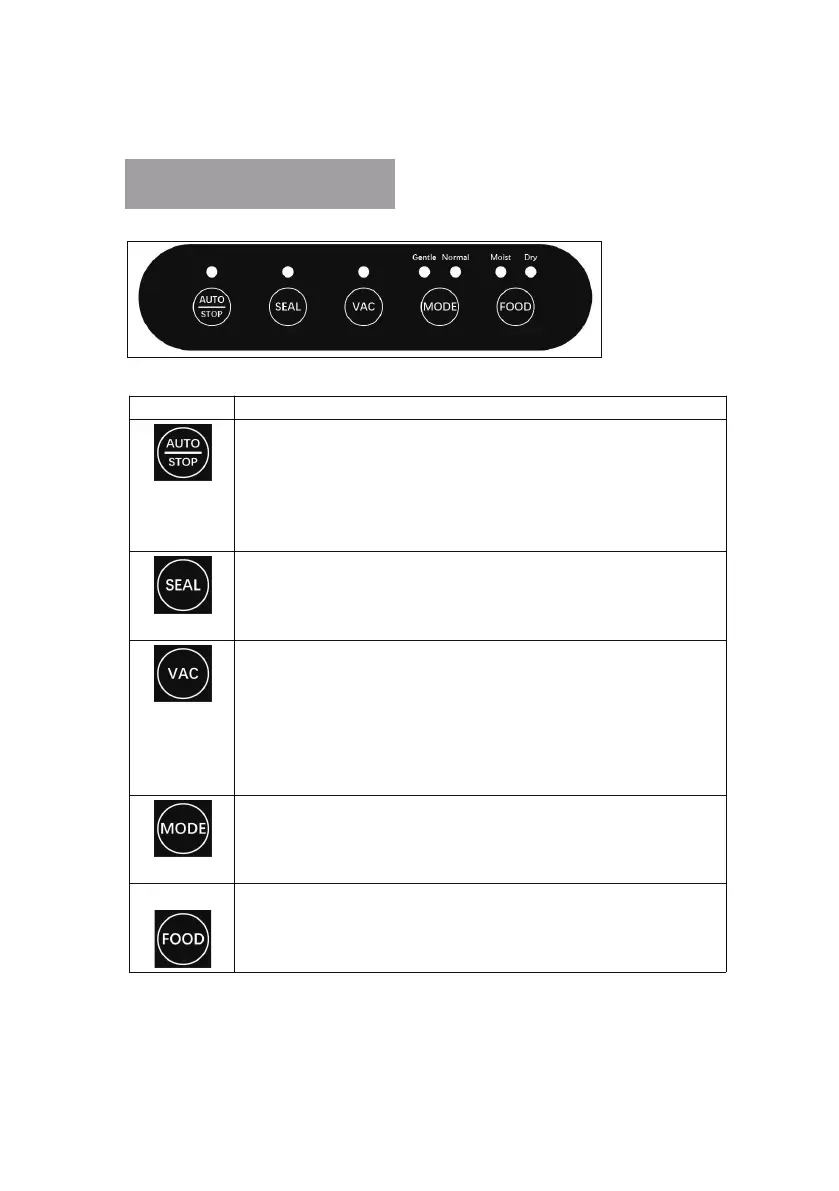
Button Function
Pressing this button has two operational functions:
(1) When press this key, the machine starts to work ----- vacuuming and then
sealing automatically, and stops automatically after sealing is completed.
(Three sounds of drip,drip,drip indicate that the machine has stopped)
(2) Pressing this key while the m achine is under the working s tate will
immediately stop the machine.
Press this button to start working on the machine ------ to seal the bag and stop
automatically when the sealing is complete.
(A single drop indicates that the se aling has been stopped) If you want to stop in
the middle of the working process, press the "Auto/Stop" key.
When this button is press ed, the machine starts to evacuate and automatically
stops w hen the vacuum value is reached. (A single drop ind ic ates that the
machine has stopped). In the working state of the machine, press this button and
the machine will stop immediately. It is possible to control the pumping power
of th e b ags or cans ma nually; once the desired effect has been achieved, press
STOP the machine and then press SEAL to co mplete the work or remove the
pumping pipe to complete the work.
Normal Mode: Strong suction, for hard foods or objects.
Gentle Mode: Gentle suction, for soft food or objects.
Pressing this button allows you to freely selec t the mode according to your
needs, the system defaults to Normal Mode.
Dry: for dry goods and ba gs, a shorter sealing time should be used.
Moist: for wet items and bags, a longer sealing time must be selected.
Press this button to freely select the sealing time according to your
requirements, the system defaults to dry.
Operation Instructions


 To Next Page