PressureMAT User Guide
Revision 8
Page 31/48
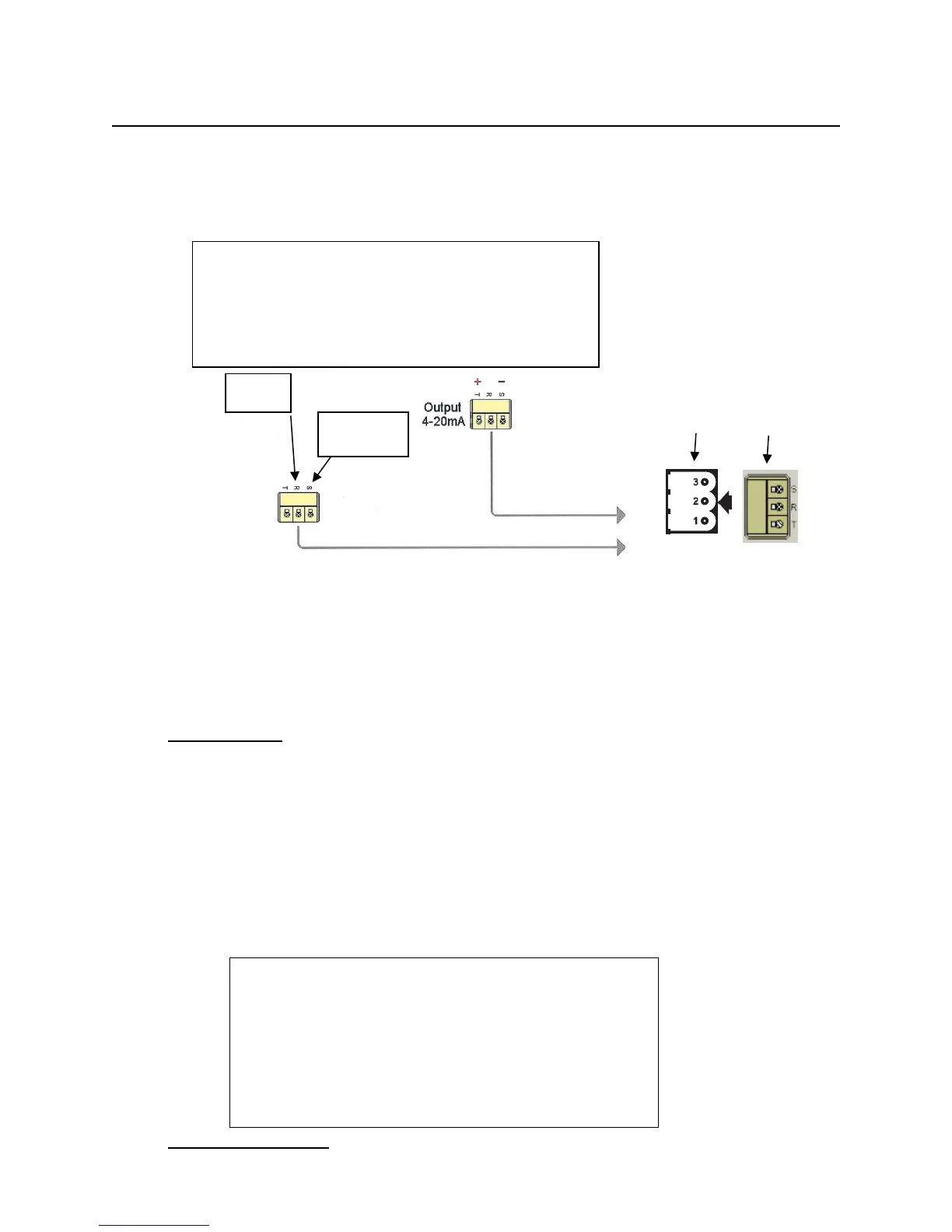
4.3. Connection to Back Panel
External Cable Connections to Back Panel
___________________
Panel Connector
_____________________
4.4. Navigation in the Analog Input Channel
At the HOME screen, the UP/DOWN arrows are used to select the Analog input channel (3
rd
line). The menu is as follows.
Input Viewing
At this screen the UP/DOWN arrows are used to select what value is displayed on the HOME
screen. Press the SELECT/PROG button to select what value appears on the home screen.
The “*” appears next to the current selection for HOME screen display. In most case this will
remain as the PV which is the scaled value based the values entered for the 4-20mA values.
PV Signal is the actual mA input value. The Service Time is the number of hours the system
has been in service. Pressing the SELECT/PROG button will confirm a change- UNTIL THIS
IS DONE, A SETTING CHANGE IS NOT CONFIRMED. Pressing the HOME or BACK
button before confirming a setting change with the SELECT/PROG button will escape from
that program menu without saving changes made before confirming the entry.
PV Signal 0.000 mA
Service Time XXXX hrs
[SELECT] home display value
Input Programming
Common
INPUT
As shown on the back panel label, the ANALOG
INPUT signal is on the middle pin and the top pin
is the common / ground. The ANALOG
OUTPUT signal is on the bottom pin and the top
is common ground.



 To Next Page