Complete solution
7
SETTINGS
The user can only set or maintain the following:
• set the simulator sights (the laser dot)
• set the trigger position, weight and travel
• set the grip angle
• change the battery
• change the simulator stock
It is forbidden to open or modify the laser simulator, with the exception of changing the battery
or grip. The Laser beam parameters can only be changed by the manufacturer or an authorized
person. The simulator owner must confirm his consent to the change in writing. The manufacturer
does not assume responsibility for any damage that would arise from the change.
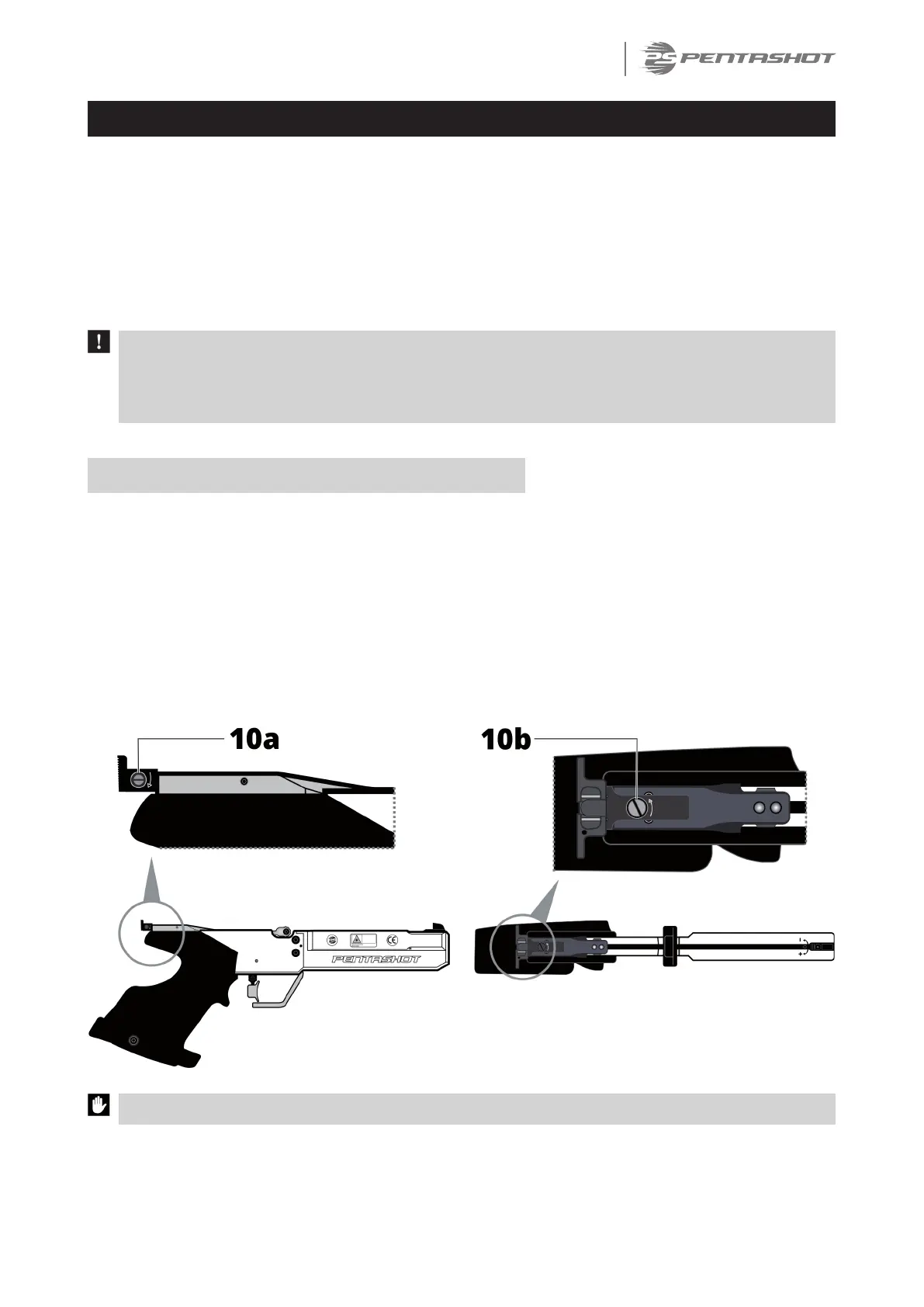
SETTING THE SIGHTS (ALIGNING THE LASER DOT)
To adjust the simulator sights, aim at awhite wall or awhite object from adistance of 10 meters
and check the alignment of the red laser dot and simulator sights. If necessary, use the adjusting
screws to align the laser dot:
• Turning the screw (10a) clockwise – laser dot moves to the right
• Turning the screw (10a) counterclockwise – laser dot moves to the left
• Turning the screw (10b) clockwise – laser dot goes downward
• Turning the screw (10b) counterclockwise – laser dot goes upward
IMPORTANT: The movement of the adjusting screws must be very small.


 To Next Page