Page 26
Androidviews
Recording
Mainsideconnectioninformation(seefig.D)
Livescreenside(seefig.E)
Recordingslist(seefig.F)
SystemInformation(seefig.G)
20 cameraname
21 connectiondetails
22 settings(toSystemInformation)
23 deletecamera
24 record
25 screenshot
26 enrollnextcamera
27 control(tothecontrolicons
28 refresh
29 information
30 livescreen
31 recordingIndicator
32 snapshot
33 audioon/off
34 manualrecording
35 back
36 recording
37 cameraname
38 periodofrecordings
39 delete
40 search
41 cameraname
42 deviceIDnumber(DID)
43 devicepasswort
44 EnableEmailAlert(Emailuponmotiondetection)
45 Search(searchDID)
46 Advanced(settings)
47 Cancel(leaveSystemInformation)
48 Save(savesettings)
Picturesensor 1/4”CMOS
Viewingangle approx.60°horizontal
Lightsensitivity 1Lux(w/oIR-LEDs)
Dylightsensor 1-8Lux
Illumination 10InfraredLEDs
Infraredfilter automaticchange
Nightvision max.5m
Microphone builtin,back
Brecommended)
Recordingformat
imageresolution max.VGA640x480pixel
recordingrate max25fps
5. Technicaldata
[22/23/24])
Camera
microSDHC-Memorycard (max.32GB,32G
H.264
max. recording capacity in hours 1,5 (2 GB SD-card) / 6 (8 GB) /
15(16 GB)/31(32GB)
Storage min.1GBinternal
IOS v5.01xorabove
Android 2.3xorabove
Hardware CortexA6800MHzorabove
OperatingVoltage 5.9V DC(mainsadapter)
Currentconsumption 650mA
Protectionclass IP66
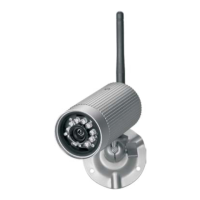
Dimensions(mm) 92xØ42
Operatingtemperature -10°Cto+40°C
OperatingVoltage 230V~50Hz
VA
The following instructions are provided for your safety and satisfaction during
operation of the device. Note that non-observance of these safety instructions
results in significant risks of accident.
If this point is notheeded life and health is endangered and it
puts property at risk of damage.
Do not leave small children unsupervised with the device, packaging
material or small parts. Otherwise there is a risk of fatal injury due to
choking or suffocation.
Do not damage any gas, electricity, water or telecommunication lines
during drilling and fixing work. Otherwise there are dangers of fire,
personal and fatal injury.
Treat the cables carefully. Lay these so that they cannot be damaged and
do not present any tripping hazard. Otherwise there are dangers of fire,
personal and fatal injury.
If you use the device for monitoring babies or small children ensure that
the camera and cable are out of reach of children. Otherwise there is a
risk to life and limb!
Do not pull the cables over sharp edges and do not crush or crimp them
elsewhere. Otherwise there are dangers of fire, personal and fatal injury.
Prevent the device from coming into contact with moisture and do not
submerge in water. Otherwise there is a danger of fatal injury.
Only operate the device from the supplied power supply. Before
connecting the power supply to the mains, ensure that the mains current
complies with 230 V ~, 50 Hz and is fitted with a fuse according to
regulations. Otherwise there are dangers of fire and fatal injury.
Protect the equipment and the cables against strong magnetic or
Requirementforsupportedmobileinternetdevice
General
Mains Adapter
Danger!
6. Safetyinstructions
!
!
!
!
!
!
!
!
Network
WiFi IEEE802.11b/g
LAN Ethernet(10/100Base-T/Base-TX)
Protocol TCP/IP,UDP,SMTP,NTP,DHCP,ARP
Connections max.3concurrentusers
Security WPA/WPA2/WPA2-PSK(TKIP,128bitAES)
"
"
DCOutput 5.9 ,1,0
26 - GB


 To Next Page
 Loading...