EasyManua.ls Logo

Pentax IQZoom EZY-S - Page 10

Pentax IQZoom EZY-S
40 pages
Print Icon
To Next Page IconTo Next Page
To Previous Page IconTo Previous Page
Loading...
Installing
/
Replacing
battery
EXHAUSTION
WARNING
Use
one
3V
lithium
battery
(CR-123A
or
DL-123A).
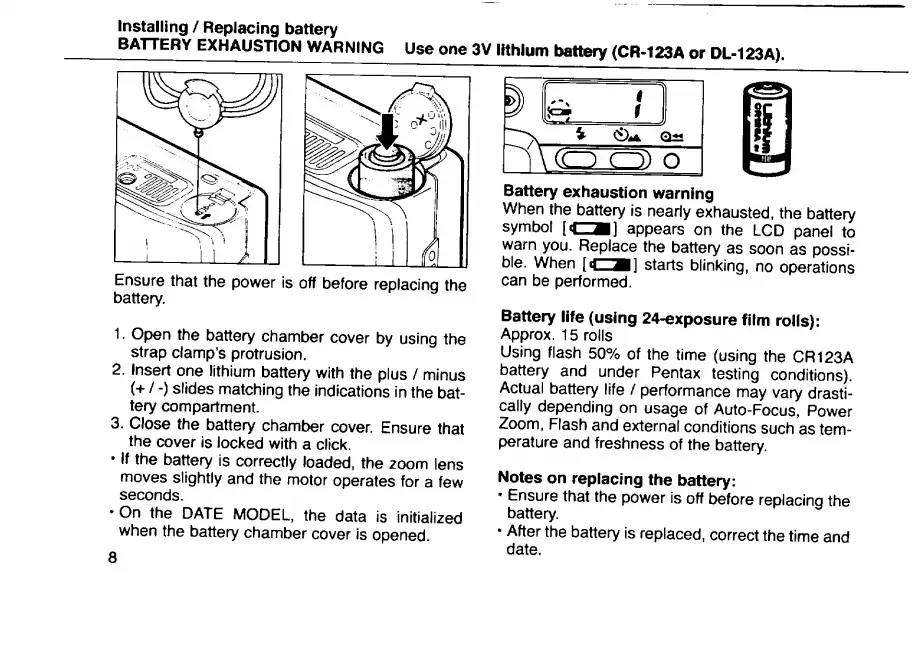
Ensure
that
the
power
is
off
before
replacing
the
battery.
1.
Open
the
battery
chamber
cover
by
using
the
strap
clamp’s
protrusion.
2.
Insert
one
lithium
battery
with
the
plus
/
minus
(+
/
-)
slides
matching
the
indications
in
the
bat¬
tery
compartment.
3.
Close
the
battery
chamber
cover.
Ensure
that
the
cover
is
locked
with
a
click.
If
the
battery
is
correctly
loaded,
the
zoom
lens
moves
slightly
and
the
motor
operates
for
a
few
seconds.
On
the
DATE
MODEL,
the
data
is
initialized
when
the
battery
chamber
cover
is
opened.
Battery
exhaustion
warning
When
th
e
batte
r
y
is
nearly
exhausted,
the
battery
symbol
[C^]
appears
on
the
LCD
panel
to
warn
you.
R
e
p
lace
the
battery
as
soon
as
possi¬
ble.
When
starts
blinking,
no
operations
can
be
performed.
Battery
life
(using
24-exposure
film
rolls):
Approx.
15
rolls
Using
flash
50%
of
the
time
(using
the
CR123A
battery
and
under
Pentax
testing
conditions).
Actual
battery
life
/
performance
may
vary
drasti¬
cally
depending
on
usage
of
Auto-Focus,
Power
Zoom,
Flash
and
external
conditions
such
as
tem¬
perature
and
freshness
of
the
battery.
Notes
on
replacing
the
battery:
Ensure
that
the
power
is
off
before
replacing
the
battery.
After
the
battery
is
replaced,
correct
the
time
and
date.

Related product manuals