EasyManua.ls Logo

Pentax IQZoom EZY-S - Date Model

Pentax IQZoom EZY-S
40 pages
Print Icon
To Next Page IconTo Next Page
To Previous Page IconTo Previous Page
Loading...
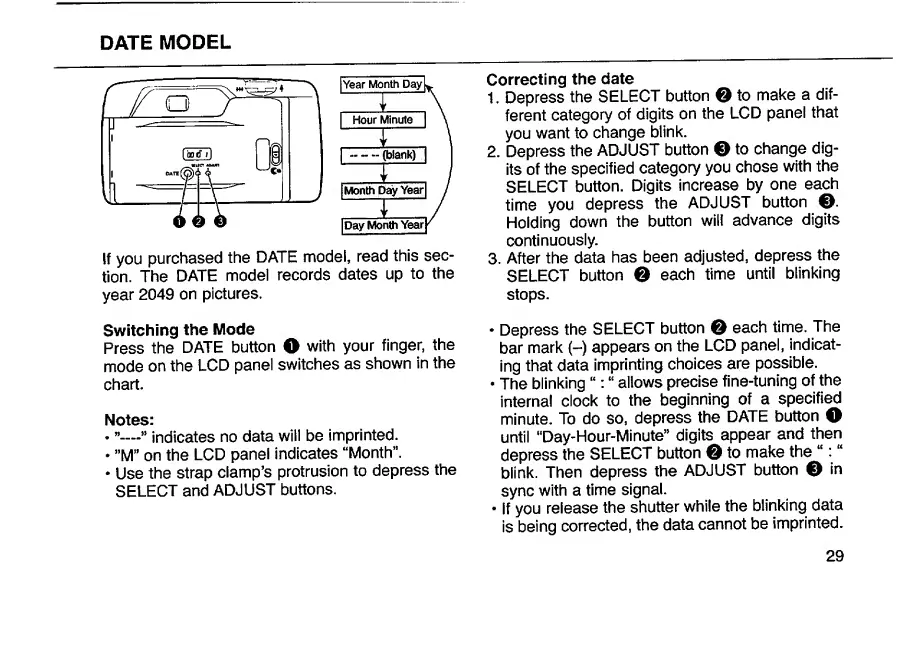
DATE
MODEL
Year
Month
Day[^
T
Hour
Minute
|
-
(blank)
X
Month
D^Yearl
T
[Day
Month
If
you
purchased
the
DATE
model,
read
this
sec¬
tion.
The
DATE
model
records
dates
up
to
the
year
2049
on
pictures.
Correcting
the
date
1.
Depress
the
SELECT
button
O
to
make
a
dif¬
ferent
category
of
digits
on
the
LCD
panel
that
you
want
to
change
blink.
2.
Depress
the
ADJUST
button
O
to
change
dig¬
its
of
the
specified
category
you
chose
with
the
SELECT
button.
Digits
increase
by
one
each
time
you
depress
the
ADJUST
button
®.
Holding
down
the
button
will
advance
digits
continuously.
3.
After
the
data
has
been
adjusted,
depress
the
SELECT
button
0
each
time
until
blinking
stops.
Switching
the
Mode
Press
the
DATE
button
O
with
your
finger,
the
mode
on
the
LCD
panel
switches
as
shown
in
the
chart.
Notes:
.
”—»indicates
no
data
will
be
imprinted.
”M”
on
the
LCD
panel
indicates
“Month”.
Use
the
strap
clamp’s
protrusion
to
depress
the
SELECT
and
ADJUST
buttons.
Depress
the
SELECT
button
0
each
tirne.
The
bar
mark
(-)
appears
on
the
LCD
panel,
indicat¬
ing
that
data
imprinting
choices
are
possible.
The
blinking
“;
allows
precise
fine-tuning
of
the
interna!
clock
to
the
beginning
of
a
specified
minute.
To
do
so,
depress
the
DATE
button
O
until
“Day-Hour-Minute”
digits
appear
and
then
depress
the
SELECT
button
0
to
make
the
“:
blink.
Then
depress
the
ADJUST
button
0
in
sync
with
a
time
signal.
If
you
release
the
shutter
while
the
blinking
data
is
being
corrected,
the
data
cannot
be
imprinted.
29

Related product manuals