– 7 –
3. PREPARATION AND SAFETY CHECK
3-1. PREPARATION
3-1-1. SETTING UP THE LIGHT SOURCE
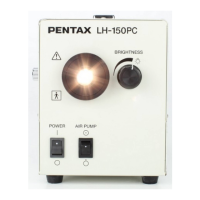
1) Place the light source on a stable, level surface.
WARNING:
– Avoid places where the light source may be splashed with liquid.
– Absolutely do NOT use in any environment with explosive or flammable gases or chemicals.
– Do NOT block the ventilation grids on the sides of the light source.
– Do NOT install, operate or store electro-medical equipment in a dusty environment.
Accumulation of dust within these units may cause malfunction, smoke, or ignition.
2) Make sure the power switch is OFF.
3) Plug the power cord into an appropriate power source using the plug supplied with the unit.
CAUTION:
When using any ancillary equipment such as a TV monitor, connect power cords of the ancillary
equipment to isolation transformers to prevent electric shock.
NOTE:
When using isolation transformers, be sure to check that the total power consumption of all the
devices does not exceed the isolation transformers’ power rating. Make sure that the power cord is
connected to the main with an appropriate plug. Contact your local PENTAX distributor for the details.
3-1-2. CONNECTING THE WATER BOTTLE
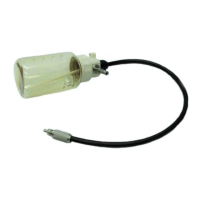
1) Fill the water bottle approx. 2/3 full with sterile water.
2) Screw the water bottle cap assembly to the water bottle snugly.
NOTE:
Do NOT overtighten the water bottle cap.
3) Set the Air/Water-Drain lever to A/W position.
4) Insert the water bottle air pipe stem into the LH-150PC water
bottle receptacle and press until the water bottle ‘clicks’ into
position.
NOTE:
Do NOT press the water bottle too forcefully into the
LH-150PC. Rough handling may cause water to
leak onto/into the light source.
5) Insert the Air/Water connector into the holding on the water
bottle cap assembly until the endoscope is connected.


 To Next Page
 Loading...