EasyManua.ls Logo

Pentax ME Super - Inserting Batteries

Pentax ME Super
51 pages
Print Icon
To Next Page IconTo Next Page
To Previous Page IconTo Previous Page
Loading...
INSERTING
BATTERIES
Do
not
throw
dead
batteries
into
a
fire
as
they
may
explode.
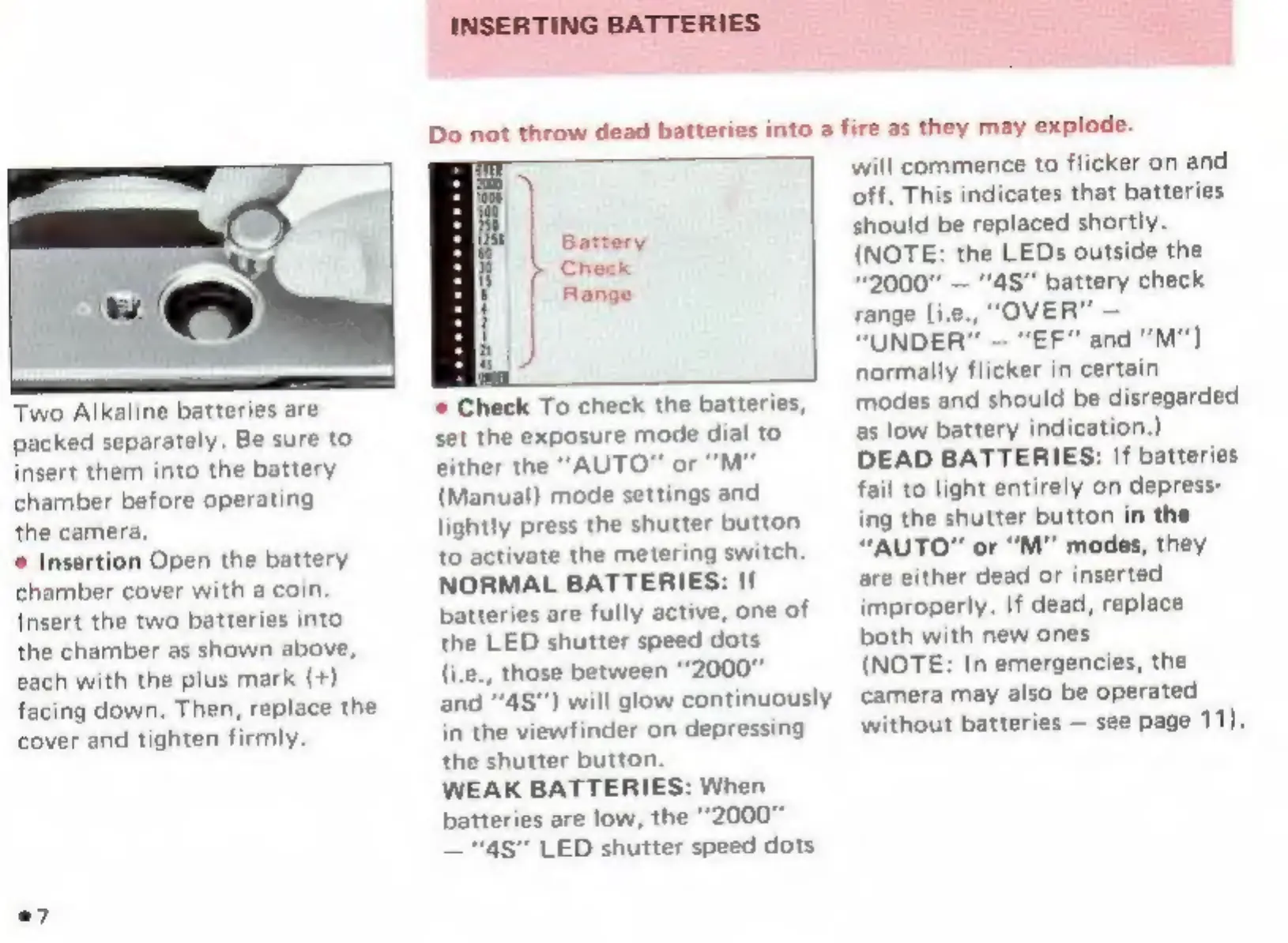
Two
Alkaline
batteries
are
packed
separately.
Be
sure
to
insert
them
into
the
battery
chamber
before
operating
the
camera.
*
Insertion
Open
the
battery
chamber
cover
with
a
coin.
Insert
the
two
batteries
into
the
chamber
as
shown
above,
each
with
the
plus
mark
(4)
facing
down.
Then,
replace
the
cover
and
tighten
firmly.
.7
*
Check
To
check
the
batteries,
set
the
exposure
mode
dial
to
either
the
"AUTO"
or
"M"
(Manual)
mode
settings
and
lightly
press
the
shutter
button
to
activate
the
metering
switch.
NORMAL
BATTERIES:
If
batteries
are
fully
active,
one
of
the
LED
shutter
speed
dots
(i.e.,
those
between
“2000”
and
48”)
will
glow
continuously
in
the
viewfinder
on
depressing
the
shutter
button.
WEAK
BATTERIES:
When
batteries
аге
low,
the
“20007
"48"
LED
shutter
speed
dots
will
commence
to
flicker
on
and
off.
This
indicates
that
batteries
should
be
replaced
shortly.
(NOTE:
the
LEDs
outside
the
"2000"
"4S"
battery
check
range
[i.e.,
"OVER"
"UNDER"
"EF"
and
"M"]
normally
flicker
in
certain
modes
and
should
be
disregarded
as
low
battery
indication.)
DEAD
BATTERIES:
If
batteries
fail
to
light
entirely
on
depress-
ing
the
shutter
button
in
the
“AUTO”
or
“М”
modes,
they
are
either
dead
or
inserted
improperly.
If
dead,
replace
both
with
new
ones
(NOTE:
In
emergencies,
the
camera
may
also
be
operated
without
batteries
see
page
11).

Other manuals for Pentax ME Super

Related product manuals