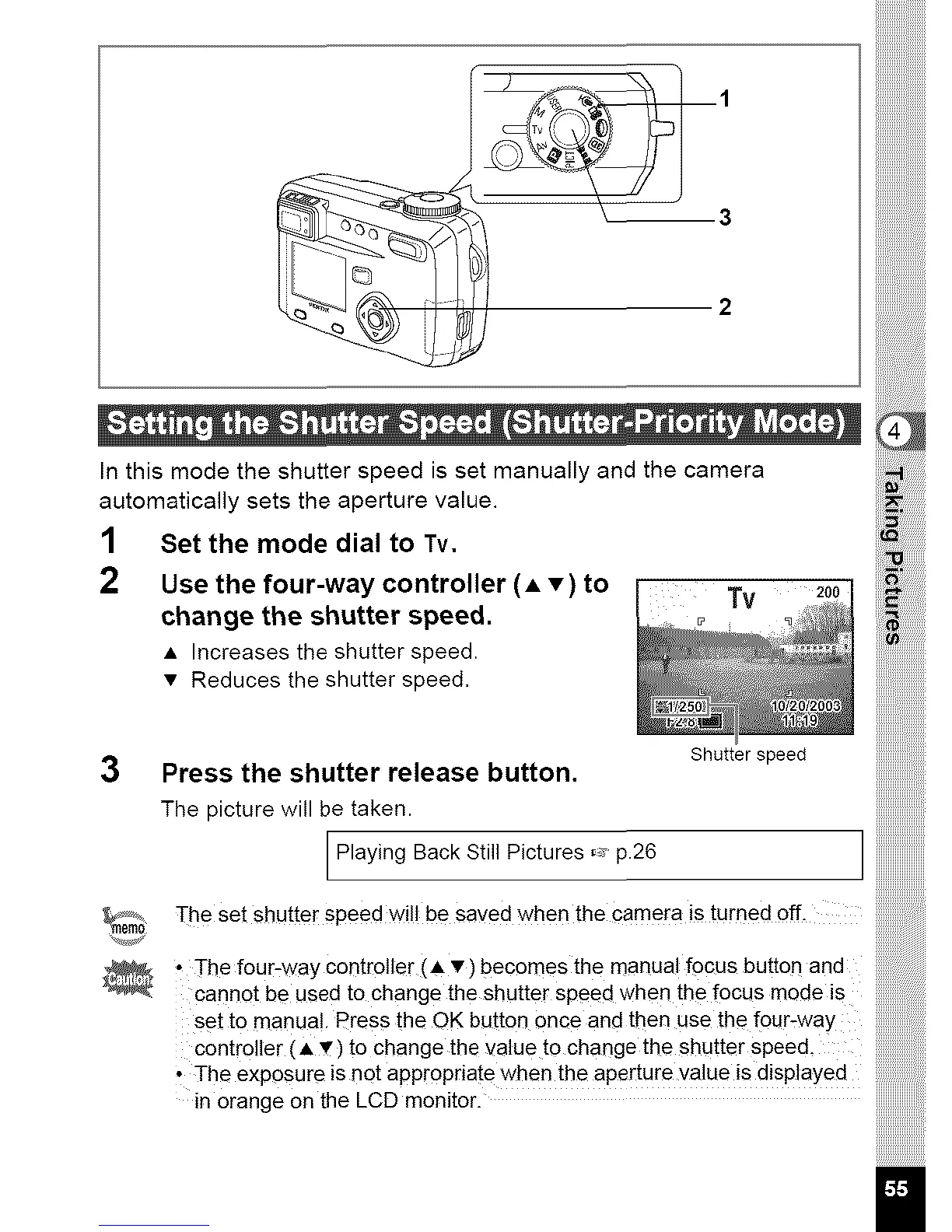
Inthismodetheshutterspeedissetmanuallyandthecamera
automaticallysetstheaperturevalue.
1 Set the mode dial to Tv.
2 Use the four-way controller (A •) to Tv
change the shutter speed.
• Increases the shutter speed.
• Reduces the shutter speed,
Shutter speed
3 Press the shutter release button, iiiiiiiiiiiiiiii,,
The picture will be taken, iiiiiiiiiiiiiiiiii;;;_
Playing Back Still Pictures _ p.26
_r%: ThesetshuttersPeed'will besavedwhenthecarnera isturned off-
• Thefour:waycontr011er(A•)becomesthemanualfocusbutton and iiiiiiiiiiiiiiiiiiiii!i!i!i!iiii!!
carmotbe used tochangetheshutterspeedwhen thef0cus mode is iiiiiiiiiiiiiiiiiiiiiiiiiiii!iiiiii
setto manual. PresstheOKbutton 0nceand thenusethefour-way iiiiiiiiiiiiiiiiiiiiiiiiiiii!ii!
controller (A_) to change the valueto change the shutterspeed, iiiiiiiiiiiiiiiiiiiiiiiiiiiiiiii
• The exposure is not appropriatewhen the aperture value is displayed
inorangeontheLCDmonitoriiiiiiiiiiiiiiiiiii!!!



 To Next Page